
Introduction
This manual provides essential information for the safe and efficient operation, installation, maintenance, and troubleshooting of your Voltas 123 Eya Executive Y Series Split Air Conditioner. Please read this manual thoroughly before using the appliance and keep it for future reference.
The Voltas 123 Eya is a 1 Ton, 3 Star rated split AC designed for effective cooling in residential or office environments.
Safety Information
Always follow basic safety precautions when using electrical appliances to reduce the risk of fire, electric shock, and injury to persons.
- Ensure the power supply matches the specifications listed on the unit.
- Do not operate the AC with wet hands.
- Do not insert objects into the air outlet or inlet.
- Keep children away from the unit.
- Do not attempt to repair or modify the unit yourself. Contact qualified service personnel.
- Ensure proper grounding to prevent electric shock.
- Turn off the power supply before cleaning or performing maintenance.
Product Overview
Main Components
The Voltas 123 Eya Split AC consists of an indoor unit and an outdoor unit, connected by refrigerant piping and electrical wiring.
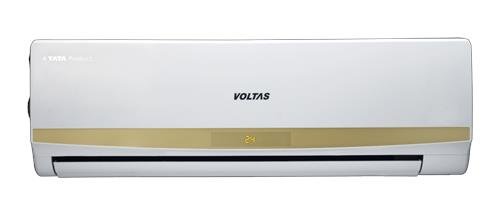
Figure 1: Voltas 123 Eya Split AC Indoor Unit. This image shows the front panel of the indoor unit, typically mounted inside the room.
Key Features
- Anti Dust Filter: Helps in filtering out dust particles from the air.
- Nano Silver Filter: Provides enhanced air purification.
- Hydrophylic Aluminium Fin: Improves heat exchange efficiency and corrosion resistance.
- Blue Copper Tube: Enhances durability and heat transfer.
- Inner Grooved Copper Tube: Optimizes refrigerant flow for better cooling.
- LED Display: Clear indication of settings and status on the indoor unit.
- Self Diagnosis: Automatically detects and displays error codes for easier troubleshooting.
- Auto Restart: Automatically resumes operation with previous settings after a power outage.
- LCD Remote Control: For convenient operation with various modes and settings.
Setup & Installation
Installation of a split air conditioner requires specialized tools and expertise. It is strongly recommended to have the unit installed by a qualified and certified technician.
Pre-Installation Checks
- Ensure the installation site for both indoor and outdoor units is suitable and provides adequate space for air circulation and maintenance.
- Verify that the electrical wiring and power outlet meet the unit's requirements.
- Confirm that the drainage system can effectively remove condensate water.
Installation Process (Overview)
- Mount the indoor unit securely on the wall.
- Install the outdoor unit on a stable, level surface, ensuring proper ventilation.
- Connect the refrigerant pipes between the indoor and outdoor units.
- Perform electrical wiring connections according to the wiring diagram.
- Evacuate the refrigerant lines and check for leaks.
- Connect the drainage pipe.
- Test the unit's operation.
For professional installation assistance, Amazon will connect with you via Email and SMS on your registered mobile number. You can also reach out to the service provider on Toll Free Number 1800-3000-9027.
Operating Instructions
Your Voltas AC is operated using the provided LCD remote control. Ensure batteries are correctly inserted.
Remote Control Functions
- Power Button: Turns the unit ON/OFF.
- Mode Button: Cycles through operating modes (Cool, Fan, Dry, Auto).
- Temperature Up/Down: Adjusts the desired temperature.
- Fan Speed Button: Selects fan speed (Low, Medium, High, Auto).
- Swing Button: Activates/deactivates the automatic louver swing.
- Sleep Mode: Adjusts temperature for comfortable sleep and energy saving.
- Turbo Mode: Provides rapid cooling by operating at maximum fan speed and compressor capacity.
- Timer Button: Sets the ON/OFF timer for scheduled operation.
Basic Operation
- Press the Power button to turn on the AC.
- Press the Mode button to select your desired operating mode (e.g., Cool).
- Use the Temperature Up/Down buttons to set the desired room temperature.
- Adjust the Fan Speed as needed.
- To turn off the AC, press the Power button again.
Maintenance
Regular maintenance ensures optimal performance and extends the lifespan of your air conditioner. Always disconnect power before performing any maintenance.
Air Filter Cleaning
- Open the front panel of the indoor unit.
- Remove the air filters.
- Clean the filters using a vacuum cleaner or wash them with lukewarm water and a mild detergent.
- Allow the filters to dry completely in a shaded area before reinserting them.
- Clean filters every two weeks or more frequently depending on usage and air quality.
Outdoor Unit Cleaning
- Periodically clear any debris, leaves, or dust from the outdoor unit's coils and fan blades.
- Ensure that the area around the outdoor unit is clear to allow for proper airflow.
General Care
- Wipe the indoor unit's surface with a soft, dry cloth. For stubborn stains, use a damp cloth with mild detergent, then wipe dry.
- Do not use harsh chemicals, abrasive cleaners, or solvents.
- Schedule annual professional servicing to ensure all components are functioning correctly and to clean internal parts.
Troubleshooting
Before contacting service, please check the following common issues and solutions:
| Problem | Possible Cause | Solution |
|---|---|---|
| AC does not start | No power supply; Remote control batteries dead; Timer function active. | Check power connection and circuit breaker; Replace remote batteries; Deactivate timer. |
| Insufficient cooling | Dirty air filters; Blocked outdoor unit; Doors/windows open; Temperature setting too high. | Clean air filters; Clear obstructions from outdoor unit; Close doors/windows; Lower temperature setting. |
| Water leakage from indoor unit | Blocked drain pipe; Improper installation. | Clear drain pipe; Contact a qualified technician for inspection. |
| Unusual noise | Loose parts; Obstruction in fan; Unit not level. | Check for loose parts; Remove obstructions; Ensure unit is level. If noise persists, contact service. |
| AC turns ON/OFF frequently | Incorrect temperature setting; Overheating of outdoor unit. | Adjust temperature; Ensure outdoor unit has proper ventilation. |
If the problem persists after trying these solutions, please contact customer support.
Specifications
| Feature | Value |
|---|---|
| Brand | Voltas |
| Model | 1.0T 123 Eya |
| Capacity | 1 Ton |
| Energy Efficiency Rating | 3 Star |
| Rated Cooling Capacity | 3200 W |
| Rated Current - Cooling | 4.6 Amps |
| Rated Power Input - Cooling | 1028 Watts |
| Rated EER | 3.11 W/W |
| Power Supply | 230 V / 50 Hz / 1 Phase |
| Air Flow Volume - Indoor | 600 CMH |
| Noise Level - Indoor | ≤45 dB(A) |
| Compressor Type | High EER Rotary |
| Refrigerant Gas | R-22 |
| Indoor Unit Dimension (WxHxD) | 870x195x290 mm |
| Indoor Unit Net Weight | 9.0 Kg |
| Outdoor Unit Dimension (WxHxD) | 840x540x300 mm |
| Outdoor Unit Net Weight | 31 Kg |
| Connecting Pipe Type | Cu-Cu |
| Connecting Pipe Length | 3 Metre |
| Connecting Cable Length | 3.5 Metre |
| Special Features | Anti Bacterial Filter |
| Included Components | 1 Main unit, Warranty card |
Warranty & Support
Warranty Information
- Product Warranty: 1 year on the complete product from the date of purchase.
- Compressor Warranty: 5 years on the compressor from the date of purchase.
Please retain your purchase invoice and warranty card for any warranty claims. The warranty covers manufacturing defects under normal use conditions. It does not cover damages due to improper installation, misuse, or unauthorized repairs.
Customer Support
For any queries, service requests, or technical assistance, please contact Voltas customer support:
- Toll-Free Number: 1800-3000-9027
- Refer to the official Voltas website for the latest contact information and service center locations.


