
Introduction
This manual provides essential information for the safe and efficient operation, installation, and maintenance of your Voltas 183 DY Split Air Conditioner. Please read this manual thoroughly before using the appliance and retain it for future reference.
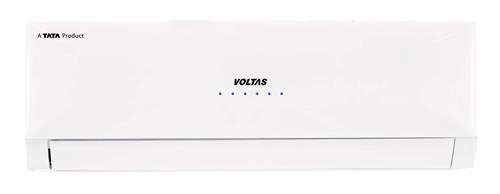
Image: The indoor unit of the Voltas 183 DY Split AC, typically mounted on a wall, showing its white casing and sleek design.
Important Safety Information
Always follow basic safety precautions when using electrical appliances to reduce the risk of fire, electric shock, and injury to persons.
- Ensure the power supply matches the specifications of the unit.
- Do not operate the AC with wet hands.
- Keep children away from the unit.
- Do not insert objects into the air outlet.
- For installation and major repairs, contact qualified service personnel.
- Ensure proper grounding of the unit.
Setup and Installation
The Voltas 183 DY Split AC requires professional installation. Please do not attempt to install the unit yourself.
Installation Service
For installation assistance, Amazon will contact you via email and SMS on your registered mobile number to share the next steps. For further assistance, please reach out to the toll-free number: 1800-3000-9027.
Included Components
Upon unboxing, verify that the following components are present:
- 1 Main unit (Indoor and Outdoor units)
- Warranty card
- Remote Control
- Connecting Pipe (Copper-Copper, Length: 3.5 Metre)
- Connecting Cable (Length: 3.5 Metre)
Operating Instructions
Your Voltas 183 DY Split AC is designed for user-friendly operation via the included LCD remote control.
Remote Control Functions
The LCD remote control allows you to adjust various settings. Ensure the remote is pointed towards the indoor unit when operating.
- Power On/Off: Press the power button to start or stop the unit.
- Mode Selection: Cycle through cooling, fan, and other available modes.
- Temperature Adjustment: Use the up/down arrows to set your desired temperature.
- Fan Speed: Adjust the fan speed for optimal comfort.
- Swing Function: Activate the swing feature for even air distribution.
- Sleep Mode: Engages a quiet, energy-saving operation for comfortable sleep.
- Timer: Set the unit to turn on or off automatically at specified times.
LED Display
The indoor unit features an LED display that shows the current settings, temperature, and operational status.
Maintenance and Care
Regular maintenance ensures optimal performance and longevity of your Voltas AC unit.
Air Filter Cleaning
The Anti Dust filter should be cleaned regularly (e.g., every two weeks, depending on usage and air quality) to maintain cooling efficiency and air quality.
- Turn off the AC unit and disconnect power.
- Open the front panel of the indoor unit.
- Remove the air filters.
- Clean the filters with a vacuum cleaner or wash them with lukewarm water and mild detergent.
- Allow filters to dry completely before reinserting.
- Close the front panel.
The unit also features an Anti Fungal Clean function and is Fungusproof, which helps in preventing mold and mildew growth within the unit. Refer to your remote control guide for activating the Anti Fungal Clean cycle.
General Cleaning
Wipe the exterior of the indoor and outdoor units with a soft, damp cloth. Do not use harsh chemicals or abrasive cleaners.
Troubleshooting
Your Voltas AC is equipped with a Self Diagnosis system to help identify common issues. If a problem occurs, the LED display may show an error code. Refer to the service manual or contact customer support for specific error code interpretations.
Common Issues and Solutions
- Unit does not turn on: Check power supply, circuit breaker, and ensure the remote control batteries are not depleted.
- Insufficient cooling: Clean air filters, ensure no obstructions to airflow, check if doors/windows are closed, and verify temperature settings.
- Unusual noise: Ensure the unit is installed on a stable surface. If noise persists, contact service.
- Water leakage: Check for clogged drain pipes. If problem persists, contact service.
For issues not resolved by these steps, please contact Voltas customer support.
Technical Specifications
| Feature | Value |
|---|---|
| Brand | Voltas |
| Model Name | 183 DY |
| Model Number | 1.5 T 183 DY |
| Capacity | 1.5 tons |
| Energy Rating | 3 Star (BEE Star Rating) |
| Rated Cooling Capacity | 4900 W |
| Rated Power Input - Cooling | 1526 Watt |
| Rated EER | 3.21 W/W |
| Power Supply | 230 V / 50 Hz / 1 Phase |
| Refrigerant Gas | R-22 |
| Compressor Type | High EER Rotary |
| Air Flow Volume - Indoor | 940 CMH |
| Noise Level - Indoor | ≤48 dB(A) |
| Indoor Unit Dimension (WxHxD) | 940x222x300 mm |
| Outdoor Unit Dimension (WxHxD) | 840x540x300 mm |
| Core Material | Copper |
| Special Features | Anti Bacterial Filter, Anti Fungal Clean, Self Diagnosis, LED Display |
Warranty and Support
Warranty Information
Your Voltas 183 DY Split AC comes with the following warranty:
- 1 year comprehensive warranty on the product.
- 5 years warranty on the compressor.
Please retain your purchase receipt and warranty card for any warranty claims.
Customer Support
For service requests, technical assistance, or warranty claims, please contact Voltas customer support:
Toll-Free Number: 1800-3000-9027
Please have your model number (1.5 T 183 DY) and purchase details ready when contacting support.


