
1. Introduction
This manual provides essential information for the safe and efficient operation, installation, and maintenance of your Carrier Durakool Plus 42KGL-024D+51MSG-024RD Split Air Conditioner. Please read this manual thoroughly before using your AC unit and retain it for future reference. Proper use and maintenance will ensure optimal performance and longevity of your appliance.
2. Safety Information
Important Safety Instructions: Always follow basic safety precautions to reduce the risk of fire, electric shock, or injury.
- Installation must be performed by qualified personnel in accordance with all applicable national wiring standards.
- Ensure the power supply matches the voltage specified on the unit's nameplate.
- Do not operate the AC unit with wet hands or when standing on a wet surface.
- Keep children away from the unit and remote control.
- Do not insert objects into the air outlet or inlet.
- Turn off the power supply before cleaning or performing any maintenance.
- In case of abnormal operation (e.g., burning smell), immediately turn off the unit and disconnect the power supply. Contact a qualified service technician.
3. Product Overview
The Carrier Durakool Plus 42KGL-024D+51MSG-024RD is a 2 Ton, 2 Star rated split air conditioner designed for residential use. It features a robust rotary compressor and an anti-bacterial filter for improved air quality.
Key Features:
- 2 Ton Capacity, 2 Star Energy Rating
- Rotary Compressor for efficient cooling
- Anti Bacterial Filter and Electrostatic Dust Filter for cleaner air
- Sleep Mode and Auto Restart functions
- LCD Remote Control and LED Panel Display
- Auto Fan Speed, Auto Swing, Real Time Clock, Auto Mode, Turbo Mode
Included Components:
- 1 x Main Unit (Indoor Unit)
- 1 x Outdoor Unit (Required, not explicitly listed in "whats_in_the_box" but implied by "Split AC" and "Is Outdoor Unit Required: Yes")
- 1 x Remote Control
- 1 x Warranty Card
- User Manual (this document)
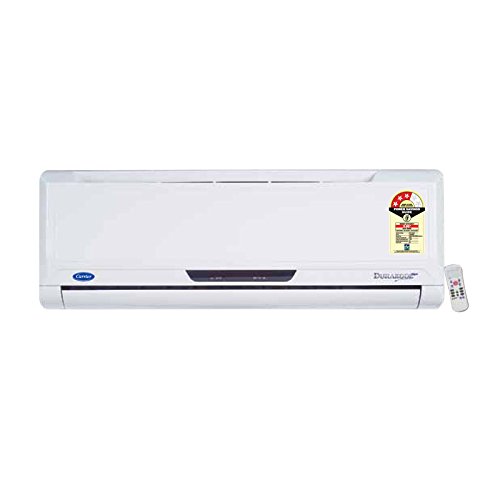
Figure 3.1: Carrier Durakool Plus Split AC Indoor Unit. This image shows the white indoor unit of the air conditioner, typically mounted on a wall.
4. Setup
The Carrier Durakool Plus is a split system air conditioner, requiring both an indoor and an outdoor unit. Professional installation is mandatory to ensure proper functioning, safety, and warranty validity.
4.1 Professional Installation
Due to the complexity of refrigerant handling, electrical connections, and structural mounting, installation must be carried out by a certified HVAC technician. Attempting self-installation may void your warranty and pose significant safety risks.
4.2 Site Selection
- Indoor Unit: Select a location that allows for even air distribution throughout the room, away from direct sunlight or heat sources. Ensure sufficient space around the unit for maintenance.
- Outdoor Unit: Choose a well-ventilated area, free from obstructions, and away from direct sunlight or excessive dust. Ensure the unit is placed on a stable, level surface. The outdoor unit should be easily accessible for maintenance.
4.3 Electrical Connection
The unit requires a dedicated power circuit. The electrical wiring must comply with local and national electrical codes. Ensure the power source is properly grounded. Refer to the wiring diagram provided with the outdoor unit for specific connection details.
5. Operating Instructions
Your Carrier Durakool Plus AC unit is controlled via an LCD remote control. Familiarize yourself with the remote's functions for optimal use.
5.1 Remote Control Functions
The remote control allows you to adjust temperature, fan speed, operating mode, and set timers. An LED display on the indoor unit will show current settings. Refer to the remote control's specific user guide for detailed button functions and display indicators.
- Power Button: Turns the unit ON or OFF.
- Mode Button: Cycles through operating modes: Auto, Cool, Dry, Fan, Heat (if applicable).
- Temperature Buttons (▲/▼): Adjusts the desired room temperature.
- Fan Speed Button: Selects fan speed (Auto, Low, Medium, High).
- Swing Button: Activates or deactivates the automatic vertical air swing.
- Sleep Mode: Optimizes temperature and fan speed for comfortable sleep and energy saving.
- Timer ON/OFF: Sets a specific time for the unit to turn ON or OFF.
- Turbo Mode: Provides rapid cooling by operating at maximum fan speed and cooling capacity.
- Auto Restart: If power is interrupted, the unit will automatically restart with previous settings once power is restored.
6. Maintenance
Regular maintenance ensures efficient operation and extends the lifespan of your air conditioner. Always disconnect power before performing any maintenance.
6.1 Air Filter Cleaning
The unit is equipped with an electrostatic dust filter and an active carbon filter. Clean these filters regularly (every 2-4 weeks, depending on usage and air quality) to maintain cooling efficiency and air quality.
- Turn off the AC unit and disconnect the power supply.
- Open the front panel of the indoor unit.
- Carefully remove the air filters.
- Clean the filters using a vacuum cleaner or wash them with lukewarm water and a mild detergent. Rinse thoroughly.
- Allow the filters to dry completely in a shaded area before reinserting them.
- Close the front panel and restore power.
6.2 General Cleaning
- Wipe the indoor unit's exterior with a soft, damp cloth. Do not use harsh chemicals or abrasive cleaners.
- Ensure the outdoor unit's coils are free from debris, leaves, and dirt. Use a soft brush or vacuum to clean the fins.
6.3 Seasonal Maintenance
It is recommended to have your AC unit professionally serviced annually, especially before the cooling season, to check refrigerant levels, electrical connections, and overall system performance.
7. Troubleshooting
Before contacting service, please check the following common issues:
| Problem | Possible Cause | Solution |
|---|---|---|
| Unit does not start | No power supply; Remote control batteries depleted; Circuit breaker tripped. | Check power connection; Replace remote batteries; Reset circuit breaker. |
| Insufficient cooling | Dirty air filters; Doors/windows open; Temperature setting too high; Outdoor unit obstructed. | Clean air filters; Close doors/windows; Lower temperature setting; Clear obstructions from outdoor unit. |
| Unusual noise | Loose parts; Unit not level; Debris in fan. | Ensure unit is securely mounted; Check for and remove debris. If noise persists, contact service. |
| Water leakage from indoor unit | Clogged drain pipe; Improper installation. | Clear drain pipe obstruction; Contact professional for inspection. |
If the problem persists after attempting these solutions, please contact Carrier customer support or a qualified service technician.
8. Specifications
| Feature | Detail |
|---|---|
| Brand | Carrier |
| Model Name | Durakool Plus 42KGL-024D+51MSG-024RD |
| Capacity | 2 Tons |
| Cooling Power | 6741 Watts |
| Energy Efficiency | 2 Star BEE Rating |
| Special Features | Anti Bacterial Filter, Electrostatic Dust Filter, Sleep Mode, Auto Restart, Auto Swing, Turbo Mode |
| Colour | White |
| Noise Level (Indoor) | 47 Decibels |
| Inverter Type | No Inverter |
| Installation Type | Split System |
| Compressor Type | Rotary Scroll |
| Core Material | Copper |
| Power Source | Corded Electric |
| Recommended Floor Area | 180 Square Feet |
| Control Method | Remote Control |
9. Warranty and Support
9.1 Warranty Information
Your Carrier Durakool Plus AC unit comes with a limited warranty:
- 1 year warranty on the product.
- 5 years warranty on the compressor.
Please retain your purchase receipt and warranty card for any warranty claims. The warranty terms and conditions are detailed on the warranty card included with your product.
9.2 Customer Support
For technical assistance, service requests, or further inquiries, please contact Carrier customer support. Refer to your warranty card or the official Carrier website for up-to-date contact information.
You can also visit the official Carrier store for more information: Carrier Store on Amazon.in