
Important Safety Information
WARNING: Do not use this scale if you have a pacemaker or use any other electronic personal medical device. The Bioelectrical Impedance Analysis (BIA) technology sends a small, unperceivable electrical signal through your body, which could interfere with such devices.
- Always place the scale on a hard, flat surface for accurate measurements. Carpets or uneven floors can affect readings.
- The glass platform can be slippery when wet. Ensure the surface is dry before stepping on.
- Do not jump on the scale or drop heavy objects on it.
- Keep the scale away from extreme temperatures and direct sunlight.
- This scale is intended for household use only.
Product Overview
The Escali BF180 Glass Body Analyzing Bathroom Scale is designed to provide a comprehensive analysis of your body composition. Utilizing advanced Bioelectrical Impedance Analysis (BIA) technology, it measures not only your body weight but also estimates body fat, body water, lean muscle mass, and bone mass. The scale features an ultra-slim design with a tempered safety glass platform and an easy-to-read LCD display.

Figure 1: Top view of the Escali BF180 scale, showing the black glass platform, silver electrodes, and digital display.

Figure 2: Angled view of the Escali BF180 scale, highlighting its sleek, low-profile design.
Key Features:
- Advanced Body Composition Measurements: Measures percentage of body fat, body water, lean muscle, and bone mass.
- Bioelectrical Impedance Analysis (BIA): Utilizes a safe, unperceivable electronic signal for detailed body analysis.
- Ultra Slim Design: Tempered safety glass platform less than 1 inch thick for stability and modern aesthetics.
- Auto-detect User Profiles: Automatically recognizes up to eight users and calculates body composition based on stored profiles.
- Weight Only Mode: Allows for quick body weight measurement without requiring a personal profile.
- Automatic Shut-off: Conserves battery life by turning off automatically after use.
- Easy-to-Read Display: Clear LCD display shows measurements in pounds or kilograms.

Figure 3: Diagram illustrating key features of the Escali BF180 scale, including the easy-to-read display, body composition analysis, ultra-slim design, and touch-sensitive controls.
Setup
Unpacking
Carefully remove the scale from its packaging. Inspect the scale for any signs of damage. Retain the packaging for future storage or transport.
Battery Installation
The Escali BF180 scale typically comes with batteries included. Locate the battery compartment on the underside of the scale. Open the compartment cover and ensure the batteries are correctly inserted according to the polarity indicators (+/-). If replacing batteries, use the specified type (usually AAA or CR2032, refer to the battery compartment for exact type) and dispose of old batteries responsibly.
Initial Placement
Place the scale on a hard, flat, and stable surface. Avoid placing it on carpets, rugs, or uneven flooring, as this can lead to inaccurate readings. Ensure the scale is not exposed to direct sunlight or extreme temperatures.
Operating Instructions
Basic Weight Measurement
- Ensure the scale is on a hard, flat surface.
- Gently tap the center of the scale with your foot to activate it. The display will show "0.0" or "0.00".
- Once "0.0" is displayed, step onto the scale with bare feet, standing still and centered on the platform.
- Your weight will be displayed. The scale will automatically turn off after a few seconds.
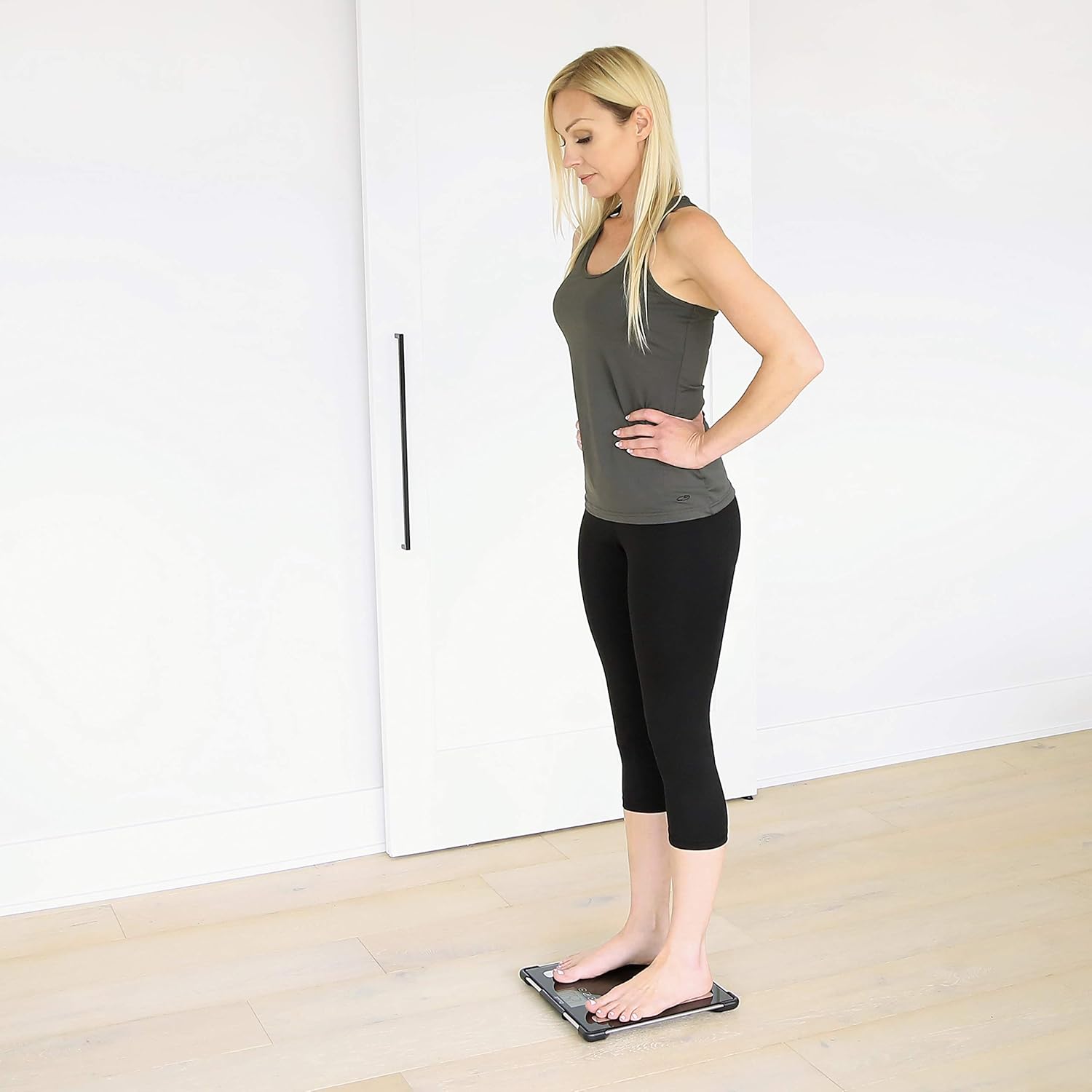
Figure 4: A person's feet positioned correctly on the scale's electrodes for accurate measurement.
Setting Up User Profiles (for Body Analysis)
The scale can store profiles for up to eight users. Setting up a profile allows the scale to accurately calculate your body composition based on your personal data.
- With the scale off, press the "SET" button. The display will show a user number (e.g., "P1").
- Use the "UP" or "DOWN" arrow buttons to select an empty user profile (P1-P8).
- Press "SET" to confirm the user number.
- The display will prompt you to enter your gender (male/female icon). Use the arrow buttons to select and "SET" to confirm.
- Next, enter your height. Use the arrow buttons to adjust the value and "SET" to confirm.
- Then, enter your age. Use the arrow buttons to adjust the value and "SET" to confirm.
- The scale will then display "0.0" or "0.00". Step onto the scale with bare feet. The scale will automatically recognize your profile based on your weight and perform the body composition analysis.
Body Composition Analysis
Once your profile is set up and you step on the scale with bare feet, the scale will perform a Bioelectrical Impedance Analysis (BIA). Ensure your feet are clean and make good contact with the silver electrodes on the scale's surface. The scale will cycle through and display your body weight, body fat percentage, body water percentage, muscle mass, and bone mass.

Figure 5: Visual representation of the various body composition metrics measured by the scale: Body Weight, Body Fat, Muscle Mass, Body Water, and Bone Density.
Changing Measurement Units
The scale can display weight in pounds (lb), kilograms (kg), or stones (st). To change the unit, locate the unit switch button on the underside of the scale (or sometimes by pressing the 'SET' button repeatedly when the scale is off). Press it to cycle through the available units until your desired unit is displayed.

Figure 6: Diagram illustrating the conversion between different measurement units: pounds (lb), kilograms (kg), and stones (st).
Weight Only Mode
If you or a guest wish to measure only body weight without body composition analysis or profile selection, simply step onto the scale after it displays "0.0" or "0.00". The scale will provide a weight reading without attempting to identify a user profile or perform BIA.
Maintenance and Care
- Cleaning: Wipe the scale's surface with a damp cloth and mild detergent if necessary. Do not use abrasive cleaners or immerse the scale in water.
- Storage: Store the scale in a dry place at room temperature. Avoid storing it vertically or with heavy objects on top.
- Battery Replacement: If the display shows "Lo" or becomes dim, it's time to replace the batteries. Refer to the "Battery Installation" section for instructions.
- Calibration: If the scale has been moved or stored vertically, it may require re-calibration. Step on the scale briefly, then step off. Wait for it to display "0.0" before taking a measurement.
Troubleshooting
| Problem | Possible Cause | Solution |
|---|---|---|
| Scale does not turn on / No display | Dead or incorrectly installed batteries. | Check battery polarity or replace batteries. |
| Inaccurate weight readings | Scale on uneven surface; not calibrated; moved recently. | Place on a hard, flat surface. Step on, then off, wait for "0.0" before re-weighing. |
| "Err" or "O-Ld" displayed | Overload (weight exceeds maximum capacity). | Step off the scale. Ensure weight is within the maximum capacity (400 lbs / 180 kg). |
| Body composition readings not displayed | Not standing with bare feet; feet not making good contact with electrodes; profile not set up. | Ensure bare feet are clean and centered on electrodes. Set up a user profile as per instructions. |
| Scale does not recognize user profile | Multiple users with similar weight; profile not correctly saved. | Ensure you are selecting the correct user number if prompted, or re-enter your profile data. |
Specifications
| Feature | Detail |
|---|---|
| Model Number | BF180 |
| Colour | Black |
| Product Dimensions | 33.02 x 3.81 x 33.02 cm (13 x 1.5 x 13 inches) |
| Item Weight | 907 g (2 lbs) |
| Maximum Weight Capacity | 400 lbs (180 kg) |
| Material | Tempered Glass |
| Special Features | Body Fat, Bodyweight, Muscle Mass, Body Water, Bone Mass |
| Display Type | LCD |
| User Profiles | Up to 8 users |
Warranty Information
The Escali BF180 Glass Body Analyzing Bathroom Scale comes with a manufacturer's warranty. Please refer to the product packaging or the manufacturer's official website for specific warranty terms and conditions. Generally, Escali products are known for their quality and often come with a lifetime warranty against defects in materials and workmanship.
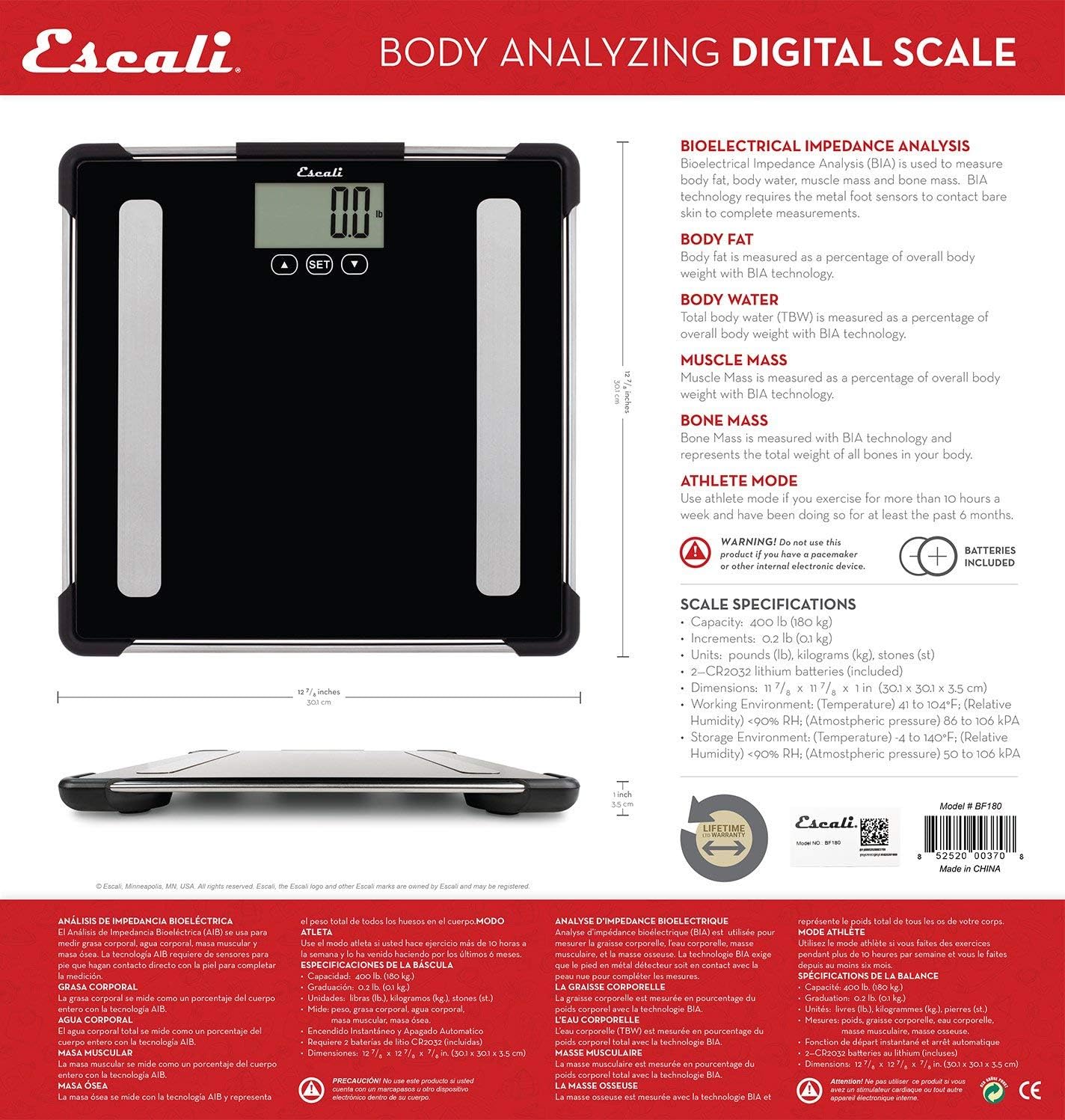
Figure 7: Product packaging detail, indicating specifications and the mention of a lifetime warranty.
Customer Support
For further assistance, technical support, or warranty claims, please contact Escali customer service. You can typically find contact information on the product packaging, the official Escali website, or through your retailer.
Website: www.escali.com
Manufacturer: ESCGV
Place of Business: SEATTLE, WA, 98107 US


