
AT&T CRL81212
AT&T CRL81212 DECT 6.0 Cordless Phone System User Manual
Model: CRL81212
1. Introduction
This manual provides complete instructions for the installation and operation of your AT&T CRL81212 DECT 6.0 Cordless Phone System. This system features DECT 6.0 digital technology for enhanced sound quality and security, an extra-large LCD display, and large, backlit buttons for ease of use. It includes caller ID, call waiting, and a 50-name/number phonebook directory.
2. Package Contents
Ensure your package contains the following items:
- One (1) AT&T CRL81212 base unit with power adapter
- Two (2) AT&T CRL81212 cordless handsets
- Two (2) handset chargers with power adapters
- Two (2) battery packs for handsets
- One (1) telephone line cord
- This User Manual
3. Setup
3.1 Battery Installation
Before using your phone, you must install and charge the battery pack in each handset.
- Open the battery compartment cover on the back of the handset.
- Connect the battery pack connector securely into the jack inside the compartment.
- Place the battery pack with the label UP.
- Close the battery compartment cover.
3.2 Base Unit Connection
Connect the base unit to a telephone line and power outlet.
- Plug one end of the telephone line cord into the TEL LINE jack on the back of the base unit.
- Plug the other end of the telephone line cord into a telephone wall jack.
- Plug the small end of the base unit power adapter into the POWER jack on the back of the base unit.
- Plug the large end of the base unit power adapter into an electrical outlet not controlled by a wall switch.
3.3 Handset Charging
Place each handset in its respective charger or the base unit cradle to charge. The CHARGE indicator on the handset will illuminate. Allow at least 16 hours for the initial charge.
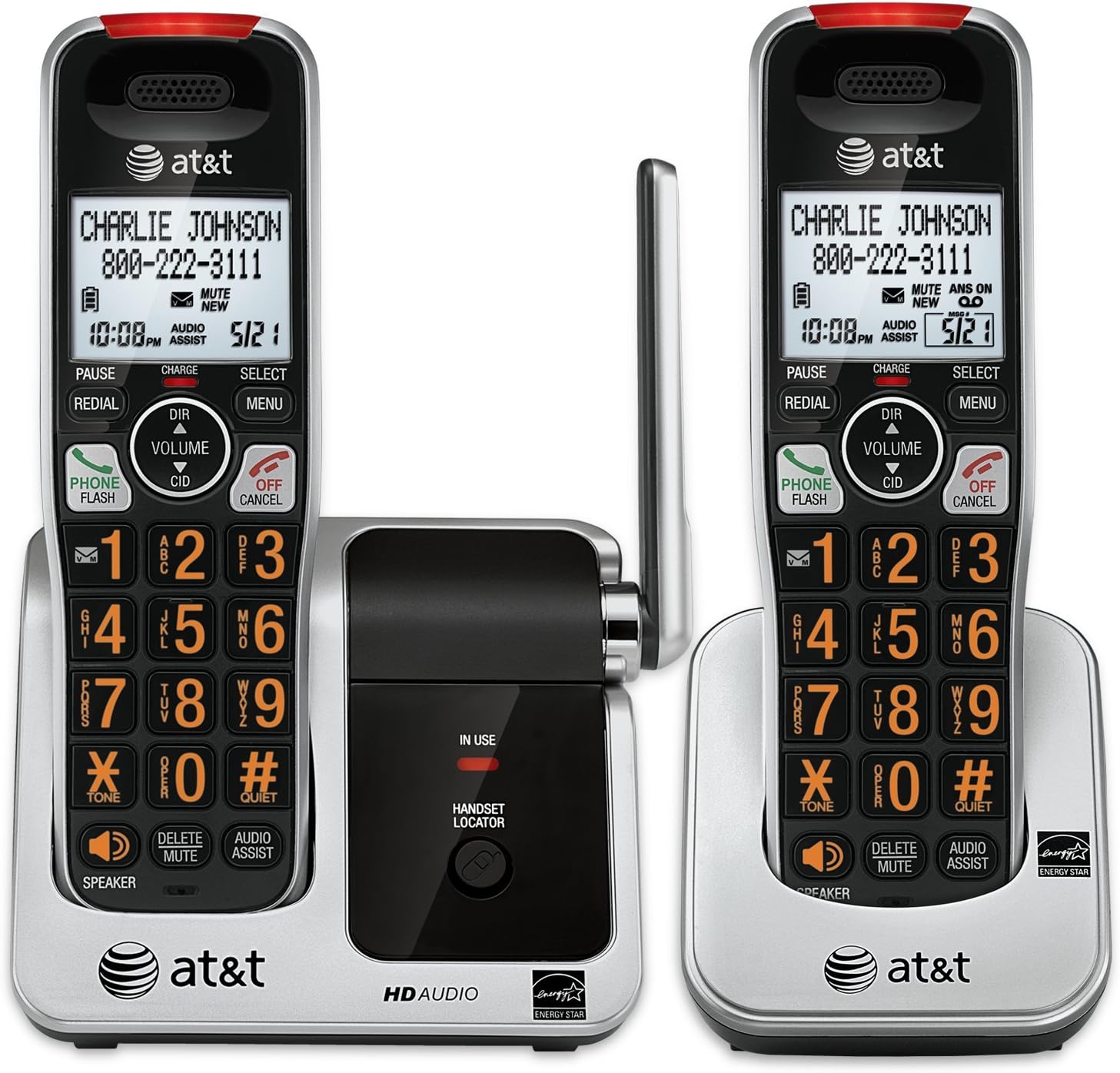
Image: The AT&T CRL81212 DECT 6.0 Cordless Phone System, showing two handsets in their charging cradles. The handsets feature large, backlit buttons and an extra-large LCD display. The base unit includes a handset locator button and an 'in use' indicator.
4. Operating Your Phone
4.1 Making and Receiving Calls
- To Make a Call: Press PHONE/FLASH or SPEAKER, then dial the number.
- To Answer a Call: Press PHONE/FLASH or SPEAKER when the phone rings.
- To End a Call: Press OFF/CANCEL or place the handset in the charger.
4.2 Caller ID
The handset displays the caller's name and number (if available) after the first ring. To review caller ID history, press CID.
4.3 Phonebook
Store up to 50 names and numbers in the phonebook directory.
- To Add an Entry: Press MENU, select 'Phonebook', then 'Add New Entry'. Follow the on-screen prompts.
- To Search/Dial: Press DIR, then use the arrow keys to scroll or enter the first letter of the name. Press PHONE/FLASH to dial.
4.4 Voicemail and Message Retrieval
When you have new voicemail messages, the voicemail icon will appear on the handset display. To retrieve messages, press and hold 1 on the keypad (if configured for speed dial to voicemail) or dial your voicemail service number.
4.5 Intercom and Conference Calls
- Intercom: To call another handset, press MENU, select 'Intercom', then the desired handset number.
- 3-Way Conference Call: During an external call, press FLASH to get a dial tone, dial the second party's number, and once connected, press FLASH again to join all parties.
4.6 Other Functions
- Speakerphone: Press SPEAKER during a call to activate/deactivate.
- Mute: Press DELETE/MUTE during a call to mute your microphone. Press again to unmute.
- Redial: Press REDIAL to view the last 10 dialed numbers. Press PHONE/FLASH to dial a selected number.
- Audio Assist: Press AUDIO ASSIST to temporarily boost the audio volume during a call.
- Handset Locator: Press HANDSET LOCATOR on the base unit to page all registered handsets.
5. Features Overview
- DECT 6.0 Digital Technology: Provides superior sound quality, security, and range.
- Extra-Large LCD Display: Offers clear visibility of caller ID, menu options, and phonebook entries.
- Extra-Large Backlit Buttons: Enhances usability, especially in low-light conditions, and for users with visual impairments.
- Visual Ringer Indicator: A light on the handset flashes when there is an incoming call, providing an additional alert.
- Expandable System: Supports up to 12 handsets (sold separately) on a single base unit.
- 50-Name/Number Phonebook: Conveniently store frequently called contacts.
- 17-Minute Digital Answering System: (If applicable to your specific model variant, check product packaging for confirmation) Records incoming messages.
6. Maintenance
- Cleaning: Clean the phone and charger with a soft, damp cloth. Do not use cleaning sprays or harsh chemicals.
- Battery Care: Replace the battery pack when the handset indicates low battery or when operating time decreases significantly. Use only the specified replacement battery type.
- Environmental Conditions: Avoid placing the phone in direct sunlight, near heat sources, or in areas with excessive moisture or dust.
7. Troubleshooting
7.1 No Dial Tone
- Ensure the telephone line cord is securely plugged into both the base unit and the wall jack.
- Verify the base unit power adapter is properly connected to a working electrical outlet.
- Check if the handset battery is charged.
7.2 Handset Not Charging
- Ensure the handset is correctly seated in the charger.
- Verify the charger's power adapter is plugged into a working electrical outlet.
- Clean the charging contacts on both the handset and charger with a dry cloth.
7.3 Poor Sound Quality
- Move the handset closer to the base unit.
- Avoid placing the base unit near other electronic devices that may cause interference.
- Check for any loose connections.
8. Specifications
| Brand | AT&T |
| Model | CRL81212 |
| Wireless Technology | DECT 6.0 |
| Display Type | LCD |
| Power Source | Corded Electric, Battery Operated |
| Batteries Required | 2 AA (included) |
| Recording Capacity | 17 Minutes (for models with answering machine) |
| Dimensions (Base Unit) | Approximately 20 x 15 x 11 cm |
| Weight (Handset) | Approximately 85.05 g (3 Ounces) |
9. Warranty and Support
For warranty information and technical support, please refer to the warranty card included in your product packaging or visit the official AT&T website. Keep your purchase receipt as proof of purchase.
For further assistance, you may contact AT&T customer service.
Related documentsCRL81212


Ask a question about this manual
Ask about setup, troubleshooting, compatibility, parts, safety, or missing instructions. Manuals+ will review the question and use this page’s manual context to help answer it.