
COSMO C51EIX
COSMO C51EIX 24 in. Electric Wall Oven Instruction Manual
Model: C51EIX | Brand: COSMO
Introduction
This manual provides essential information for the safe and efficient operation of your COSMO C51EIX 24-inch Electric Wall Oven. Please read all instructions carefully before installation and use, and retain this manual for future reference.
Key Features:
- Turbo True European Convection: Designed to cook food more evenly in less time and at a lower temperature than in a standard oven with a compact 2.5 cu. ft. capacity.
- 8 Oven Functions: This electric single wall oven includes 8 specialized oven functions: Conventional Cooking, Convection with Fan, Small Broiler, Double Broiler, Double Grill with Fan, Bottom Heater, Defrost, and Oven Lamp.
- Built for Safety: Oven safety features include Auto Safety Shut-Off, Cavity Cooling System, and a triple-layer door with cool-to-touch glass to prevent accidental burns.
- Clean Design: Modern, easy-to-clean stainless steel finish blends into any kitchen. Monitor the progress of your cooking with an extra-large oven window and dual oven lights. Features push button and pop-out knobs controls with clock and timer.
- Capacity: Spacious 2.5 cubic feet.
Setup and Installation
1. Unboxing the Oven
Carefully remove the oven from its packaging. Ensure all protective materials are removed from the exterior and interior of the appliance. Inspect the oven for any signs of damage during transit.
2. What's in the Box
Your COSMO C51EIX oven package includes:
- Baking Tray
- 2 Oven Racks
- Installation Kit
- User Manual (this document)
3. Electrical Requirements and Connection
The oven requires a hardwired, 4-wire connection. It operates at 240V, 3250W, and 13.6 Amps. Ensure that the electrical supply meets these specifications and that installation is performed by a qualified electrician.

Image: Close-up of the oven's electrical wiring, showing the four-wire connection required for installation.
4. Oven Placement and Dimensions
The oven is designed for built-in installation. Refer to the diagram below for precise dimensions to ensure proper fit within your cabinetry.

Image: Technical drawing illustrating the dimensions of the COSMO C51EIX 24-inch Electric Wall Oven for installation planning.
Product Dimensions: 23.4" (W) x 22.6" (D) x 23.4" (H).
5. Initial Clock Setting
Upon first power-up, the oven display will show "12:30" flashing. To set the clock:
- Press and hold the "+" and "-" buttons to adjust the clock hour and minute.
- Press the "< >" button to confirm both the clock hour and the clock minute.
Video: Quick Start Guide for the Cosmo Wall Oven C51EIX, demonstrating how to set the clock and timer functions.
Operating Instructions
To use the oven, ensure the clock time is set and the oven is out of standby mode. Press and hold the "< >" button for 3 seconds to exit Standby Mode.
1. Selecting a Cooking Function and Temperature
Turn the left control knob to select a cooking function (e.g., Bake, Roast, Convection Roast, Broil Low, Broil High, Defrost, Convection Broil, Oven Lamp). Turn the right control knob to set the desired temperature (e.g., 400°F).
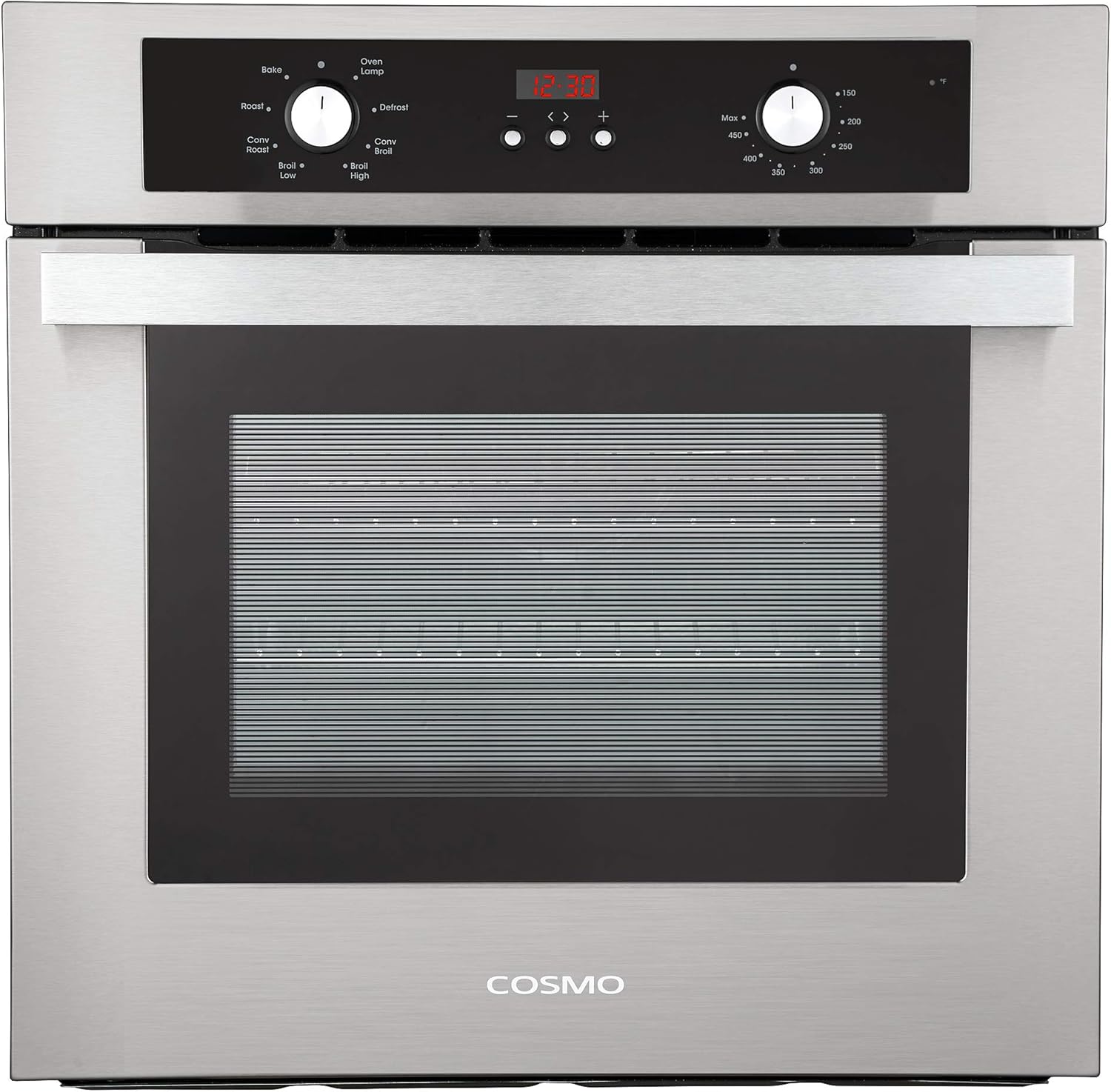
Image: Front view of the COSMO C51EIX oven, highlighting the control panel with function and temperature knobs.
2. Using the Timer
To set the timer (Minute Minder function):
- Press the "< >" button until the timer icon appears on the display.
- Use the "+" and "-" buttons to adjust the desired time.
- Press the "< >" button again to confirm and start the timer.
3. Recessing the Control Knobs
The control knobs can be recessed into the panel for a flush appearance. Press the control knob inward and release to recess it. To release the control knob, press inward again.
4. Child Lock Function
To activate or deactivate the child lock, press and hold the "Start" button for 3 seconds. A lock icon will appear on the display when activated.
5. Using Oven Racks and Baking Tray
The oven features multiple rack positions for versatile cooking. Position the racks as needed for your dishes. The included baking tray can be placed on any rack.

Image: Interior view of the COSMO C51EIX oven, showing the multiple rack positions and the included baking tray.
Maintenance and Cleaning
Regular cleaning and maintenance will ensure the longevity and optimal performance of your oven.
1. General Cleaning
- Always ensure the oven is cool and disconnected from power before cleaning.
- Wipe the exterior stainless steel surfaces with a soft cloth and mild detergent. Avoid abrasive cleaners.
- Clean the interior enamel coating with a non-abrasive oven cleaner or a solution of warm water and mild soap.
- The oven racks can be removed and washed with warm, soapy water.
2. Oven Light Replacement
If the oven light needs replacement, ensure the oven is cool and unplugged. Consult a qualified technician or refer to the detailed instructions in the full user manual for specific bulb type and replacement procedure.
Troubleshooting
Before contacting customer support, please refer to the following common issues and solutions:
| Problem | Possible Cause | Solution |
|---|---|---|
| Oven does not turn on. | No power supply; oven in standby mode. | Check circuit breaker. Press and hold "< >" for 3 seconds to exit standby. |
| Uneven cooking. | Improper rack placement; food too close to heating elements. | Adjust rack position. Utilize Turbo True European Convection for even heat distribution. |
| Control knobs are not responsive. | Child lock activated. | Deactivate child lock by pressing and holding "Start" for 3 seconds. |
For issues not listed here or if problems persist, please contact COSMO customer support.
Specifications
| Feature | Detail |
|---|---|
| Brand | COSMO |
| Model Info | C51EIX |
| Item Weight | 80 pounds |
| Product Dimensions | 21.4 x 23.4 x 23.2 inches |
| Capacity | 2.5 Cubic Feet |
| Annual Energy Consumption | 1679 Kilowatt Hours Per Year |
| Installation Type | Built-In |
| Form Factor | Single Oven |
| Special Features | Interior Light, Timer |
| Oven Cooking Mode | Convection |
| Color | Stainless Steel |
| Voltage | 240.0 |
| Wattage | 3250 watts |
| Racks | 2 |
| Fuel type | Electric |
| Defrost | Yes |
| Door Hinges | Left |
| Material Type | Stainless Steel |
Warranty and Support
Warranty Information:
Your COSMO C51EIX Electric Wall Oven comes with a 1-Year Limited Warranty. Please refer to the warranty card included with your product or visit the official COSMO website for full terms and conditions.
Customer Support:
Our customer support team is based in the USA and is available to assist with any questions or concerns regarding your oven. For technical assistance, troubleshooting, or warranty claims, please contact us through the official COSMO channels provided in your product documentation.
Related documentsC51EIX


Ask a question about this manual
Ask about setup, troubleshooting, compatibility, parts, safety, or missing instructions. Manuals+ will review the question and use this page’s manual context to help answer it.