
Introduction
This manual provides essential information for the setup, operation, maintenance, and troubleshooting of your Schecter C-6 Deluxe Solid-Body Electric Guitar. Please read this manual thoroughly to ensure proper use and to maximize the lifespan of your instrument.

Image: Full view of the Schecter C-6 Deluxe Solid-Body Electric Guitar in Satin Black finish.
Setup
Before playing your new Schecter C-6 Deluxe guitar, follow these steps for initial setup:
- Unpacking: Carefully remove the guitar from its packaging. Inspect for any visible damage.
- Tuning: Tune the guitar to standard pitch (E-A-D-G-B-e) using an electronic tuner. New strings may require frequent re-tuning initially.
- Strap Attachment: Attach a guitar strap to the strap buttons located on the body of the guitar for comfortable playing while standing.
- Amplifier Connection: Connect a standard 1/4-inch instrument cable from the guitar's output jack to your amplifier's input.

Image: Front view of the Schecter C-6 Deluxe Electric Guitar, highlighting the body and neck.
Operating the Guitar
Your Schecter C-6 Deluxe features intuitive controls for shaping your sound:
- Volume Knob: Controls the overall output level of the guitar. Turn clockwise to increase volume, counter-clockwise to decrease.
- Tone Knob: Adjusts the treble response. Turn clockwise for brighter tones, counter-clockwise for warmer, darker tones.
- Pickup Selector Switch: This switch allows you to select different pickup configurations.
- Position 1 (Bridge): Activates the bridge pickup for a sharp, bright tone, often used for lead guitar or aggressive rhythms.
- Position 2 (Middle): Activates both bridge and neck pickups, offering a balanced tone.
- Position 3 (Neck): Activates the neck pickup for a warm, mellow tone, ideal for clean passages or blues.
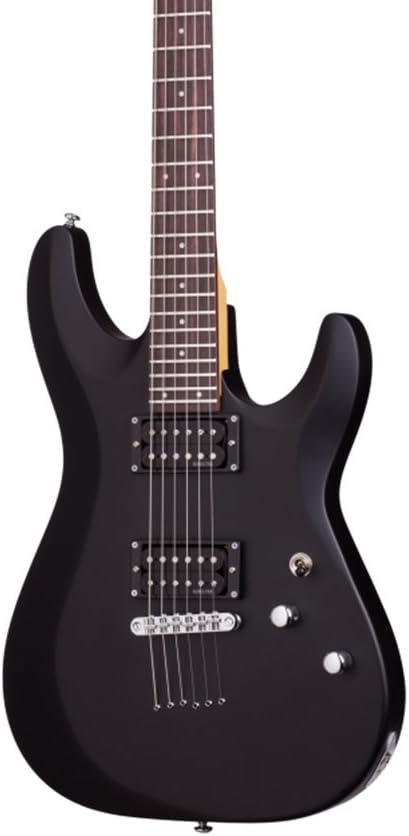
Image: Close-up of the guitar's body, showing the Schecter Diamond Plus humbucker pickups, volume and tone knobs, and the pickup selector switch.
Maintenance
Regular maintenance will preserve your guitar's playability and appearance:
- Cleaning: Wipe down the body, neck, and strings with a soft, lint-free cloth after each use to remove sweat and oils. Use guitar-specific cleaning products for deeper cleaning.
- String Replacement: Replace strings regularly (e.g., every 1-3 months, depending on usage) to maintain optimal tone and playability. Change one string at a time to maintain neck tension.
- Fretboard Care: Periodically clean and condition the rosewood fretboard to prevent drying and cracking. Use a lemon oil or specialized fretboard conditioner.
- Storage: Store the guitar in a stable environment, away from extreme temperature changes and humidity fluctuations. A guitar case or gig bag is recommended for protection.

Image: Close-up of the guitar's headstock, featuring the Schecter logo and tuning machines.
Troubleshooting
Here are solutions to common issues you might encounter:
- No Sound:
- Check all cable connections (guitar to amp, amp to power).
- Ensure the amplifier is turned on and volume is up.
- Verify the guitar's volume knob is not turned down.
- Test with a different cable or amplifier if possible.
- Buzzing Strings:
- Check for proper fretting technique.
- Inspect for worn frets or incorrect string action. Professional setup may be required.
- Ensure strings are correctly seated in the nut and bridge.
- Poor Tuning Stability:
- Stretch new strings thoroughly after installation.
- Check tuning machines for looseness.
- Ensure the nut slots are not binding the strings.
Specifications
| Feature | Detail |
|---|---|
| Item Weight | 10.33 pounds |
| Product Dimensions | 44 x 19 x 5 inches |
| ASIN | B00LE533EU |
| Item Model Number | 430 |
| Back Material | Basswood |
| Body Material | Wood (Basswood) |
| Color Name | Black |
| Fretboard Material | Rosewood |
| Guitar Pickup Configuration | H (Humbucker) |
| Scale Length | 25.5 inches |
| String Material | Alloy Steel |
| Top Material | Basswood, Maple Wood, Rosewood |
| Neck Material Type | Maple |
| Number of Strings | 6 |
| Guitar Bridge System | Tune-O-Matic |
| Hand Orientation | Right |
Product Demonstration
Watch this video for a demonstration and sound test of the Schecter C-6 Deluxe Electric Guitar:
Video: Electric Guitar Video Review | Demo, Unboxing + Sound Test for the Schecter C-6 Deluxe Electric Guitar.
Warranty and Support
Information regarding specific warranty details and customer support for the Schecter C-6 Deluxe Solid-Body Electric Guitar was not available in the provided product data. Please refer to the manufacturer's official website or contact your retailer for warranty registration, support, and service inquiries.


