
1. Introduction
This manual provides comprehensive instructions for the installation, operation, and maintenance of your Intermatic EC210WK Countdown Timer. This device is designed to provide silent, timed control for various electrical loads, enhancing energy savings and convenience in your home or office.
The EC210WK offers selectable countdown times of 10, 20, 30, and 60 minutes, along with a "HOLD" function for continuous operation. It is suitable for controlling indoor and outdoor lighting, bathroom and exhaust fans, and other energy-consuming appliances.
2. Important Safety Information
WARNING: Risk of electric shock. Improper installation can lead to serious injury or death. Always turn off power at the circuit breaker or fuse box before installing or servicing this device. Installation should be performed by a qualified electrician or in accordance with local electrical codes.
- Disconnect power at the circuit breaker before installation.
- Ensure all wiring connections are secure.
- This device is for indoor use only.
- Do not exceed the maximum load ratings specified in the specifications section.
- A neutral wire is required for operation.
3. Package Contents
Verify that all components are present before beginning installation:
- Intermatic EC210WK Countdown Timer (1 unit)
- Instruction Manual (this document)
Note: A wall plate is sold separately and is not included with this unit.
4. Installation
4.1 Tools Required
- Screwdriver (Phillips and/or Flathead)
- Wire Strippers
- Electrical Tape (optional)
- Voltage Tester (recommended)
4.2 Wiring Diagram and Connections
The EC210WK timer requires a neutral wire for proper operation. Ensure your electrical box has a neutral wire available. Refer to the wiring diagram below for correct connections.
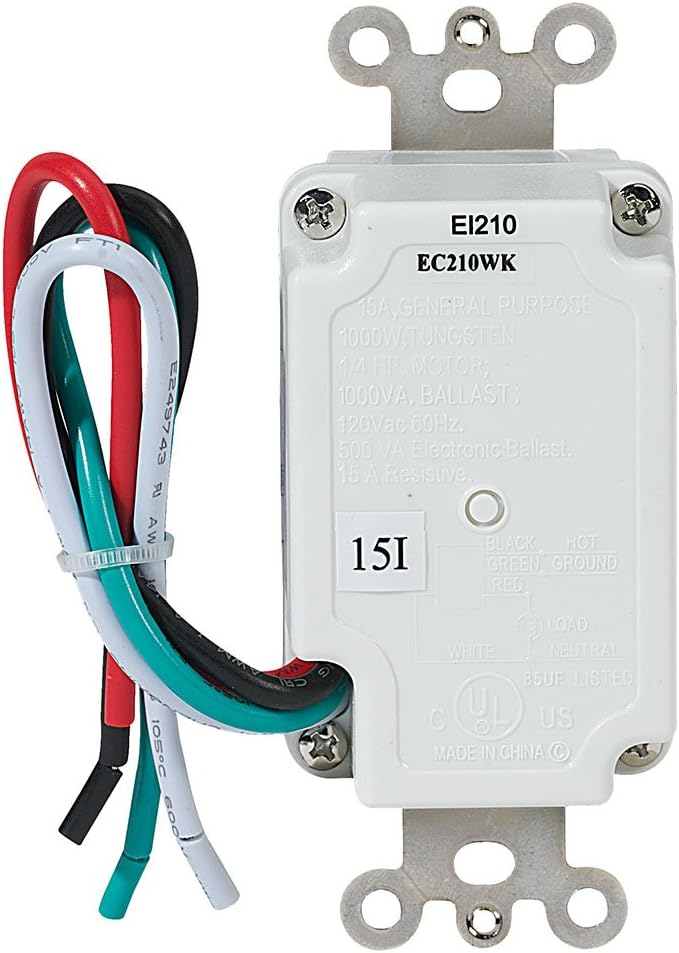
- Turn off Power: Locate the circuit breaker controlling the switch you are replacing and turn it OFF. Verify power is off using a voltage tester.
- Remove Old Switch: Carefully remove the existing wall plate and unscrew the old switch from the electrical box. Disconnect the wires from the old switch.
- Identify Wires:
- Black Wire: Connects to the incoming 120 VAC HOT line.
- White Wire: Connects to the NEUTRAL line.
- Red Wire: Connects to the LOAD (the appliance or light fixture).
- Green Wire: Connects to the GROUND wire.
- Connect New Timer: Using wire nuts (not included), connect the wires from the EC210WK timer to the corresponding wires in the electrical box.
- Timer's Black wire to House Hot wire.
- Timer's White wire to House Neutral wire.
- Timer's Red wire to House Load wire.
- Timer's Green wire to House Ground wire.
- Mount Timer: Carefully fold the wires into the electrical box, ensuring no wires are pinched. Secure the timer to the electrical box using the provided screws.
- Install Wall Plate: Attach a standard decorator-style wall plate (not included) over the timer.
- Restore Power: Turn the power back ON at the circuit breaker.
5. Operation
The Intermatic EC210WK timer features five push buttons for selecting countdown durations and a "HOLD" function.

- Selecting a Countdown Time: Press the desired time button (10 MIN, 20 MIN, 30 MIN, or 60 MIN). The corresponding LED indicator will illuminate, and the connected load will turn ON for the selected duration. The load will automatically turn OFF when the countdown expires.
- "HOLD" Function: Press the "HOLD" button to keep the connected load ON continuously. The "HOLD" LED indicator will illuminate. To exit the "HOLD" function, press any of the countdown time buttons, or press the "HOLD" button again to turn the load OFF.
- Canceling a Countdown: To turn OFF the connected load before the countdown expires, press the currently active countdown button again, or press the "HOLD" button (which will then require a second press to turn off if the load was already on).
6. Maintenance
The Intermatic EC210WK Countdown Timer requires minimal maintenance.
- Cleaning: To clean the surface of the timer, wipe with a soft, damp cloth. Do not use abrasive cleaners or solvents. Ensure power is off before cleaning.
- Inspection: Periodically inspect the timer and wall plate for any signs of damage or loose connections. If any issues are found, turn off power at the circuit breaker and consult a qualified electrician.
7. Troubleshooting
If you experience issues with your EC210WK timer, refer to the following common problems and solutions:
| Problem | Possible Cause | Solution |
|---|---|---|
| Timer does not turn ON. | No power to the timer; incorrect wiring; tripped circuit breaker. | Check circuit breaker. Verify wiring connections (Hot, Neutral, Load, Ground). Ensure power is restored. |
| Load does not turn OFF after countdown. | Timer is in "HOLD" mode; internal malfunction. | Press the "HOLD" button to disengage. If issue persists, contact customer support. |
| LED indicators do not light up. | No power; faulty unit. | Check power supply and wiring. If power is present and wired correctly, the unit may be faulty. |
| Timer makes noise. | This timer is designed for silent operation. Noise indicates a potential issue. | Immediately turn off power at the circuit breaker and contact customer support. |
8. Specifications
Technical specifications for the Intermatic EC210WK Countdown Timer:
- Model: EC210WK
- Color: White
- Input Voltage: 120 VAC, 60 Hz
- Resistive Load: 15A, 1800W
- Tungsten Load: 8.3A, 1000W
- Inductive Ballast: 8A, 1000 VA
- Electronic Ballast: 500 VA
- Motor: 1/4 HP
- Countdown Settings: 10, 20, 30, 60 minutes, and HOLD
- Mounting Type: In-Wall
- Switch Style: SPST
- Item Weight: 5.3 ounces
- Certifications: UL Listed
9. Warranty and Support
Warranty: This Intermatic EC210WK Countdown Timer is covered by a 1-year limited warranty from the date of purchase. This warranty covers defects in materials and workmanship under normal use.
Customer Support: For technical assistance, warranty claims, or further information, please contact Intermatic customer service. Refer to the official Intermatic website for current contact details.
Please retain your proof of purchase for warranty purposes.


