
Visionis LZ600
Visionis LZ600 L and Z Bracket for 600 lbs Electromagnetic Lock - Instruction Manual
Model: LZ600 / FPC-LZ600
Introduction
This instruction manual provides detailed guidance for the proper installation and maintenance of the Visionis LZ600 L and Z Bracket. This bracket is specifically designed to facilitate the secure mounting of a 600 lbs electromagnetic lock on inswing doors. Adherence to these instructions will ensure optimal performance and longevity of your security system component.
Important Note: This bracket is exclusively compatible with the Visionis VISML600LED electromagnetic lock.
Product Components
Carefully unpack the contents and verify that all components are present and undamaged.
- 1x Visionis LZ600 L Bracket
- 1x Visionis LZ600 Z Bracket
- Mounting hardware (screws, nuts, washers)

Image: All components of the Visionis LZ600 L and Z Bracket, including the L-shaped bracket, the Z-shaped bracket, and the accompanying screws, nuts, and washers required for installation.
Specifications
| Model Number | FPC-LZ600 |
| Brand | Visionis |
| Color | Silver |
| Compatible Lock | Visionis VISML600LED Electromagnetic Lock (600 lbs) |
| Installation Type | Bracket Mount (Inswing Door) |
| Item Weight | 1.25 pounds (0.57 kg) |
| Package Dimensions | 10.6 x 2.5 x 2.4 inches (26.9 x 6.35 x 6.1 cm) |
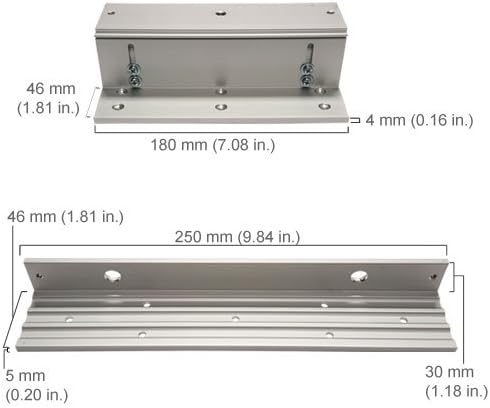
Image: Detailed dimensional drawing showing the length, width, and height of both the L and Z brackets, with measurements provided in both millimeters and inches for precise installation planning.
Setup and Installation
The Visionis LZ600 bracket set is designed for inswing door applications, allowing a 600 lbs electromagnetic lock to be mounted securely. Follow these steps carefully for proper installation.
- Identify Mounting Location: Determine the optimal position for the electromagnetic lock and bracket on the door frame and the door itself. Ensure sufficient clearance for the door to open and close freely.
- Install L-Bracket: Mount the L-bracket to the door frame. The L-bracket typically holds the main body of the electromagnetic lock. Use appropriate fasteners for your door frame material (wood, metal, etc.). Ensure it is level and securely fastened.
- Install Z-Bracket: Mount the Z-bracket to the door. The Z-bracket is designed to hold the armature plate of the electromagnetic lock. Position it so that when the door is closed, the armature plate aligns perfectly with the electromagnetic lock body on the L-bracket. Adjustments may be necessary to achieve proper alignment and secure locking.
- Attach Electromagnetic Lock: Secure the electromagnetic lock body to the L-bracket and the armature plate to the Z-bracket using the provided hardware. Ensure all screws are tightened firmly.
- Test Operation: After installation, test the door's operation. Verify that the electromagnetic lock engages and disengages smoothly and securely. Check for any obstructions or misalignment.

Image: An exploded diagram showing the assembly of the L and Z brackets with an electromagnetic lock and armature plate on an in-swing door. It illustrates how the L-bracket mounts to the door frame and the Z-bracket mounts to the door, facilitating the secure closure of the door.

Image: The Visionis LZ600 L and Z Bracket set, presented in a silver finish. The L-bracket is designed for mounting the main lock body, and the Z-bracket is for the armature plate, specifically for inswing door configurations.
Operating
The Visionis LZ600 L and Z Bracket itself does not have operational controls. Its function is to provide a stable and correctly aligned mounting platform for the Visionis VISML600LED electromagnetic lock. The operation of the lock (engaging and disengaging) is controlled by the associated access control system or power supply, not by the bracket.
Ensure that the electromagnetic lock is properly wired and configured according to its own instruction manual for correct operation.
Maintenance
The Visionis LZ600 L and Z Bracket requires minimal maintenance. Regular inspection is recommended to ensure continued secure operation:
- Visual Inspection: Periodically check the brackets and mounting hardware for any signs of loosening, corrosion, or damage.
- Tighten Fasteners: If any screws or bolts appear loose, gently tighten them to ensure the bracket remains firmly attached to the door and frame. Avoid over-tightening.
- Cleaning: Wipe the brackets with a soft, dry cloth to remove dust or debris. Avoid using abrasive cleaners or solvents that could damage the finish.
- Alignment Check: Confirm that the electromagnetic lock's armature plate still aligns correctly with the lock body when the door is closed. Misalignment can reduce the holding force of the lock.
Troubleshooting
If you encounter issues after installing the LZ600 bracket, consider the following:
- Lock Not Engaging Properly:
- Check the alignment of the armature plate on the Z-bracket with the electromagnetic lock body on the L-bracket. Adjust as necessary.
- Ensure all mounting screws are tight and the brackets are not shifting.
- Verify that the electromagnetic lock itself is receiving power and functioning correctly (refer to the lock's manual).
- Door Not Closing Smoothly:
- Inspect for any physical obstructions caused by the bracket installation.
- Ensure the brackets are mounted flush and not protruding excessively.
- Bracket Appears Loose:
- Re-tighten all mounting screws on both the L and Z brackets.
- Ensure the fasteners used are appropriate for the door and frame material and are installed correctly.
Support and Contact Information
For technical assistance, product inquiries, or warranty information, please contact Visionis customer support.
You can often find support resources, FAQs, and contact details on the official Visionis website. Please refer to your purchase documentation for specific warranty terms and conditions.
Online Resources: Visit the Visionis Store on Amazon
Related documentsLZ600

Ask a question about this manual
Ask about setup, troubleshooting, compatibility, parts, safety, or missing instructions. Manuals+ will review the question and use this page’s manual context to help answer it.