
1. Introduction
Thank you for purchasing the QFX SBX-1507BTL Bluetooth LED Speaker Amplifier. This powerful and versatile audio system is designed to deliver high-quality sound with integrated features such as Bluetooth connectivity, a USB player, FM radio, and LED lighting. Please read this manual carefully before operating the unit to ensure proper use and to maximize its performance. Keep this manual for future reference.
Important Safety Instructions
- Do not expose this appliance to rain or moisture.
- Do not block any ventilation openings.
- Do not install near any heat sources such as radiators, heat registers, stoves, or other apparatus (including amplifiers) that produce heat.
- Protect the power cord from being walked on or pinched, particularly at plugs, convenience receptacles, and the point where they exit from the appliance.
- Only use attachments/accessories specified by the manufacturer.
- Unplug this appliance during lightning storms or when unused for long periods of time.
- Refer all servicing to qualified service personnel.
2. Key Features
- Integrated Bluetooth for wireless audio streaming.
- USB player with remote control.
- FM Radio tuner.
- Built-in equalizer for sound customization.
- Metal grill covered speakers.
- 15-inch woofer with 60oz magnet and 75mm voice coil.
- 44mm Titanium Diaphragm Horn Tweeter.
- Multiple input options: Line input, 1/4-inch Mic/Instrument, XLR professional inputs.
- Speakon line output.
- Integrated 36mm pole mount socket.
- Convenient handle bars and wheels for portability.
- AC power input: 100-240V, 60Hz-50Hz.
3. Package Contents
Please check that all items are present:
- QFX SBX-1507BTL Speaker Amplifier
- Remote Control
- Power Cable (AC 100-240V)
- 3.5 mm Male to 2 RCA Cable
- User Manual (This document)
4. Controls and Connections
The QFX SBX-1507BTL features a variety of controls and input/output ports for versatile connectivity. Familiarize yourself with these components before operation.
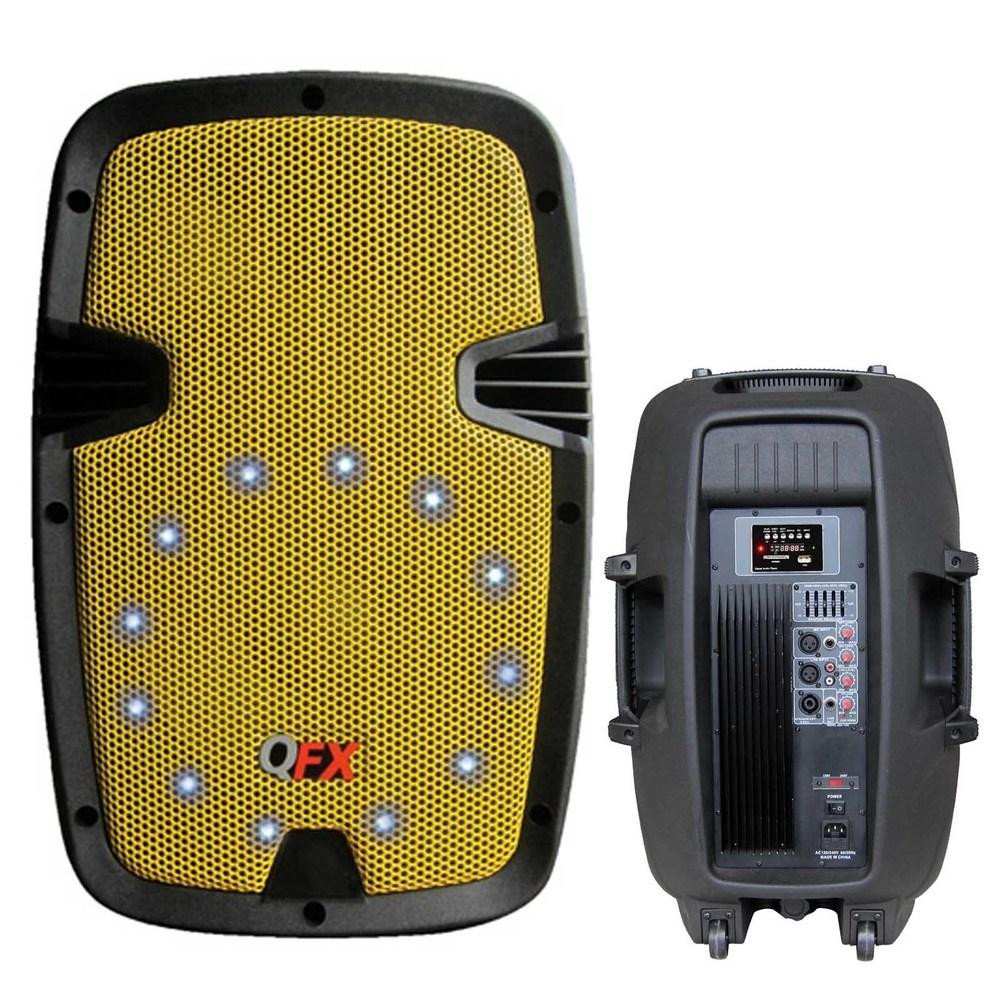
Figure 1: Front view of the QFX SBX-1507BTL speaker, showcasing the 15-inch woofer, tweeter, and LED lighting behind a protective metal grill. The speaker features integrated handles and wheels for easy transport.
4.1. Rear Panel / Control Panel (Typical Layout)
- Power Switch: Turns the unit ON/OFF.
- AC Power Input: Connects the included power cable.
- USB Port: For connecting USB drives to play audio files.
- Display Screen: Shows current mode, track information, and FM frequency.
- Control Buttons: Play/Pause, Skip Forward/Backward, Mode selection (Bluetooth, USB, FM, Line).
- Equalizer Controls: Adjust bass, treble, and other sound parameters.
- Master Volume: Adjusts the overall output volume.
- Mic/Instrument Inputs: Two 1/4-inch TRS connectors for microphones or instruments.
- XLR Microphone Inputs: Two XLR3 connectors for professional microphones.
- Line Input (RCA): For connecting external audio sources (e.g., CD player, smartphone via 3.5mm to RCA cable).
- Speakon Line Output: For connecting to another compatible speaker or audio device.
5. Setup Guide
5.1. Unpacking and Placement
- Carefully remove the speaker from its packaging.
- Place the speaker on a stable, flat surface or mount it on a compatible 36mm pole stand. Ensure adequate ventilation around the unit.
- Keep the speaker away from direct sunlight, heat sources, and moisture.
5.2. Power Connection
- Ensure the speaker's power switch is in the OFF position.
- Connect the included AC power cable to the AC power input on the speaker.
- Plug the other end of the power cable into a suitable wall outlet (100-240V, 60Hz-50Hz).
6. Operating Instructions
6.1. Powering On/Off
To power on the speaker, flip the power switch to the ON position. To power off, flip the switch to the OFF position.
6.2. Mode Selection
Press the "Mode" button on the control panel or remote control to cycle through available input modes: Bluetooth, USB, FM Radio, and Line Input.
6.3. Bluetooth Pairing
- Turn on the speaker and select Bluetooth mode. The display will show "BLUETOOTH" or a similar indicator, and the unit will enter pairing mode.
- On your Bluetooth-enabled device (e.g., smartphone, tablet), enable Bluetooth and search for available devices.
- Select "QFX SBX-1507BTL" (or similar name) from the list of devices.
- Once paired, the speaker will emit a confirmation sound, and you can now stream audio wirelessly.
6.4. USB Playback
- Insert a USB flash drive containing MP3 or WMA audio files into the USB port.
- Select USB mode. The speaker will automatically begin playing the audio files.
- Use the Play/Pause, Skip Forward/Backward buttons on the control panel or remote control to manage playback.
6.5. FM Radio
- Select FM Radio mode.
- Press the Play/Pause button to initiate an automatic scan for available FM stations. The speaker will save detected stations.
- Use the Skip Forward/Backward buttons to navigate through the saved stations.
6.6. Line Input
- Connect your external audio device (e.g., laptop, CD player) to the RCA Line Input using the provided 3.5mm to 2 RCA cable or another suitable cable.
- Select Line Input mode.
- Play audio from your connected device.
6.7. Microphone and Instrument Inputs
- Connect your microphone(s) to the XLR or 1/4-inch TRS Mic inputs.
- Connect your instrument(s) to the 1/4-inch TRS Instrument inputs.
- Adjust the individual volume controls for microphones/instruments and the master volume for overall sound balance.
6.8. Equalizer Adjustment
Use the equalizer controls on the speaker to fine-tune the bass, treble, and other audio frequencies to your preference.
7. Maintenance and Care
- Cleaning: Use a soft, dry cloth to clean the exterior of the speaker. Do not use abrasive cleaners, waxes, or solvents.
- Storage: If storing the speaker for an extended period, ensure it is powered off, unplugged, and stored in a cool, dry place.
- Ventilation: Ensure that the ventilation openings are not blocked to prevent overheating.
- Power Cord: Regularly inspect the power cord for any damage. If damaged, have it replaced by qualified personnel.
8. Troubleshooting Guide
| Problem | Possible Cause | Solution |
|---|---|---|
| No power | Power cable not connected; Power outlet not active; Power switch off. | Ensure power cable is securely connected. Check power outlet with another device. Flip power switch to ON. |
| No sound output | Volume too low; Incorrect input mode selected; Audio cable not connected properly; Bluetooth not paired. | Increase master volume. Select the correct input mode. Check all audio cable connections. Re-pair Bluetooth device. |
| Bluetooth not connecting | Speaker not in pairing mode; Device too far; Interference; Device already paired to another speaker. | Ensure speaker is in Bluetooth pairing mode. Move device closer to speaker. Avoid obstacles. Disconnect from other Bluetooth devices. |
| USB playback issues | USB drive not formatted correctly; Unsupported file format; USB drive damaged. | Ensure USB drive is FAT32 formatted. Use MP3/WMA files. Try a different USB drive. |
| FM radio poor reception | Weak signal; Interference. | Reposition the speaker. Extend any external antenna if available (not explicitly mentioned but common). |
9. Technical Specifications
| Feature | Detail |
|---|---|
| Model Number | SBX-1507BTL |
| Speaker Type | Active Speaker Amplifier with LED Light |
| Woofer Size | 15 inches (60oz magnet, 75mm voice coil, 4 ohms) |
| Tweeter | 44mm Titanium Diaphragm Horn Driver (8 ohms) |
| Sensitivity | 98 ± 2 dB/m/w |
| Frequency Response | 50 – 20 kHz (-dB) |
| Maximum Power (RMS) | 250 W RMS |
| Music Power (P.M.P.O) | 2000 W |
| Impedance | 8 Ohms |
| Connectivity | Bluetooth, USB, FM Radio, Line Input (RCA), 1/4" TRS Mic/Instrument, XLR3 Mic |
| Output | Speakon Line Output |
| Power Source | AC 100 – 240 V, 60 Hz-50Hz (Cable Eléctrico) |
| Control Method | Remote Control, On-unit controls |
| Special Features | Integrated LED Light, Equalizer, Handle bars and wheels, 36mm Pole Mount Socket |
| Product Weight | 24.95 kg (55.01 lbs) |
10. Warranty and Support
QuantumFX products are designed and manufactured to the highest quality standards. For warranty information and technical support, please refer to the warranty card included with your product or visit the official QuantumFX website. Keep your purchase receipt as proof of purchase.
For further assistance, please contact QuantumFX customer service through their official channels. Do not attempt to repair the unit yourself, as this may void your warranty.