
1. Overview
The WAC Lighting HR-LED87-27-DB is a versatile round LED button light designed for both recessed and surface-mounted installations. It features a low profile and shallow installation depth, making it suitable for various applications such as under cabinets, shelves, curios, and displays. This light operates on 24V and provides 2700K soft white illumination.
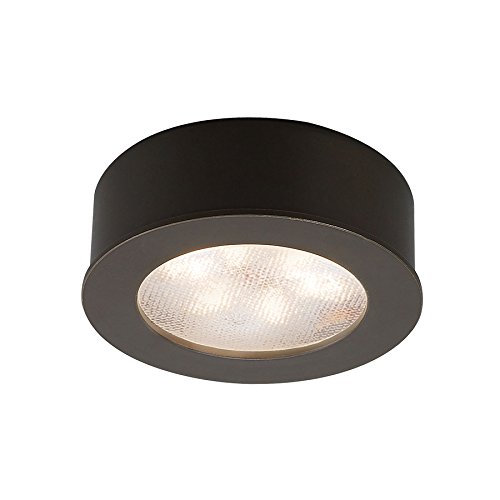
Image: The WAC Lighting HR-LED87-27-DB Round LED Button Light in Dark Bronze finish.
Key Features:
- All steel construction, suitable for recessed or surface mounting.
- Low profile and shallow installation depth for discreet integration.
- Smooth and continuous dimming to 15% using an Electronic Low Voltage (ELV) dimmer.
- Includes 72-inch wires and a cutout template for recessed installations.
- Requires a Class 2 power supply (sold separately).
- 4.8W high-powered LED, 2700K color temperature, 180 lumens, G4 base, with a 70,000-hour rated life.
- UL & cUL listed for damp locations.
2. Safety Information
Please read and understand all instructions before beginning installation. Failure to follow these instructions may result in electric shock, fire, or other hazards.
- Always disconnect power at the circuit breaker or fuse box before installation, servicing, or cleaning.
- Installation must be performed by a qualified electrician in accordance with all applicable national and local electrical codes.
- Ensure the product is used with a compatible Class 2, 24V power supply as specified in this manual. Using an incompatible power supply may damage the fixture and void the warranty.
- Do not modify the product in any way; doing so voids the warranty and may pose safety risks.
- This fixture is suitable for damp locations but should not be exposed to direct water spray or submersion.
- Avoid looking directly into the LED light source when illuminated.
3. Package Contents
Verify that all components are present before beginning installation:
- 1 x HR-LED87-27-DB LED Button Light
- Mounting Hardware (for recessed and surface mounting)
- 72-inch Wires
- Cutout Template (for recessed installations)
4. Setup and Installation
4.1 Before You Begin
Ensure power is disconnected at the circuit breaker. Review all instructions and gather necessary tools (e.g., screwdriver, wire strippers, drill, hole saw for recessed installation).
4.2 Power Supply Requirements
This LED button light requires a Class 2, 24V remote or plug-in transformer (not included). Compatible models include: EN-2460-RB2, EN-24100-RB2, EN-2460-P-AR, EN-24100-277-RB2-T. Up to 20 button lights can be wired in series to one power supply, depending on the power supply's maximum load. Refer to the power supply's instructions for specific wiring details.
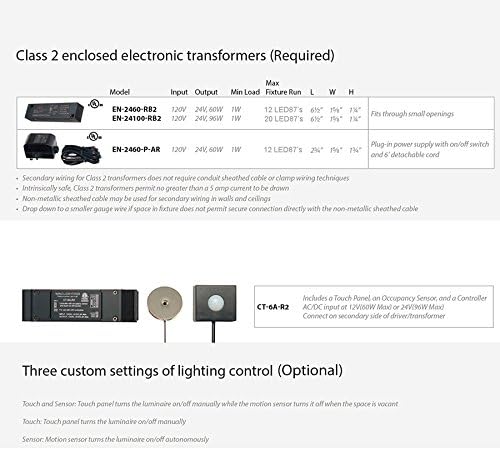
Image: Compatible Class 2 enclosed electronic transformers and general wiring guidelines. Note the input, output, minimum load, and maximum fixture run for each model.
4.3 Mounting Options
The HR-LED87-27-DB can be installed as either a recessed or surface-mounted fixture. The necessary hardware for both options is included.
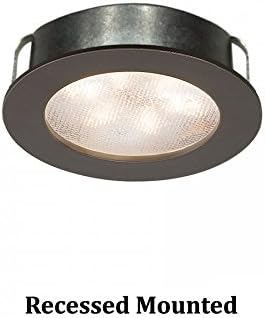
Image: The WAC Lighting HR-LED87-27-DB LED button light shown in a recessed mounted configuration.

Image: Diagram illustrating the dimensions for both surface mount (2-1/4 inches diameter, 7/8 inches height) and recessed mount (2-1/4 inches diameter, 5/8 inches visible height, 1-7/8 inches depth) installations.
4.3.1 Recessed Installation
- Use the provided cutout template to mark the desired location. Ensure adequate clearance behind the mounting surface for the fixture's depth (approximately 1-7/8 inches).
- Cut a hole of the specified diameter (refer to the dimensions diagram) using an appropriate hole saw or tool.
- Connect the light's 72-inch wires to the Class 2 power supply wiring. Observe proper polarity (typically red to positive, black to negative).
- Gently push the light into the cutout until the spring clips engage and secure it in place.
4.3.2 Surface Mounted Installation
- Mark the desired mounting location.
- Secure the provided mounting hardware (e.g., screws) to the surface, ensuring it aligns with the light fixture's mounting points.
- Connect the light's 72-inch wires to the Class 2 power supply wiring. Observe proper polarity.
- Attach the light fixture to the mounting hardware, ensuring it is securely fastened.
4.4 Wiring Multiple Lights
Multiple button lights can be wired in series. Ensure the total wattage of all connected lights does not exceed the maximum load of the Class 2 power supply. Secondary wiring for Class 2 transformers does not require conduit; however, non-metallic sheathed cable may be used for secondary wiring in walls and ceilings in accordance with local codes.
5. Operating Instructions
5.1 Powering On/Off
Once installed and connected to a compatible power supply, the light can be controlled via the connected wall switch or dimmer.
5.2 Dimming Functionality
This fixture supports smooth and continuous dimming down to 15% when used with an Electronic Low Voltage (ELV) dimmer. Ensure your dimmer is specifically rated for ELV LED loads to ensure optimal performance and prevent flickering or damage.
6. Care and Maintenance
To maintain the appearance and performance of your LED button light, follow these simple guidelines:
- Before cleaning, ensure the power to the fixture is turned off at the circuit breaker.
- Wipe the fixture with a soft, dry, or slightly damp cloth.
- Do not use abrasive cleaners, solvents, or harsh chemicals, as these may damage the finish or electrical components.
- The LED light source is integrated and not user-replaceable.
7. Troubleshooting
If you experience issues with your LED button light, refer to the table below for common problems and solutions:
| Problem | Possible Cause | Solution |
|---|---|---|
| Light does not turn on | No power to the fixture Loose wiring connection Faulty power supply | Check the circuit breaker and ensure power is on. Verify all wiring connections are secure. Test the power supply with a multimeter or replace if suspected faulty. |
| Light flickers or dims improperly | Incompatible dimmer Incorrect power supply Loose wiring | Ensure an ELV dimmer is used and is compatible with LED loads. Verify a Class 2, 24V power supply is installed. Check all wiring connections for tightness. |
| Light output is low | Incorrect power supply voltage Too many lights on one power supply | Verify the power supply provides 24V. Ensure the total wattage of connected lights does not exceed the power supply's maximum load. |
If the problem persists after attempting these solutions, please contact WAC Lighting customer support.
8. Product Specifications
| Specification | Detail |
|---|---|
| Brand | WAC Lighting |
| Model | HR-LED87-27-DB |
| Color | Dark Bronze |
| Light Color Temperature | 2700K Soft White |
| Material | Alloy Steel |
| Light Source Type | LED |
| Wattage | 4.8W |
| Lumens | 180 |
| Voltage | 24 Volts |
| Bulb Base | G4 |
| Rated Hours | 70,000 hours |
| Product Dimensions | 2.25"L x 0.88"W x 2.25"H |
| Installation Type | Recessed or Surface Mounted |
| Dimming | Smooth and continuous to 15% with ELV dimmer |
| Standards | UL & cUL Listed for Damp Locations |
| UPC | 790576290737 |
9. Warranty Information
This WAC Lighting product is covered by a 5-year manufacturer's warranty. This warranty covers defects in materials and workmanship under normal use. For complete details on warranty terms, conditions, and limitations, please refer to the official WAC Lighting website or contact their customer support department.
10. Customer Support
For further assistance, technical support, or to inquire about replacement parts, please visit the official WAC Lighting website or contact their customer service department.
WAC Lighting Store: Visit Store

