
Introduction
This manual provides detailed instructions for the safe installation, operation, and maintenance of your WAC Lighting DS-WD06-F35C-WT 6-Inch Double Side Tube Arch Wall Mount fixture. Please read all instructions carefully before beginning installation and retain this manual for future reference.
Safety Information
- WARNING: Risk of electric shock. Disconnect power at the circuit breaker or fuse box before installation or servicing.
- All electrical connections must be in accordance with local and National Electrical Code (NEC) standards. If you are unfamiliar with proper electrical wiring connections, consult a qualified electrician.
- This fixture is designed for 120V AC operation.
- Do not attempt to modify the fixture. Any modifications may void the warranty and create safety hazards.
- This product is ETL & CETL Listed and UL Listed, indicating compliance with safety standards.
- The fixture is IP65 rated, suitable for wet locations.
Package Contents
Carefully unpack your fixture and inspect for any damage. Ensure all components are present before discarding packaging materials.
- WAC Lighting DS-WD06-F35C-WT Wall Mount Fixture (1)
- Mounting Hardware Kit (screws, wire nuts, etc.)
- Instruction Manual

Image: The WAC Lighting DS-WD06-F35C-WT 6-inch double-sided tube arch wall mount fixture in white.
Setup and Installation
Professional installation by a qualified electrician is recommended.
- Prepare for Installation: Turn off power at the main circuit breaker or fuse box. Ensure the power is off before proceeding.
- Mounting Location: Select a suitable wall-mounted location. The fixture is designed for vertical wall mounting.
- Attach Mounting Plate: Secure the fixture's mounting plate to the junction box on the wall using the provided screws. Ensure the plate is firmly attached.
- Wiring Connections: Connect the fixture's wires to the corresponding house wires:
- Connect the black (hot) wire from the fixture to the black (hot) wire from the junction box.
- Connect the white (neutral) wire from the fixture to the white (neutral) wire from the junction box.
- Connect the green or bare copper (ground) wire from the fixture to the green or bare copper (ground) wire from the junction box.
- Secure Fixture: Carefully tuck all wires into the junction box. Align the fixture with the mounting plate and secure it using the provided screws. Ensure the fixture is flush against the wall and securely fastened.
- Restore Power: Once installation is complete, restore power at the circuit breaker.
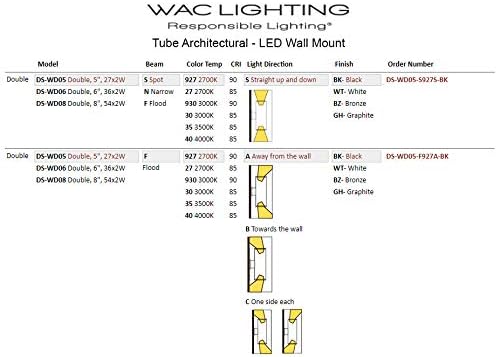
Image: Technical diagram showing dimensions for various WAC Lighting tube architectural wall mount models, including the DS-WD06.
Operating Instructions
The WAC Lighting DS-WD06-F35C-WT is a double-sided LED wall mount fixture designed to provide both up and down light. It is compatible with standard 120V dimmers (100%-10% dimming range).
- Power On: Once installed and power is restored, the fixture will illuminate.
- Dimming: If connected to a compatible dimmer switch, adjust the dimmer to control the light output from 100% to 10%.
- Light Distribution: This fixture provides light from both the top and bottom openings, creating an architectural lighting effect.

Image: Diagram illustrating the 'One side each' light distribution pattern, where light is emitted from both the top and bottom of the fixture.
Maintenance
This LED fixture requires minimal maintenance. The LEDs have a rated life of 80,000 hours and are not user-replaceable.
- Cleaning: To clean the fixture, ensure power is off. Use a soft, damp cloth. Do not use abrasive cleaners or solvents, as these may damage the finish or electrical components.
- Inspection: Periodically inspect the fixture for any signs of damage or loose connections. If any issues are found, disconnect power and consult a qualified electrician.
Troubleshooting
| Problem | Possible Cause | Solution |
|---|---|---|
| Fixture does not light up | No power to the fixture Incorrect wiring Faulty switch or dimmer | Check circuit breaker and wall switch. Verify wiring connections are secure and correct (refer to Setup section). Test switch/dimmer with another device or replace if faulty. |
| Light flickers or dims improperly | Incompatible dimmer switch Loose wiring connection | Ensure dimmer is compatible with LED fixtures and within the 10%-100% range. Check all wiring connections for tightness. |
Specifications
| Feature | Detail |
|---|---|
| Model Number | DS-WD06-F35C-WT |
| Brand | WAC Lighting |
| Dimensions (L x W x H) | 6.25" x 2.88" x 12.5" |
| Item Weight | 12 Pounds |
| Light Source Type | Integrated LED |
| Color Temperature | 3500 Kelvin |
| Brightness | Up to 3685 Lumens x2 (Total 4890 Lumens listed in specs) |
| Color Rendering Index (CRI) | 85+ |
| Rated Life | 80,000 Hours |
| Voltage | 120 Volts |
| Dimming | 100% - 10% (with compatible dimmer) |
| Ingress Protection Rating | IP65 (Wet Location Listed) |
| Certifications | Energy Star, ETL & CETL Listed, UL Listed |
| Construction Material | Aluminum |
| Shade Material | Glass |
| Mounting Type | Wall Mount |
| Finish | White |
Warranty Information
This WAC Lighting fixture is covered by a 5-year manufacturer's warranty from the date of purchase. This warranty covers defects in materials and workmanship under normal use. Please retain your proof of purchase for warranty claims. For full warranty terms and conditions, please refer to the official WAC Lighting website or contact customer support.
Support and Contact
If you have any questions regarding the installation, operation, or maintenance of your WAC Lighting DS-WD06-F35C-WT fixture, please contact WAC Lighting customer support or consult a qualified electrician.
WAC Lighting Official Website: www.waclighting.com