1. Introduction
This manual provides detailed instructions for the installation, operation, and maintenance of your WAC Lighting DS-WD06-F27A-WT 6-Inch Double Side Tube Arch Wall Mount. This fixture is designed for optimal performance and durability, featuring double-sided illumination with high lumen output and excellent color consistency. It is suitable for wet locations and is Energy Star rated.

Figure 1.1: WAC Lighting DS-WD06-F27A-WT Double Side Tube Arch Wall Mount in White.
2. Safety Information
Please read all instructions carefully before installation and use. Failure to do so may result in electric shock, fire, or other hazards that could cause injury or property damage.
- Always disconnect power at the circuit breaker before installing, servicing, or cleaning this fixture.
- Installation must be performed by a qualified electrician in accordance with all local electrical codes.
- Ensure the mounting surface can support the weight of the fixture.
- Do not attempt to modify the fixture. Any modifications will void the warranty and may create safety hazards.
- This fixture is rated for 120 Volts. Ensure your power supply matches this requirement.
3. Package Contents
Verify that all components are present before beginning installation:
- 1 x WAC Lighting DS-WD06-F27A-WT Wall Mount Fixture
- Mounting Hardware (screws, wire nuts, etc.)
- Installation Guide (this document)
4. Setup and Installation
This fixture is designed for wall mounting with a protruding fixture type. Professional installation is recommended due to electrical connections.
4.1 Pre-Installation Steps
- Turn off power at the main circuit breaker.
- Carefully unpack the fixture and inspect for any damage.
- Review the dimensional drawings to ensure proper placement and clearance.

Figure 4.1: Dimensional drawings for various WAC Lighting Tube Architectural Wall Mount models, including DS-WD06.
4.2 Mounting the Fixture
- Attach the mounting bracket to the junction box using the provided screws.
- Make electrical connections: Connect the fixture's black wire to the supply's black wire (Live), the fixture's white wire to the supply's white wire (Neutral), and the fixture's ground wire to the supply's ground wire. Secure connections with wire nuts.
- Carefully tuck all wires into the junction box.
- Align the fixture with the mounting bracket and secure it in place using the provided screws.
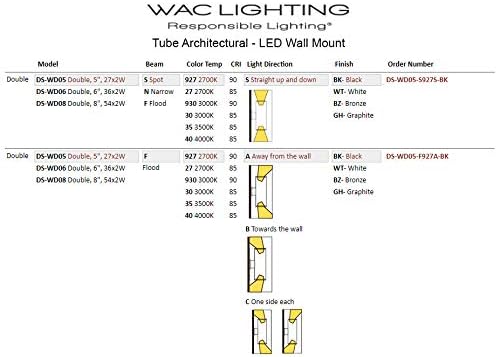
4.3 Light Direction and Beam Pattern
The DS-WD06-F27A-WT model provides double-sided illumination, projecting light both upwards and downwards. This specific model is designed for light projection 'Away from the Wall'.

Figure 4.2: Illustration of the double-sided light beam pattern.
5. Operating Instructions
Once installed and power is restored, the WAC Lighting DS-WD06-F27A-WT operates via a standard wall switch or compatible dimmer. The fixture features a push-button controller type, typically integrated into the dimming system.
- Turning On/Off: Use the wall switch connected to the fixture's circuit.
- Dimming: This fixture is dimmable from 100% down to 10%. Use a compatible LED dimmer switch for optimal performance. Consult a qualified electrician if unsure about dimmer compatibility.
6. Maintenance
The WAC Lighting DS-WD06-F27A-WT is designed for minimal maintenance. The integrated LED light source has a rated life of 80,000 hours, meaning no bulb replacement is typically needed for many years.
- Cleaning: To clean the fixture, ensure power is off at the circuit breaker. Use a soft, damp cloth. Do not use abrasive cleaners or solvents, as these may damage the finish or electrical components.
- Inspection: Periodically inspect the fixture for any signs of wear or damage. If any issues are found, disconnect power and contact a qualified electrician or WAC Lighting support.
7. Troubleshooting
If you experience issues with your fixture, refer to the following common troubleshooting steps:
| Problem | Possible Cause | Solution |
|---|---|---|
| Light does not turn on | No power to fixture; Loose wiring; Faulty switch | Check circuit breaker; Verify all wire connections are secure; Test switch functionality. |
| Light flickers or dims inconsistently | Incompatible dimmer; Loose wiring; Overloaded circuit | Ensure dimmer is LED compatible; Check wiring connections; Consult an electrician to assess circuit load. |
| Fixture is hot to the touch | Normal operation (LEDs generate some heat); Improper ventilation | Ensure fixture is installed in an area with adequate airflow. If excessively hot, disconnect power and contact support. |
If these steps do not resolve the issue, please contact WAC Lighting customer support.