
RYOBI RY40601A
RYOBI 24-inch 40-Volt Lithium-ion Cordless Hedge Trimmer Instruction Manual
Model: RY40601A

Image 0: The RYOBI 24-inch 40-Volt Lithium-ion Cordless Hedge Trimmer, featuring its distinctive green and black design with a long orange blade housing.
1. Introduction and Safety Information
This manual provides essential instructions for the safe operation, assembly, maintenance, and troubleshooting of your RYOBI 24-inch 40-Volt Lithium-ion Cordless Hedge Trimmer (Model RY40601A). Please read this manual thoroughly before operating the tool to ensure proper use and to prevent injury or damage.
Important Safety Instructions:
- Always wear appropriate personal protective equipment, including safety glasses, gloves, and hearing protection, when operating the hedge trimmer.
- Keep hands and feet away from the cutting blades.
- Ensure the work area is clear of debris, obstacles, and bystanders.
- Do not operate the trimmer in wet conditions or near electrical wires.
- Remove the battery pack when not in use, before cleaning, or when performing maintenance.
- Use only RYOBI 40-Volt battery packs and chargers.
2. Package Contents
Your RYOBI 24-inch 40-Volt Lithium-ion Cordless Hedge Trimmer (Model RY40601A) package includes the following:
- RYOBI 24-inch 40-Volt Cordless Hedge Trimmer (Bare Tool)
- Blade Sheath
- Operator's Manual
Note: This is a "Bare Tool" model. The 40-Volt battery pack and charger are sold separately and are required for operation.
3. Setup
3.1 Battery Installation and Removal
The hedge trimmer operates with a RYOBI 40-Volt Lithium-ion battery pack. Ensure the battery is fully charged before use.
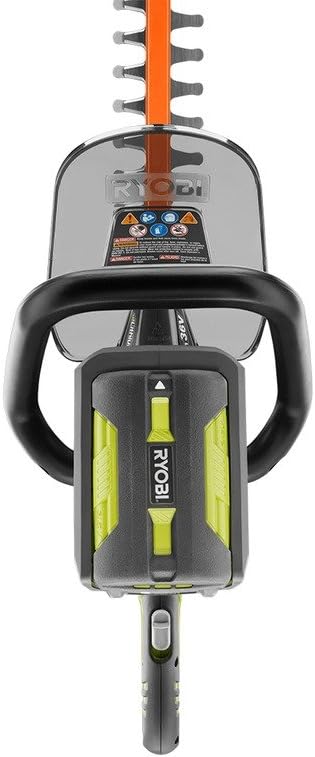
Image 1: Top view of the RYOBI 40-Volt Hedge Trimmer, illustrating the battery compartment located at the rear of the tool's main body. The compartment is designed to securely hold the 40V battery pack.
- To Install: Align the ribs on the battery pack with the grooves in the trimmer's battery port. Slide the battery pack into the port until it clicks securely into place.
- To Remove: Press the battery release latch (usually located on the battery pack itself) and pull the battery pack out of the trimmer.
3.2 Blade Sheath Removal
Before operating, carefully remove the blade sheath from the cutting blades. Always replace the blade sheath when the trimmer is not in use or during storage to prevent accidental contact with the blades.
4. Operating Instructions
4.1 Starting and Stopping the Trimmer
The hedge trimmer features a two-hand operation safety switch to prevent accidental starting.
- To Start: Grip the front handle with one hand and the rear handle with the other. Depress the lock-out button (if present) and then squeeze the trigger switch. The trimmer will start.
- To Stop: Release the trigger switch. The blades will stop quickly.
4.2 Cutting Techniques
For optimal results and safety, follow these cutting guidelines:
- Maintain a firm grip with both hands.
- Use a smooth, sweeping motion to cut hedges.
- Avoid forcing the blades through thick branches. The trimmer is designed for branches up to 3/4 inch in diameter.
- Cut the sides of the hedge first, then the top.
- Keep the trimmer blades parallel to the cutting surface for an even cut.

Image 2: A user demonstrating the operation of the RYOBI 40-Volt Hedge Trimmer, actively trimming a bush. The image highlights the two-hand grip and the trimmer's extended blade length in use.
4.3 HedgeSweep Debris Shield
The integrated HedgeSweep debris shield helps clear clippings from the top of hedges as you trim, improving visibility and reducing cleanup time. Ensure it is properly attached before operation.

Image 3: A detailed view of the RYOBI Hedge Trimmer's 24-inch dual-action blades, featuring the orange HedgeSweep debris shield. This shield is designed to push clippings away from the cutting area during operation.
5. Maintenance
Regular maintenance ensures the longevity and safe operation of your hedge trimmer. Always remove the battery pack before performing any maintenance.
5.1 Cleaning
- After each use, clean the blades with a stiff brush to remove sap and debris.
- Wipe down the exterior of the trimmer with a damp cloth. Do not use solvents or harsh chemicals.
- Ensure all air vents are clear of obstructions.
5.2 Blade Care
- Periodically lubricate the blades with a light machine oil or blade lubricant to reduce friction and prevent rust.
- If the blades become dull or damaged, they may need sharpening or replacement. Consult a qualified service technician or refer to the RYOBI service manual for detailed instructions.
5.3 Storage
- Store the hedge trimmer in a dry, secure location, out of reach of children.
- Always replace the blade sheath before storing.
- Remove the battery pack from the trimmer before long-term storage.
6. Troubleshooting
| Problem | Possible Cause | Solution |
|---|---|---|
| Trimmer does not start. | Battery not installed correctly or discharged. Safety switches not engaged. | Ensure battery is fully charged and properly seated. Engage both front and rear handles and trigger. |
| Poor cutting performance. | Dull or damaged blades. Excessive material being cut. | Clean and lubricate blades. Sharpen or replace blades if necessary. Do not attempt to cut branches thicker than 3/4 inch. |
| Excessive vibration. | Damaged blades. Loose components. | Inspect blades for damage. Ensure all fasteners are tight. If vibration persists, discontinue use and contact service. |
| Trimmer stops during operation. | Battery overheated or discharged. Motor overload. | Allow battery to cool down or replace with a charged battery. Reduce cutting load. |
7. Specifications
| Brand | RYOBI |
| Model Number | RY40601A |
| Power Source | Battery Powered (40-Volt Lithium-ion) |
| Blade Length | 24 Inches |
| Cutting Capacity | Up to 3/4 Inches |
| Blade Material | Metal |
| Item Weight | 9.2 Pounds |
| Product Dimensions | 40.7 x 9.6 x 10.4 inches |
| UPC | 046396005793 |
8. Warranty and Support
RYOBI products are manufactured to high-quality standards and are backed by a manufacturer's warranty. For specific warranty details, including coverage period and terms, please refer to the warranty card included with your product or visit the official RYOBI website.
For technical assistance, replacement parts, or service inquiries, please contact RYOBI customer support. Contact information can typically be found on the product packaging or the official RYOBI website.
Online Resources: For additional information, product registration, and frequently asked questions, visit www.ryobitools.com.
Related documentsRY40601A


Ask a question about this manual
Ask about setup, troubleshooting, compatibility, parts, safety, or missing instructions. Manuals+ will review the question and use this page’s manual context to help answer it.