
Introduction
Thank you for purchasing the Koncept Z-Bar Solo Mini LED Desk Lamp. This manual provides essential information for the safe and efficient use of your new lamp. Please read these instructions carefully before assembly and operation, and retain them for future reference.
Safety Instructions
- Ensure the power supply voltage matches the lamp's requirements (120 Volts).
- Do not disassemble or modify the lamp. Refer all servicing to qualified personnel.
- Avoid exposing the lamp to water or excessive moisture. It is not water resistant.
- Keep the lamp away from heat sources and direct sunlight to prevent damage.
- Always unplug the lamp from the power outlet before cleaning or performing any maintenance.
- This product is for indoor use only.
Package Contents
Verify that all components are present before beginning assembly:
- Z-Bar Solo Mini LED Lamp Head and Arm Assembly
- Lamp Base (Aluminum)
- Power Adapter
- User Manual (this document)
Setup
Assembly is required for this desk lamp. Follow these steps to set up your Z-Bar Solo Mini:
- Unpack Components: Carefully remove all parts from the packaging and place them on a clean, flat surface.
- Attach Lamp Arm to Base: Align the bottom of the lamp arm assembly with the designated slot on the lamp base. Gently push down and secure the arm into the base. Ensure it is firmly seated.
- Connect Power Adapter: Insert the power adapter's connector into the power port located on the back or underside of the lamp base.
- Plug into Outlet: Plug the power adapter into a standard 120V AC electrical outlet.
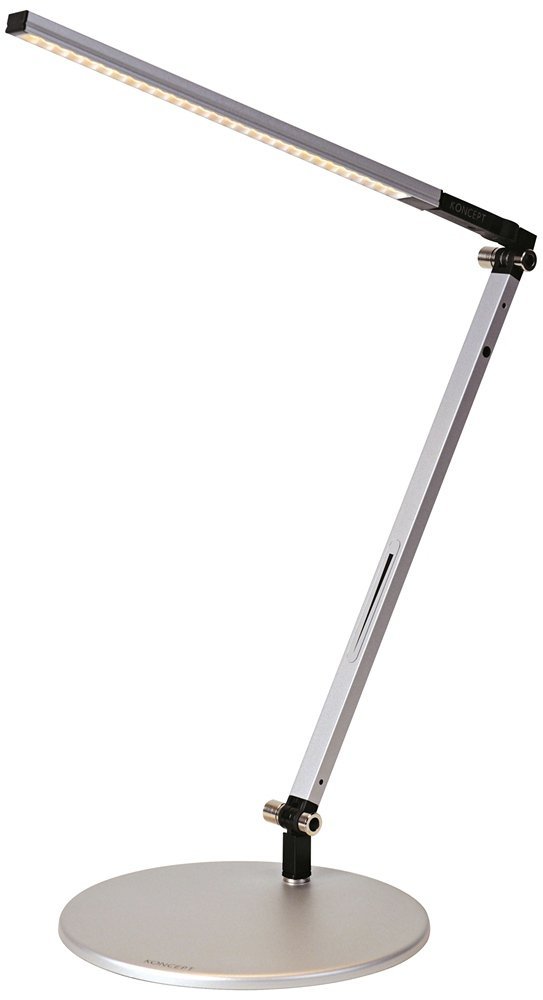
Image: The Koncept Z-Bar Solo Mini LED Desk Lamp, fully assembled and ready for use. The lamp features a sleek silver finish and a minimalist design, with its LED light bar positioned over a desk surface.
Operating Instructions
The Z-Bar Solo Mini features intuitive touch controls for power and dimming.
- Power On/Off: Lightly touch the touchstrip located on the lamp arm to turn the lamp on or off.
- Dimming: To adjust the brightness, press and hold your finger on the touchstrip. The light will gradually dim or brighten. Release your finger when the desired brightness level is reached.
Maintenance
Proper care will ensure the longevity and performance of your lamp.
- Cleaning: Disconnect the power before cleaning. Use a soft, dry cloth to wipe the lamp's surfaces. Do not use abrasive cleaners, solvents, or polishes, as these can damage the finish.
- LED Lifespan: The integrated LEDs have a lifespan of approximately 50,000 hours and are not user-replaceable.
- Storage: If storing the lamp for an extended period, unplug it and store it in a dry, cool place.
Troubleshooting
| Problem | Possible Cause | Solution |
|---|---|---|
| Lamp does not turn on. |
|
|
| Light flickers or dims unexpectedly. |
|
|
| Touchstrip not responding. |
|
|
Specifications
| Model Number | AR1100-CD-SIL-DSK |
| Brand | KONCEPT |
| Product Dimensions | 14"D x 8"W x 15"H |
| Item Weight | 4 Pounds |
| Lamp Type | Desk Lamp |
| Light Source Type | LED |
| Wattage | 6.5 watts |
| Voltage | 120 Volts |
| Switch Type | Touch |
| Control Method | Touch |
| Material | Metal (Aluminum Base) |
| Special Feature | Dimmable |
| Assembly Required | Yes |
| Water Resistance Level | Not Water Resistant |
| LED Lifespan | 50,000 hours |
Warranty and Support
For detailed warranty information and customer support, please refer to the official Koncept website or contact their customer service directly. Keep your purchase receipt for warranty claims.
Manufacturer: Koncept
Website: www.konceptlighting.com (Note: This is a placeholder URL, please verify the actual manufacturer website.)


