
Introduction
This manual provides instructions for the KeylessOption 6-Button Key Fob Replacement, model KPT2690. This product is designed as a direct replacement for original factory key fobs for compatible General Motors vehicles. Please read all instructions carefully before attempting to set up or operate your new key fob.
What's Included
The package contains the following items:

This image illustrates the contents of the package: one KeylessOption 6-button remote, a key ring loop, and a pre-installed CR2032 lithium cell battery. A program guide is also included.
- KeylessOption 6-Button Remote Key Fob
- Pre-installed Battery (CR2032)
- Key Ring Loop
- DIY Step-by-Step Self-Programming Instructions
Compatibility
This key fob is compatible with various General Motors vehicles from 2007 to 2014. Please verify your vehicle's original FCC ID and part numbers match those listed below for proper functionality.
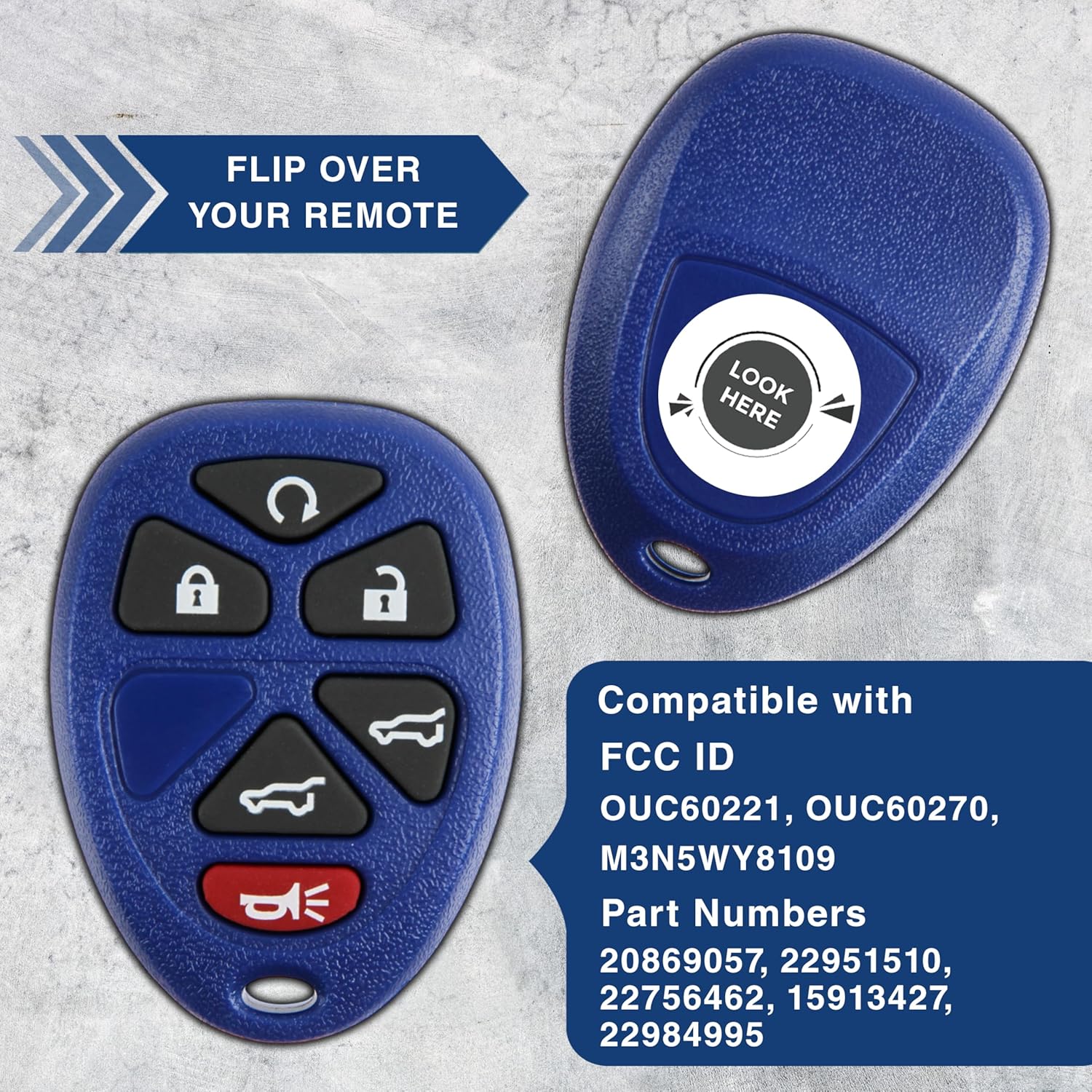
The image displays the key fob and lists compatible FCC IDs and Part Numbers. To check compatibility, flip over your original remote and locate the FCC ID and Part Number.
Compatible Vehicles:
- 2007 - 2014 Cadillac Escalade
- 2007 - 2014 Chevrolet Suburban
- 2007 - 2014 Chevrolet Tahoe
- 2007 - 2014 GMC Yukon
Compatible FCC IDs:
- OUC60221
- OUC60270
- M3N5WY8109
Compatible Part Numbers:
- 15913427
- 15857840
- 20869057
- 22756462
Setup & Programming
This key fob comes with DIY step-by-step self-programming instructions. For vehicles manufactured in 2010 or earlier, self-programming is typically possible. However, for vehicles from 2011 and above, professional programming by a dealer or locksmith is required.

This image highlights that vehicles from 2011 onwards require professional programming by a locksmith or dealership. For earlier models (2007-2010), self-programming instructions are provided.
Programming Video Overview:
This short video provides a brief overview of the KeylessOption Key Fob Remotes for GM vehicles, demonstrating the product's appearance and basic function.
Operating Instructions
The KeylessOption 6-Button Key Fob provides convenient access and control over your vehicle's functions. Each button is clearly labeled with an icon representing its function.

This image details the function of each button on the key fob.
- Lock Button: Press once to lock all vehicle doors.
- Unlock Button: Press once to unlock the driver's door, press twice to unlock all doors.
- Remote Start Button: Press and hold to remotely start your vehicle (if equipped).
- Hatch Button: Press to open the vehicle's rear hatch.
- Hatch Glass Button: Press to open the rear hatch glass (if equipped).
- Panic Button: Press and hold to activate the vehicle's alarm. Press again to deactivate.
Maintenance
The key fob comes with a pre-installed CR2032 lithium cell battery. When the battery needs replacement, carefully open the key fob casing (refer to the included programming instructions for guidance on opening the casing) and replace the old battery with a new CR2032 battery, ensuring correct polarity. Dispose of old batteries responsibly.
Troubleshooting
- Key Fob Not Responding: Ensure the battery is correctly installed and has sufficient charge. Try replacing the battery.
- Programming Issues: Double-check the programming instructions provided. For 2011+ vehicles, remember that professional programming is required.
- Intermittent Functionality: This could indicate a low battery or interference. Try operating the fob closer to the vehicle.
If issues persist after following these steps, please contact customer support.
Specifications
| Model Name | KPT2690 |
| Manufacturer | KeylessOption |
| Item Weight | 0.88 ounces |
| Product Dimensions | 2 x 0.75 x 4 inches |
| OEM Part Numbers | 15857840, 20869057, 22756462, 15913427, OUC60270, OUC60221 |
| Special Features | Lightweight |
| Number of Buttons | 6 |
| Automotive Fit Type | Vehicle Specific Fit |
Warranty Information
A KeylessOption Warranty Card is included with each purchase. Please refer to this card for detailed information regarding your product's warranty coverage, terms, and conditions.
Customer Support
For further assistance, technical support, or inquiries regarding your KeylessOption product, please refer to the contact information provided on your warranty card or visit the official KeylessOption website. Support is available to assist with any questions or concerns you may have.