
Introduction
Welcome to the user manual for your Stagg SLA-LAY3 Mobile Phone Holder Attachment. This accessory is designed to securely hold your mobile phone on a keyboard stand, providing convenient access during practice or performance. Please read these instructions carefully before assembly and use to ensure proper installation and safe operation.
Important Safety Information
- Ensure all components are securely fastened before placing any device on the holder.
- Do not overload the holder beyond its intended capacity.
- Avoid placing the holder in a position where it could obstruct your view or interfere with your instrument's operation.
- Regularly check all connections for tightness and stability.
- Keep out of reach of children.
Package Contents
Please verify that all the following components are included in your package:
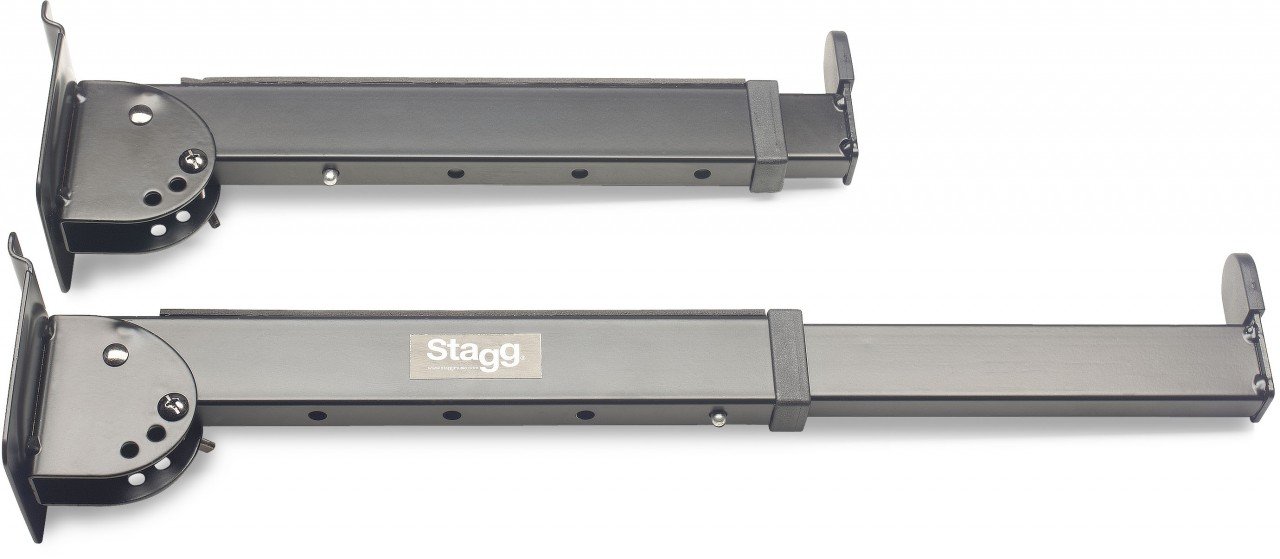
- Stagg SLA-LAY3 Mobile Phone Holder Attachment (Metal structure, black)
- Scratch-resistant rubber strips
- Stop pads
- Mounting hardware (e.g., clamp, screws)
Setup and Installation
Follow these steps to attach the mobile phone holder to your keyboard stand:
- Identify Mounting Point: Locate a suitable, stable point on your keyboard stand where the attachment can be securely fastened.
- Attach the Holder: Use the provided mounting mechanism (e.g., clamp, screw) to firmly attach the SLA-LAY3 to your keyboard stand. Ensure it is tight and does not wobble.
- Apply Rubber Strips/Pads: Affix the scratch-resistant rubber strips and stop pads to the phone-holding surfaces. These protect your device and provide grip.
- Adjust Length: The holder features 4 adjustable length positions. Select the desired length by engaging the locking mechanism at 31.5 cm, 36.5 cm, 41.5 cm, or 46.5 cm (12.4, 14.4, 16.3, or 18.3 inches).
- Adjust Angle: The holder offers 3 secured angle positions: 0°, 30°, and 45°. Adjust the angle to your preferred viewing position and ensure it locks securely into place.
- Final Check: Before placing your phone, gently test the stability of the installed holder.
Operating Instructions
- Place Your Device: Carefully place your mobile phone into the holder, ensuring it rests securely against the rubber strips and stop pads.
- Verify Security: Gently push and pull on your device to confirm it is firmly held and will not slip or fall during use.
- Adjust as Needed: If necessary, re-adjust the length or angle of the holder for optimal viewing and accessibility.
Care and Maintenance
- Cleaning: Wipe the holder with a soft, dry cloth to remove dust. For stubborn marks, a slightly damp cloth can be used, followed by immediate drying.
- Avoid Harsh Chemicals: Do not use abrasive cleaners, solvents, or strong detergents, as these can damage the finish or rubber components.
- Storage: When not in use for extended periods, store the attachment in a clean, dry environment.
- Regular Inspection: Periodically inspect the holder for any signs of wear, damage, or loose components. Tighten any loose screws or connections.
Troubleshooting
Holder is unstable or wobbles
- Check Mounting: Ensure the attachment is securely fastened to the keyboard stand. Tighten all clamps or screws.
- Stand Stability: Verify that your keyboard stand itself is stable and on a level surface.
- Weight Distribution: Ensure the weight of your device is centered and not causing imbalance.
Device does not fit securely
- Adjust Length: Make sure the holder's length is adjusted correctly for your device's dimensions.
- Rubber Strips/Pads: Confirm that the rubber strips and stop pads are correctly positioned and not worn out.
- Device Compatibility: Ensure your device's dimensions are within the specified range for the holder.
Specifications
| Feature | Detail |
|---|---|
| Model Number | SLA-LAY3 |
| Material | Metal structure |
| Color | Black |
| Adjustable Length Positions | 4 positions: 31.5 cm, 36.5 cm, 41.5 cm, 46.5 cm (12.4, 14.4, 16.3, 18.3 inches) |
| Secured Angle Positions | 3 positions: 0°, 30°, 45° |
| Product Dimensions (L x W x H) | 49 x 49 x 49 cm (approximate, as per product data) |
| Item Weight | 1.62 Kilograms |
Warranty and Support
For warranty information and customer support, please refer to the documentation provided with your purchase or contact your retailer or the manufacturer directly. Keep your proof of purchase for any warranty claims.