
Introduction
This instruction manual provides essential information for the safe installation, operation, and maintenance of your Hansgrohe Logis Bath and Shower Mixer, Model 71405000. This single-lever, flush-mounted mixer is designed to control water flow and temperature for two separate outlets in a bathtub or shower system. Please read this manual thoroughly before installation and keep it for future reference.
Safety Information
- Always turn off the main water supply before beginning any installation, maintenance, or repair work.
- Installation should be performed by a qualified professional plumber to ensure proper function and compliance with local plumbing codes.
- Ensure all connections are secure and watertight to prevent leaks.
- Do not use abrasive cleaners or solvents on the chrome finish, as this can cause damage.
- The maximum temperature can be adjusted during installation to prevent scalding.
Package Contents
Verify that all components are present before beginning installation:
- 1 x Hansgrohe Logis Single Lever Flush-Mounted Bath Mixer Trim (Model 71405000)
- Installation Hardware (screws, seals, etc.)
Note: The Hansgrohe iBox universal base set (B0017VDYGI) is required for installation and is sold separately.
Setup and Installation
The Hansgrohe Logis mixer is designed for flush-mounted installation, requiring the Hansgrohe iBox universal base set. This mixer is suitable for high-pressure water systems only.
- Prepare the iBox Universal Base Set: Ensure the iBox universal base set (not included) is correctly installed and secured within the wall according to its own instruction manual. The iBox provides the necessary connections for water supply and outlets.
- Connect the Mixer Trim: Carefully align the mixer trim with the iBox. The trim includes the single lever handle and the diverter knob.
- Secure the Trim: Use the provided installation hardware to securely fasten the mixer trim to the iBox and the wall. Ensure the trim is level and flush against the wall surface.
- Adjust Maximum Temperature: During installation, the maximum hot water temperature can be set to prevent accidental scalding. Refer to the iBox manual or consult a professional for this adjustment.
- Test for Leaks: Once installation is complete, slowly turn on the main water supply and check all connections for any signs of leakage.
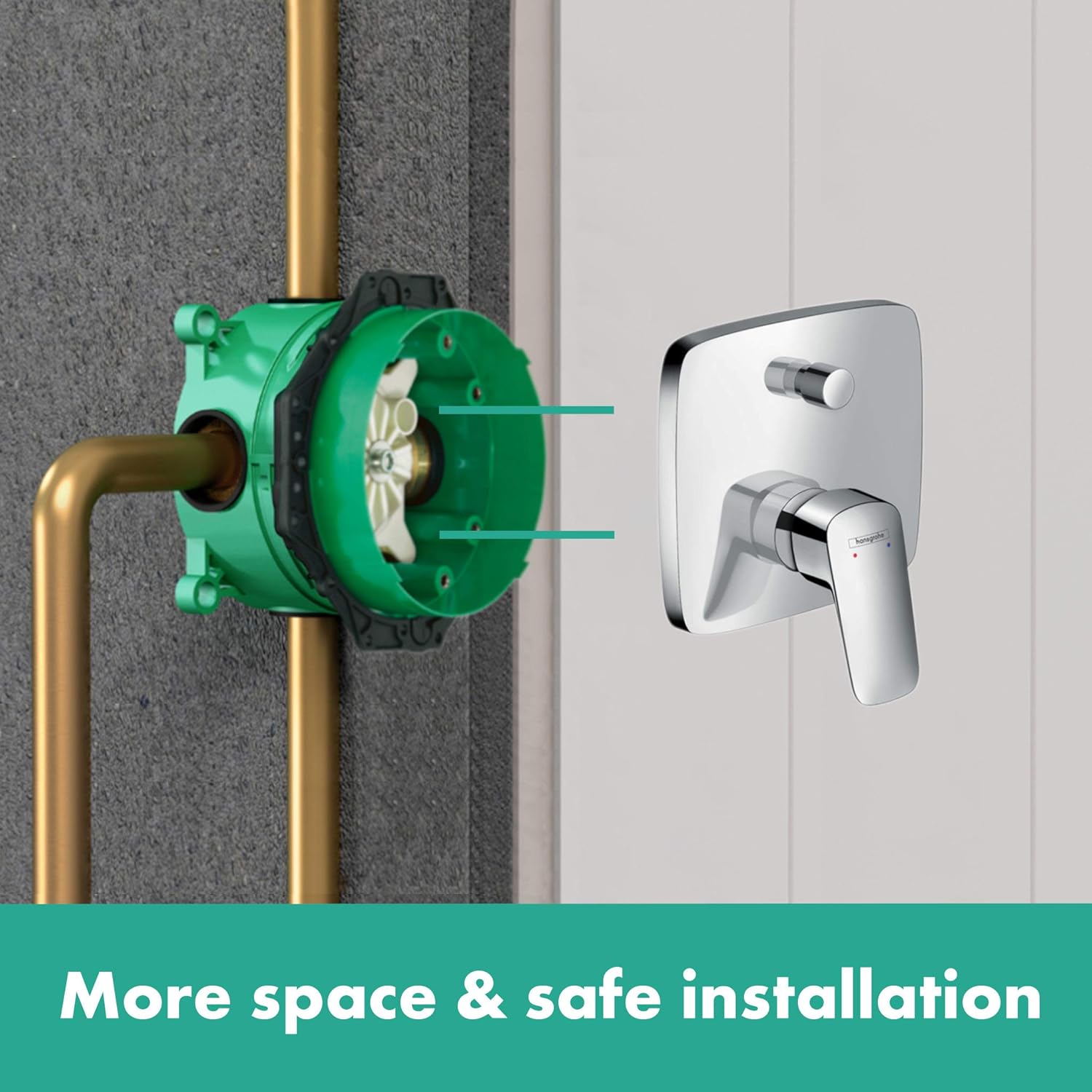
Image: Installation overview showing the mixer trim and the iBox universal base set.

Image: Front view of the Hansgrohe Logis mixer trim.

Image: Technical drawing with key dimensions for installation planning.
Operating Instructions
The Hansgrohe Logis mixer features a single lever for controlling water flow and temperature, and a diverter knob for selecting between two outlets.
- Water Flow and Temperature: Move the single lever handle to the left or right to adjust the water temperature. Move the lever up to increase water flow and down to decrease or turn off the flow.
- Outlet Selection: Use the small knob located above the main lever to switch between the two connected water outlets (e.g., bathtub filler and hand shower). Rotate or pull/push the knob as indicated by the markings on the trim to select the desired outlet.

Image: The mixer installed in a bathtub, demonstrating its function with a hand shower.
Maintenance
Regular cleaning and proper care will ensure the longevity and appearance of your Hansgrohe Logis mixer.
- Cleaning: Clean the chrome surfaces with a soft cloth and a mild, non-abrasive cleaning agent. Rinse thoroughly with clean water and dry with a soft cloth to prevent water spots.
- Avoid: Do not use cleaning agents containing alcohol, hydrochloric acid, formic acid, acetic acid, or phosphoric acid. Avoid abrasive sponges or brushes.
- Aerator Maintenance: Periodically unscrew and clean the aerator (if applicable to your specific outlet) to remove mineral deposits and maintain optimal water flow.
Troubleshooting
If you encounter issues with your mixer, refer to the following common solutions. For persistent problems, contact a qualified plumber.
| Problem | Possible Cause | Solution |
|---|---|---|
| Low water flow | Clogged aerator; partially closed stopcock; low water pressure. | Clean aerator; ensure stopcocks are fully open; check household water pressure. |
| Water temperature fluctuations | Inconsistent hot/cold water supply; faulty thermostatic cartridge (if applicable). | Check water heater settings; consult a plumber for cartridge inspection. |
| Leaks from handle or spout | Loose connections; worn seals or cartridge. | Tighten connections (ensure water is off); contact a plumber for seal/cartridge replacement. |
Specifications
- Brand: hansgrohe
- Model Number: 71405000
- Product Name: Logis Bath and Shower Mixer
- Finish: Chrome
- Material: Metal (Handle), Ceramic (Cartridge)
- Number of Handles: 1
- Number of Outlets: 2
- Installation Type: Flush-mounted, Single Hole
- Pressure Suitability: High pressure only
- Product Dimensions: Approximately 3.19 x 6.1 x 7.05 inches
- Item Weight: Approximately 3.53 pounds (1.61 Kilograms)
Warranty
This Hansgrohe product comes with a 5-year warranty, covering manufacturing defects and material flaws under normal use and service. Please retain your proof of purchase for warranty claims. For full warranty terms and conditions, please refer to the official Hansgrohe website or contact customer support.
Support
For further assistance, technical support, or to explore other Hansgrohe products, please visit the official Hansgrohe store or website.


