
Introduction
The Fotopro QP-903L is a compact, extendable monopod designed for use with compact digital cameras, smartphones (with an adapter, not included), and GoPro Hero cameras. This manual provides essential instructions for the safe and effective use of your monopod, covering setup, operation, maintenance, and troubleshooting.
Key features include:
- Non-slip soft foam handle for comfortable grip.
- Constructed from durable aluminum alloy and plastic materials.
- Collapsible design, extending from 30 cm to 95 cm.
- Adjustable ball head for 180-degree angle positioning.
- Compatible with devices featuring a 1/4" tripod socket.
Setup
Follow these steps to prepare your Fotopro QP-903L monopod for use:
- Attach Your Device: Locate the 1/4" screw on the monopod's mounting head. Carefully align your camera or smartphone holder (not included) with this screw.
- Secure the Device: Rotate your device or the smartphone holder clockwise onto the screw until it is firmly attached. Ensure it is secure but do not overtighten.
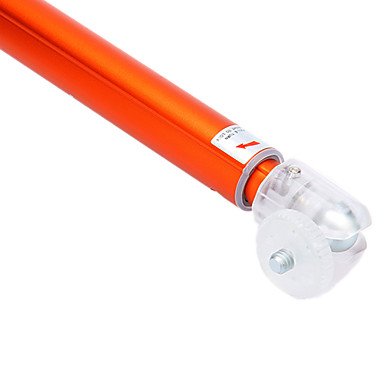
Image: The monopod's mounting head, showing the 1/4" screw for device attachment.
Operating Instructions
The Fotopro QP-903L monopod is designed for ease of use. Follow these guidelines for optimal performance:
Extending and Retracting the Monopod
- To Extend: Hold the handle firmly and gently pull the sections outwards. The monopod features a telescopic design, allowing it to extend smoothly. Extend to your desired length, up to 95 cm.
- To Retract: Push the extended sections back into the main body until the monopod is fully collapsed to its minimum length of 30 cm.
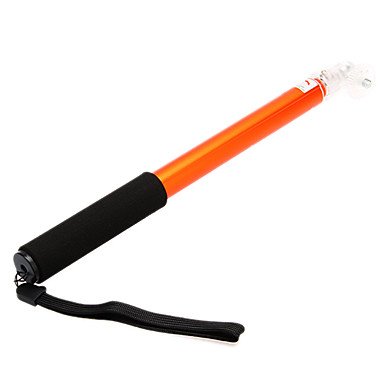
Image: The monopod in its compact, collapsed form.

Image: The monopod fully extended, ready for use.
Adjusting the Angle
- The monopod features an adjustable ball head. This allows you to position your attached device at various angles, up to 180 degrees.
- Gently pivot your camera or smartphone holder to achieve the desired shooting angle. The ball head is designed for smooth adjustments without requiring a separate thumb screw.
Maintenance
Proper care ensures the longevity and performance of your monopod:
- Cleaning: Wipe the monopod with a soft, dry cloth after each use to remove dust and dirt. For stubborn marks, a slightly damp cloth can be used, followed by immediate drying.
- Storage: Store the monopod in a dry, cool place, away from direct sunlight and extreme temperatures. Ensure it is fully retracted before storage.
- Avoid Overloading: Do not exceed the maximum load capacity of 450g to prevent damage to the monopod and attached device.
- Inspect Regularly: Periodically check all parts for any signs of wear or damage.
Troubleshooting
If you encounter issues with your Fotopro QP-903L monopod, refer to the following common problems and solutions:
- Device feels unstable:
- Ensure your camera or smartphone holder is securely tightened onto the 1/4" screw.
- Verify that the weight of your device does not exceed the monopod's maximum load capacity of 450g. Heavy devices, especially DSLRs, may not be suitable for this monopod's ball joint design.
- Monopod sections do not extend or retract smoothly:
- Check for any dirt or debris lodged between the sections. Clean as per the maintenance instructions.
- Avoid forcing the sections. If resistance is met, gently twist and pull/push.
- Ball head does not hold position:
- Confirm that your device's weight is within the specified limit.
- The ball head is designed for light to medium-weight devices. Excessive force or heavy equipment may cause it to slip.
If the issue persists, please contact Fotopro customer support.
Specifications
| Feature | Detail |
|---|---|
| Model Number | QP-903L |
| Brand | Fotopro |
| Material | Aluminum alloy, Plastic |
| Socket Size | 1/4 inch |
| Maximum Load Capacity | 450g |
| Minimum Length | 30 cm |
| Maximum Length | 95 cm |
| Number of Sections | 4 segments |
| Wrist Strap Length | 15 cm |
| Item Weight | 110 g |
| Product Dimensions (Collapsed) | 34 x 11.5 x 2 cm |
| Compatible Devices | Camera, Smartphone (with adapter) |
Warranty Information
Fotopro products are manufactured to high-quality standards. Specific warranty terms and conditions for the QP-903L monopod are typically provided at the point of purchase or can be found on the official Fotopro website. Please retain your proof of purchase for any warranty claims.
Customer Support
For further assistance, technical support, or inquiries regarding your Fotopro QP-903L monopod, please contact Fotopro customer service.
- Manufacturer: Fotopro (Guangdong) Image Industrial Co.,Ltd.
- Address: 1#Shuguang Rd, First Industrial Zone, Tanzhou Town, Zhongshan City, Guangdong China
- For the most current contact information, please visit the official Fotopro website.