
1. Introduction
This manual provides detailed instructions for the safe and effective use of your Fotopro QP-903 Monopod. The QP-903 is a versatile, extendable handheld monopod designed for capturing photos and videos with compact cameras, smartphones, and GoPro Hero devices. It features a universal 1/4-inch screw mount and an adjustable ball head for flexible positioning.
Please read this manual thoroughly before operating the device to ensure proper setup and functionality.

Figure 1: Fotopro QP-903 Monopod in its compact form, showing the handle and mounting head.
2. Setup
2.1 Attaching a Camera or Smartphone
- For Cameras: Locate the 1/4-inch screw on the monopod's mounting head. Align the camera's tripod socket with this screw and rotate the camera clockwise until it is securely fastened. Ensure the camera is stable before use.
- For Smartphones: The monopod includes an adjustable phone adapter. Expand the adapter to fit your smartphone (compatible with widths between 5.5 cm and 8.5 cm). Place your smartphone securely within the adapter, ensuring it is centered and the soft interior pads protect your device. The phone adapter can then be screwed onto the 1/4-inch universal screw of the monopod.
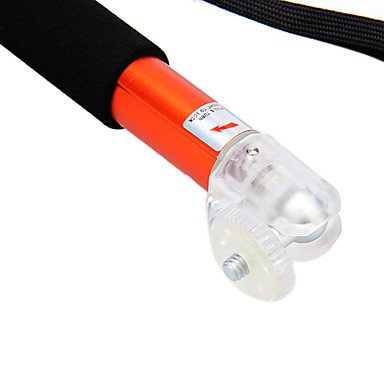
Figure 2: Detail of the monopod's ball head and 1/4-inch universal screw for device attachment.
2.2 Extending and Retracting the Monopod
- To extend: Hold the handle firmly and pull the telescopic sections outwards. The monopod has 4 segments and can extend from 20 cm to 50 cm.
- To retract: Push the telescopic sections back into the main body until the monopod is fully collapsed to its minimum length of 20 cm.
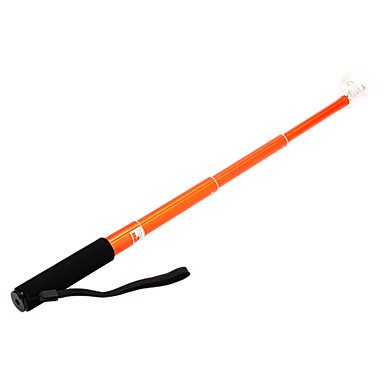
Figure 3: The Fotopro QP-903 Monopod shown in its fully extended position.
2.3 Adjusting the Ball Head
The monopod features an adjustable ball head for precise positioning. Loosen the thumb screw on the side of the ball head to adjust the angle of your attached device. Once the desired angle is achieved, tighten the thumb screw firmly to lock the position. The ball head allows for 180-degree position adjustment.
3. Operating Instructions
3.1 Holding the Monopod
Grip the foam handle firmly. Utilize the included wrist strap by looping it around your wrist to prevent accidental drops and provide added security, especially when extending the monopod.

Figure 4: The comfortable foam handle and adjustable wrist strap for secure handling.
3.2 Capturing Photos and Videos
- Extend the monopod to your desired length.
- Adjust the ball head to achieve the optimal shooting angle.
- Use your camera's self-timer function or a remote shutter (not included) to capture images or start video recording.
- Ensure your grip is stable to minimize camera shake, especially when fully extended.
4. Maintenance
- Cleaning: Wipe the monopod with a soft, dry cloth. For stubborn dirt, a slightly damp cloth can be used, followed by immediate drying. Avoid harsh chemicals or abrasive cleaners.
- Storage: Store the monopod in a cool, dry place away from direct sunlight and extreme temperatures. Ensure it is fully retracted before storage.
- Inspection: Periodically check all screws and connections to ensure they are tight. Do not overtighten.
5. Troubleshooting
- Device not fitting: Ensure your smartphone's width is within the 5.5 cm - 8.5 cm range for the phone adapter. For cameras, verify it has a standard 1/4-inch tripod socket.
- Monopod not extending/retracting smoothly: Check for any obstructions in the telescopic sections. Clean the sections if necessary. Do not force the mechanism.
- Device feels unstable: Ensure the camera/smartphone is securely fastened to the mounting head and the ball head thumb screw is tightened. Avoid exceeding the maximum load capacity of 450g.
6. Specifications
| Feature | Specification |
|---|---|
| Model Number | QP-903 |
| Material | Aluminum alloy |
| Mounting Screw Size | 1/4 inch universal |
| Maximum Load Capacity | 450g |
| Minimum Length (Retracted) | 20 cm |
| Maximum Length (Extended) | 50 cm |
| Monopod Diameter | 2.2 cm |
| Wrist Strap Length | 15 cm |
| Segments | 4 |
| Compatible Smartphone Width | 5.5 cm - 8.5 cm |
| Compatible Devices | Camera, Cellphone |
| UPC | 644949170518, 881987221219 |
7. Warranty and Support
For warranty information or technical support, please refer to the documentation provided at the time of purchase or contact your retailer. You may also visit the official Fotopro website for further assistance.
