
1. Introduction
This manual provides essential instructions for the installation, operation, and maintenance of your Maxwell P102938 Up/Down Anchor Switch. This switch is designed for marine applications, specifically for controlling anchor windlasses equipped with dual directional solenoids, operating on either 12V or 24V DC electrical systems. Please read this manual thoroughly before installation and use to ensure safe and correct operation.
2. Safety Information
- Electrical Safety: Always disconnect power to the windlass system before performing any installation, maintenance, or troubleshooting. Incorrect wiring can lead to electrical shock, fire, or damage to equipment.
- Qualified Personnel: Installation and wiring should be performed by a qualified marine electrician or technician.
- Voltage Compatibility: Ensure the switch is connected to a 12V or 24V DC system as specified. Do not connect to AC power or incompatible DC voltages.
- Water Exposure: While designed for marine environments, ensure all connections are properly sealed and protected from excessive water ingress to prevent corrosion and short circuits.
- Anchor Operation: Always maintain a clear view of the anchor and chain during operation. Keep hands and clothing clear of moving parts.
3. Package Contents
Verify that all items are present before beginning installation:
- Maxwell P102938 Up/Down Anchor Switch
- Mounting hardware (screws, nuts, washers - typical, may vary)
- Instruction Manual (this document)
4. Installation
4.1 Mounting the Switch
The Maxwell P102938 switch is designed for surface mounting. Choose a location that is easily accessible to the operator, provides a clear view of the anchor, and is protected from direct spray or excessive moisture if possible.
- Select Location: Identify a suitable flat surface for mounting.
- Mark Holes: Use the switch as a template to mark the positions for the mounting screws.
- Drill Holes: Drill pilot holes for the mounting screws and a larger hole for the wiring harness to pass through.
- Secure Switch: Mount the switch using the provided hardware, ensuring it is firmly secured to the surface.
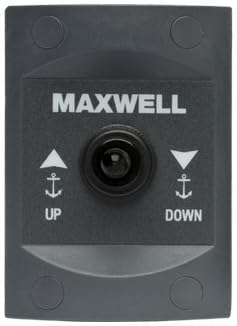
Figure 1: Front view of the Maxwell P102938 Up/Down Anchor Switch. The switch features a central button with "MAXWELL" branding above it. Below the button, there are "UP" and "DOWN" indicators with anchor symbols and directional arrows, indicating the function of each side of the switch. The unit is dark gray with a slightly raised central control area.
4.2 Wiring Instructions
The P102938 switch is designed to interface with dual directional solenoids, which control the windlass motor. A typical wiring configuration involves connecting the switch to the solenoid pack and a power source.
- Power Supply: Connect the positive (+) and negative (-) terminals of the switch to the appropriate 12V or 24V DC power supply, ensuring it is fused correctly.
- Solenoid Connections: Connect the "Up" output from the switch to the "Up" input of the windlass solenoid. Similarly, connect the "Down" output from the switch to the "Down" input of the windlass solenoid.
- Ground: Ensure a proper ground connection for the switch.
- Verify Connections: Double-check all wiring connections for tightness and correct polarity before restoring power.
Note: Refer to your windlass and solenoid manual for specific wiring diagrams and recommendations, as configurations may vary.
5. Operation
Once properly installed and wired, operating the Maxwell P102938 switch is straightforward:
- Power On: Ensure the main power supply to the windlass system is engaged.
- Anchor Up: Press and hold the "UP" side of the switch to retrieve the anchor. Release the switch to stop the windlass.
- Anchor Down: Press and hold the "DOWN" side of the switch to deploy the anchor. Release the switch to stop the windlass.
Always observe the anchor and chain during operation to prevent fouling or damage. Do not operate the windlass continuously for extended periods without allowing for cooling.
6. Maintenance
The Maxwell P102938 anchor switch requires minimal maintenance to ensure reliable operation:
- Regular Cleaning: Periodically wipe the switch surface with a damp cloth to remove salt residue, dirt, and grime. Avoid abrasive cleaners.
- Inspect Connections: Annually, or more frequently in harsh environments, inspect all electrical connections for corrosion, tightness, and signs of wear. Clean and re-tighten as necessary.
- Environmental Protection: While robust, protecting the switch from prolonged direct sunlight and extreme weather when not in use can extend its lifespan.
7. Troubleshooting
If you encounter issues with your Maxwell P102938 anchor switch, consider the following common troubleshooting steps:
| Problem | Possible Cause | Solution |
|---|---|---|
| Switch does not respond. | No power to the system; Blown fuse; Loose wiring connection; Faulty solenoid. | Check main power supply; Inspect and replace fuse if necessary; Verify all wiring connections; Test solenoid operation independently. |
| Windlass operates in one direction only. | Faulty wiring to one solenoid input; Malfunctioning solenoid. | Inspect wiring to both "Up" and "Down" solenoid inputs; Test each solenoid independently. |
| Intermittent operation. | Loose or corroded connections; Low voltage. | Clean and tighten all electrical connections; Check battery voltage and charging system. |
If the problem persists after attempting these steps, contact a qualified marine technician or Maxwell customer support.
8. Specifications
- Model: P102938
- Brand: Maxwell
- Voltage: 12V DC or 24V DC compatible
- Mounting Type: Surface Mount
- Application: Up/Down control for anchor windlasses with dual directional solenoids
9. Warranty and Support
For specific warranty information regarding your Maxwell P102938 Up/Down Anchor Switch, please refer to the warranty documentation provided at the time of purchase or visit the official Maxwell Marine website. For technical support or service inquiries, please contact your authorized Maxwell dealer or Maxwell customer service.
Contact information for Maxwell Marine can typically be found on their official website.

