
1. Introduction
The Davis Instruments 6322 Wireless Integrated Sensor Suite (ISS) is designed to provide comprehensive outdoor weather data. This manual outlines the components, setup procedures, operational guidelines, maintenance recommendations, troubleshooting tips, and technical specifications for your sensor suite.
The standard ISS includes a rain collector, temperature sensor, humidity sensor, and an anemometer. An ISS Plus model further incorporates a pre-installed solar radiation sensor and an ultra-violet (UV) radiation sensor. Temperature and humidity sensors are housed within a passive radiation shield to minimize solar radiation interference, ensuring accurate readings. The anemometer measures wind speed and direction and can be installed either adjacent to the ISS or separately.
2. Components Overview
The Davis Instruments 6322 Wireless Integrated Sensor Suite consists of several key components that work together to collect and transmit weather data.
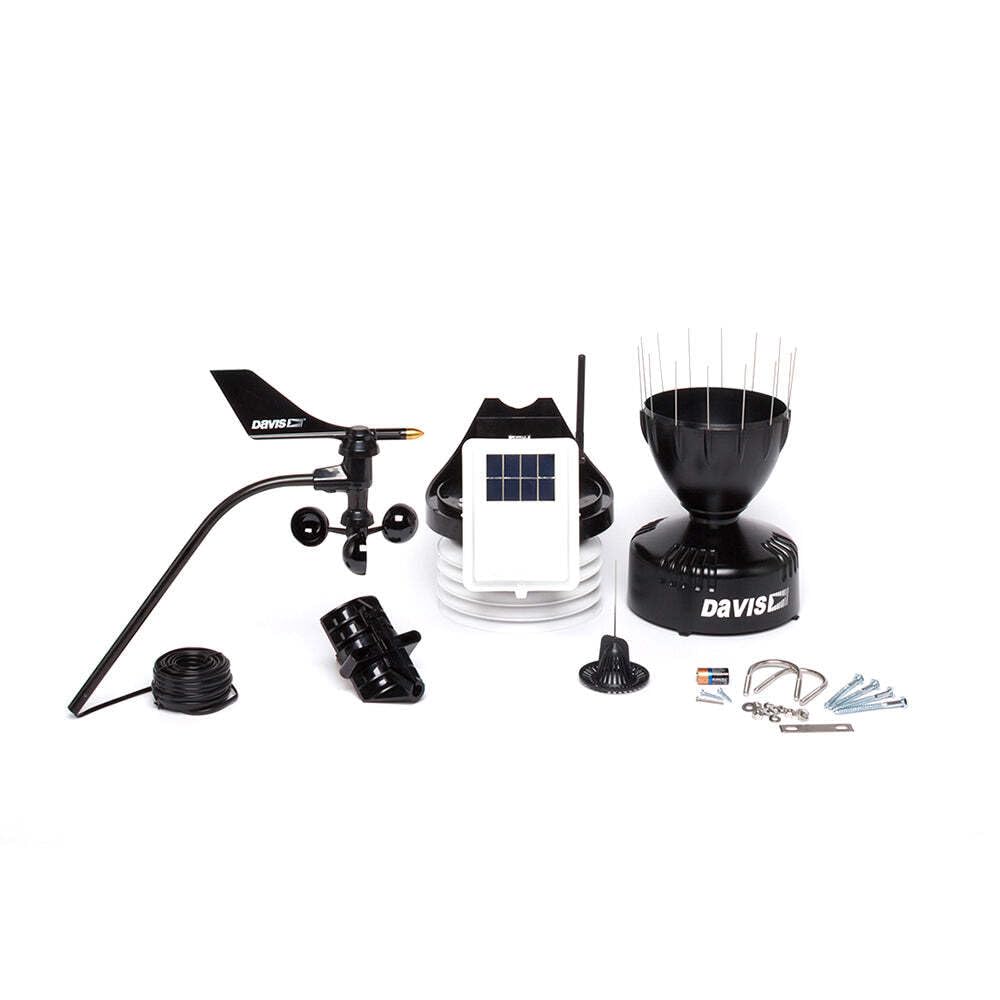
An image showing the various components of the Davis Instruments 6322 Wireless Integrated Sensor Suite, including the anemometer, solar panel, temperature/humidity sensor housing, rain collector, and mounting hardware.
The Sensor Interface Module (SIM) acts as the central processing unit and radio transmitter for the ISS. Located on the front of the radiation shield in the SIM box, it collects data from all connected sensors and wirelessly transmits it to a compatible console or receiver (sold separately).
3. Setup and Installation
3.1 Unpacking
Carefully remove all components from the packaging. Verify that all parts listed in the product documentation are present and undamaged. Retain packaging materials for future transport or storage.
3.2 Battery Installation
The ISS requires one CR123A battery, which is included. Install the battery into the designated compartment within the Sensor Interface Module (SIM). Ensure correct polarity. The battery provides backup power and ensures continuous operation during periods of low solar activity.
3.3 Mounting
The Integrated Sensor Suite is designed for surface mounting. Select a location that provides accurate readings, free from obstructions that could affect wind, rain, or solar measurements. The anemometer can be installed either directly on the ISS or separately, allowing for optimal placement to capture accurate wind data.
4. Operation
Once installed and powered, the Sensor Interface Module (SIM) continuously collects weather data from the integrated sensors. This data is then transmitted wirelessly to a compatible Davis Instruments console or receiver, such as a Vantage Pro2 console, Vantage Vue console, Weather Envoy8X, or Weather Envoy. These receiving units are sold separately and are required to display and interpret the collected weather information.
5. Maintenance
Regular maintenance ensures the longevity and accuracy of your Wireless Integrated Sensor Suite.
- Cleaning: Periodically clean the rain collector, solar panel, and sensor housings to remove dirt, debris, or insect nests that may obstruct sensors or reduce solar charging efficiency.
- Battery Check: Monitor the battery status via your console. Replace the CR123A battery as needed to ensure uninterrupted operation, especially during prolonged periods of low sunlight.
- Sensor Inspection: Inspect the anemometer cups and wind vane for free movement. Ensure the passive radiation shield remains clear to allow proper airflow around the temperature and humidity sensors.
6. Troubleshooting
If you encounter issues with your Integrated Sensor Suite, consider the following common troubleshooting steps:
- No Data Transmission: Verify that the battery is correctly installed and charged. Ensure the ISS is within the specified sensing distance (1000 feet) of your receiving console and that there are no major obstructions.
- Inaccurate Readings: Check for physical obstructions on sensors (e.g., leaves in the rain collector, debris on the anemometer). Ensure the passive radiation shield is clean and intact.
- Power Issues: Confirm the solar panel is clean and receiving adequate sunlight. Check the CR123A battery for proper installation and charge level.
For more detailed troubleshooting, refer to the comprehensive guide available on the Davis Instruments support website or contact customer service.
7. Technical Specifications
| Feature | Specification |
|---|---|
| Model Number | 6322 |
| Brand | Davis Instruments |
| Barometric Pressure Range | 26 to 32 in Hg (880 to 1080 mbar) |
| Item Weight | 4.22 kg |
| Product Dimensions (L x W x H) | 45.72 x 40.64 x 27.94 cm |
| Batteries | 1 CR123A (included) |
| Power Source Type | Solar Powered |
| Sensing Distance | 1000 Feet |
| Mounting Type | Surface Mount |
| Specific Use | Weather Monitoring |
| Color | Black |
8. Warranty and Support
For detailed information regarding the product warranty, including terms, conditions, and duration, please consult the official documentation provided with your Davis Instruments 6322 Wireless Integrated Sensor Suite or visit the manufacturer's website.
Should you require technical assistance, replacement parts, or have questions not covered in this manual, please contact Davis Instruments customer support. Contact information can typically be found on the product packaging or the official Davis Instruments website.


