
Introduction
Thank you for choosing the Hickory Hardware 3-Inch Conquest White Cabinet Pull. This instruction manual provides important information regarding the installation, maintenance, and specifications of your new cabinet pull. Please read this manual thoroughly before installation and retain it for future reference.
Package Contents
Please verify that all components are present before beginning installation. If any parts are missing or damaged, please contact customer support.
- 1 x Conquest White Cabinet Pull
- Mounting Screws (quantity may vary based on packaging)
Safety Information
- Always wear appropriate safety gear, such as safety glasses, when using power tools.
- Keep small parts, such as screws, out of reach of children to prevent choking hazards.
- Ensure that the mounting surface is stable and capable of supporting the hardware.
- Use the correct tools for installation to avoid damage to the product or injury.
Setup and Installation
This cabinet pull is designed for easy installation. Follow these steps for proper mounting:
- Gather Tools: You will need a measuring tape, a pencil, a drill, and a screwdriver (manual or power).
- Measure and Mark: Determine the desired location for your cabinet pull. The pull has a 3-inch (76mm) center-to-center screw spacing. Use a measuring tape and pencil to mark two points on your cabinet door or drawer front, ensuring they are 3 inches apart and level.
- Drill Pilot Holes: Using a drill bit appropriate for your mounting screws (typically 3/16 inch or 5mm), carefully drill pilot holes through the marked points. Ensure you do not drill completely through the cabinet if it is a thin panel.
- Attach the Pull: Align the cabinet pull with the drilled holes. Insert the mounting screws from the inside of the cabinet door or drawer and thread them into the pull.
- Tighten Screws: Using a screwdriver, tighten the screws until the pull is securely fastened. Do not overtighten, as this can strip the screw threads or damage the cabinet material.
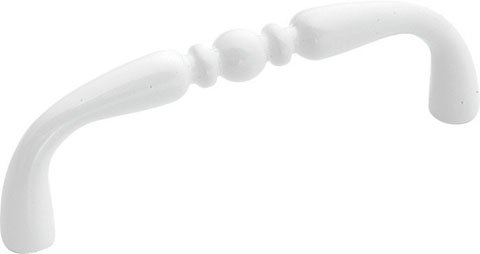
Image: The Hickory Hardware 3-Inch Conquest White Cabinet Pull, showcasing its arch design and white finish. This image illustrates the product to be installed.
Operating
The cabinet pull functions as a handle to open and close cabinet doors and drawers. Simply grasp the pull firmly and apply gentle force to operate the cabinet mechanism.
Maintenance
- Cleaning: To clean the cabinet pull, wipe it with a soft, damp cloth. Avoid using abrasive cleaners, harsh chemicals, or scouring pads, as these can damage the finish.
- Periodic Check: Periodically check the mounting screws to ensure they remain tight. If a pull feels loose, gently tighten the screws with a screwdriver.
Troubleshooting
- Pull feels loose: The mounting screws may have loosened over time. Gently tighten the screws from the inside of the cabinet door or drawer.
- Difficulty installing: Ensure that the pilot holes are drilled to the correct size and alignment. Verify that the screw spacing on the cabinet matches the 3-inch center-to-center spacing of the pull.
Specifications
| Brand | Hickory Hardware |
| Model Number | P14451-W |
| Color | White |
| Material | Zinc Alloy |
| Center-to-Center Spacing | 3 Inches (76mm) |
| Item Weight | 0.8 ounces (approx. 0.05 lbs) |
| Finish | Painted |
| Included Components | Screw |
| Special Feature | Easy to Install |
| UPC | 644558569956 |
Warranty Information
Specific warranty details for this product are not provided in this manual. For information regarding warranty coverage, please refer to the product packaging or contact Hickory Hardware customer support directly. Keep your proof of purchase for any warranty claims.
Support
If you have any questions, require assistance with installation, or need to report a missing or damaged part, please contact Hickory Hardware customer support. You can typically find contact information on the product packaging or by visiting the official Hickory Hardware website.


