1. Introduction
This manual provides essential instructions for the safe and efficient operation, setup, and maintenance of your Ohaus RC31P3 Ranger 3000 Count Bench Scale. Please read this manual thoroughly before using the device to ensure proper functionality and to prevent damage.
The Ohaus Ranger Count 3000 is a high-precision counting scale designed for accurate counting and packaging of various parts. It features advanced software, a 30-item library, and a high internal counting resolution for precise measurements of even small components.
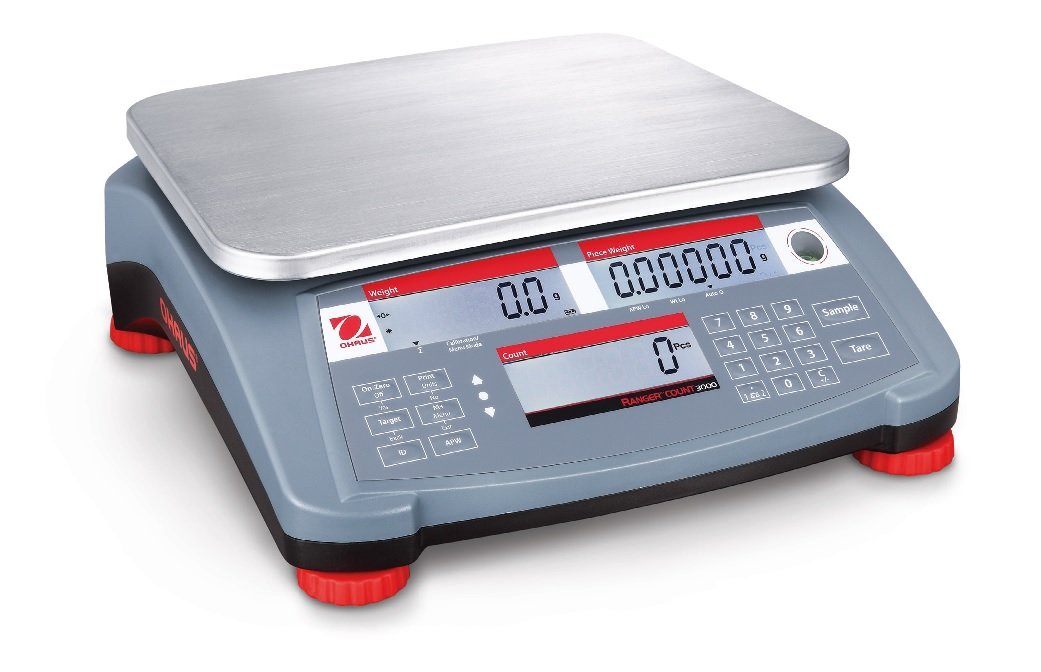
Figure 1: Ohaus RC31P3 Ranger 3000 Count Bench Scale. This image displays the complete scale unit, featuring a stainless steel weighing pan, a gray base with red feet, and a control panel with three backlit LCD displays for weight, piece weight, and count, along with a numeric keypad and function buttons.
2. Safety Information
Always follow basic safety precautions when using this product to reduce the risk of injury or damage.
- Ensure the scale is placed on a stable, level surface.
- Do not exceed the maximum capacity of 3 kg (6 lb).
- Avoid exposing the scale to extreme temperatures, humidity, or direct sunlight.
- Do not immerse the scale in water or other liquids.
- Use only the specified power adapter or ensure the internal rechargeable battery is properly charged.
- Keep the scale clean and free from dust and debris.
3. Setup
3.1 Unpacking
Carefully remove all components from the packaging. Retain the packaging for future transport or storage. Verify that all items listed in the packing list are present.
3.2 Placement
Place the scale on a firm, level, and stable surface, away from vibrations, drafts, and rapid temperature changes. Adjust the leveling feet until the bubble in the level indicator is centered.
3.3 Power Connection
Connect the provided AC adapter to the power input on the rear of the scale and then to a suitable power outlet. The internal rechargeable battery will begin charging automatically. The scale can operate on battery power for over 200 hours when fully charged.
4. Operating Instructions
4.1 Basic Weighing
- Press the ON/OFF button to power on the scale.
- Wait for the display to show 0.0 g (or selected unit) and the stability indicator to appear.
- Place the item(s) to be weighed on the center of the weighing pan.
- Read the weight displayed on the Weight LCD.
- To tare the scale (zero out the weight of a container), place the empty container on the pan and press the Tare button.
4.2 Parts Counting
The Ranger 3000 features advanced parts counting capabilities.
- Ensure the scale is tared (display shows 0.0).
- Press the Sample button.
- Enter the number of sample pieces using the numeric keypad (e.g., 10, 20, 50, 100).
- Place the corresponding number of sample pieces on the weighing pan.
- Press the Sample button again to confirm. The scale will calculate the Average Piece Weight (APW) and display the count.
- Remove the sample pieces and place the bulk quantity of items on the pan. The Count display will show the total number of pieces.
- The scale includes a low APW alert and automatic APW recalculation for enhanced accuracy.
4.3 Checkweighing / Checkcounting
This function allows you to check if a batch of items falls within a specified target range.
- Access the checkweighing/checkcounting menu (refer to the full user manual for detailed menu navigation).
- Set the desired target weight or count range (upper and lower limits).
- Place items on the pan. The scale will indicate if the weight/count is within, above, or below the set limits.
4.4 Accumulation
The accumulation feature allows you to sum up multiple weighing or counting results.
- Perform a weighing or counting operation.
- Press the Accumulation button (or equivalent, consult full manual) to add the current result to the total.
- Repeat for subsequent measurements.
- View the accumulated total when needed.
5. Maintenance
5.1 Cleaning
Clean the scale regularly with a damp cloth and mild detergent. Do not use abrasive cleaners or solvents. Ensure no liquid enters the scale's interior. The stainless steel pan can be removed for separate cleaning.
5.2 Battery Care
To maximize battery life, fully charge the internal rechargeable battery before first use and after extended periods of storage. Avoid completely discharging the battery frequently. The scale features a low battery indicator.
5.3 Calibration
Periodic calibration may be required to maintain accuracy. Refer to the full Ohaus Ranger 3000 user manual for detailed calibration procedures. Calibration should ideally be performed by qualified personnel using certified weights.
6. Troubleshooting
| Problem | Possible Cause | Solution |
|---|---|---|
| Scale does not turn on. | No power, discharged battery, faulty power adapter. | Check power connection. Charge battery. Replace power adapter if necessary. |
| Inaccurate readings. | Not level, vibrations, drafts, needs calibration, dirty pan. | Level the scale. Move to a stable location. Clean the pan. Perform calibration. |
| "Err" message on display. | Overload, internal error. | Remove excess weight. Power cycle the scale. If error persists, contact support. |
| Counting errors. | Incorrect sample size, inconsistent piece weight, APW too low. | Ensure correct sample count. Use a larger sample if pieces are very light. Recalculate APW. |
7. Specifications
- Model: RC31P3
- Manufacturer Model Number: 30031788
- Capacity: 3 kg (6 lb)
- Readability: 0.0001 kg (0.0002 lb)
- Certified Readability: 0.001 kg (0.002 lb)
- Internal Counting Resolution: 1:1,500,000
- Display: 3 Backlit LCDs (Weight, Piece Weight, Count)
- Power: AC Adapter or Internal Rechargeable Battery (200+ hours operation)
- Connectivity: RS232 Port
- Dimensions (L x W x H): 12.9 x 12.2 x 4.6 inches (32.8 x 31.0 x 11.7 cm)
- Weight: 9.2 Pounds (4.17 kg)
- Approvals: NTEP & Measurement Canada approved
- Key Features: Advanced Parts Counting Software, Low APW Alert, Automatic APW Recalculation, Rapid Stabilization, 30 Item Library, Auto Shut-off, Auto Tare.
8. Warranty and Support
For warranty information, please refer to the documentation included with your purchase or visit the official Ohaus website. Technical support can be obtained by contacting Ohaus customer service directly. Please have your model number (RC31P3) and serial number ready when contacting support.
Manufacturer: Ohaus


