
Introduction
Thank you for choosing the Cosco Commercial CS Series JK-9950 D 4 Station Gym. This manual provides essential information for the safe and effective assembly, operation, and maintenance of your new fitness equipment. Please read this manual thoroughly before using the gym and retain it for future reference.
The JK-9950 D is designed for comprehensive strength training, featuring multiple stations including pec-dec, high/low pulleys, butterfly, bench press, VKR (Vertical Knee Raise), sit-up, and leg press functions, supported by two independent weight stacks.
Important Safety Information
- Consult a physician before starting any exercise program.
- Read all instructions in this manual before assembly and use.
- Keep children and pets away from the equipment during use.
- Place the gym on a solid, level surface with adequate clearance around it.
- Inspect the equipment for worn or loose parts before each use. Do not use if any parts are damaged.
- Ensure all bolts and nuts are securely tightened before use.
- Wear appropriate exercise clothing and footwear.
- Do not overexert yourself. Stop exercising immediately if you feel faint, dizzy, or experience pain.
- Maximum user weight for this equipment is 150 kg.
Setup
1. Unpacking and Inspection
Carefully remove all components from the packaging. Lay them out in an organized manner. Check the packing list to ensure all parts are present and undamaged. If any parts are missing or damaged, do not proceed with assembly. Contact customer support immediately.
2. Choosing a Location
Select a flat, stable surface for the gym. Ensure there is sufficient space around the equipment for safe operation and movement. The working size of the gym is 2100 x 1700 x 2200mm. Allow at least 0.6 meters (2 feet) of clearance around the entire unit.
3. Assembly Instructions
Assembly requires two people. Follow the step-by-step diagrams and instructions provided in the separate assembly guide (if applicable). Ensure all bolts, nuts, and washers are used correctly and tightened securely at each stage. Do not fully tighten all fasteners until the entire frame is assembled to allow for proper alignment.
Note: Specific assembly steps are detailed in the included assembly manual. This section provides general guidance.
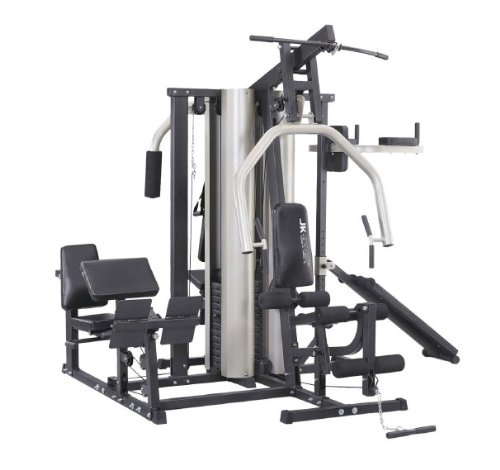
Image: The Cosco Commercial CS Series JK-9950 D 4 Station Gym, fully assembled, showcasing its multi-station design with various exercise points and weight stacks.
Operating the Gym
The JK-9950 D offers a variety of exercises targeting different muscle groups. Familiarize yourself with each station before beginning your workout.
1. Weight Adjustment
To adjust the resistance, insert the selector pin into the desired weight plate on the weight stack. Ensure the pin is fully inserted through the plate and secured. Never attempt to change weights while the machine is in use or under load.
2. Exercise Stations Overview
- Pec-Dec/Butterfly: Used for chest exercises, targeting the pectoral muscles. Adjust the arm pads for comfortable positioning.
- Bench Press: For chest and triceps development. Ensure proper back support and grip.
- High Pulley: Ideal for lat pulldowns, triceps pushdowns, and other upper body exercises. Attach appropriate handles.
- Low Pulley: Suitable for seated rows, bicep curls, upright rows, and leg exercises. Attach appropriate handles or ankle straps.
- VKR (Vertical Knee Raise): For abdominal and core strengthening. Use the padded armrests and back support.
- Sit-Up Station: Designed for abdominal crunches and sit-ups.
- Leg Press: Targets quadriceps, hamstrings, and glutes. Adjust the seat and footplate for proper alignment.
Always perform exercises with controlled movements. Avoid sudden jerks or dropping weights. If you are unsure about proper form, consult a certified fitness professional.
Maintenance
Regular maintenance ensures the longevity and safe operation of your Cosco gym.
1. Daily/Weekly Maintenance
- Wipe down all padded surfaces and handles with a damp cloth after each use to remove sweat and dirt. Use a mild soap solution if necessary, then wipe dry.
- Inspect cables and pulleys for any signs of fraying, wear, or damage.
- Check all bolts and nuts for tightness. Retighten as needed.
2. Monthly Maintenance
- Lubricate moving parts, such as guide rods for weight stacks, with a silicone-based lubricant. Avoid using oil-based lubricants that can attract dust.
- Inspect all frame connections for stability.
- Check the condition of all upholstery for tears or excessive wear.
If any component is found to be defective or worn, replace it immediately. Do not use the equipment until repairs are made.
Troubleshooting
This section addresses common issues you might encounter with your gym equipment.
| Problem | Possible Cause | Solution |
|---|---|---|
| Squeaking or grinding noise during use. | Lack of lubrication on guide rods or pivot points; loose bolts; worn pulleys. | Apply silicone lubricant to guide rods. Check and tighten all bolts. Inspect pulleys for wear and replace if necessary. |
| Cables feel loose or slack. | Cable stretch; improper installation; worn cable. | Inspect cable routing. If cables are stretched or worn, they may need replacement. Consult the assembly guide for proper cable tensioning. |
| Weight plates sticking. | Dust or debris on guide rods; bent guide rod; misaligned weight stack. | Clean guide rods thoroughly. Apply silicone lubricant. Check for any obstructions or damage to the guide rods or weight plates. |
If you encounter a problem not listed here or cannot resolve an issue, contact Cosco customer support for assistance.
Specifications
| Feature | Detail |
|---|---|
| Model | JK-9950 D |
| Working Size | 2100 x 1700 x 2200mm |
| Maximum User Weight | 150 kg |
| Net Weight | 390 kg |
| Weight Stacks | Two, total 420 lbs (approx. 190 kg) |
| Frame Material | Heavy Duty Steel |
| Handle Type | Fixed Handle |
Warranty and Support
For warranty information, please refer to the separate warranty card included with your product or visit the official Cosco website. Keep your proof of purchase for warranty claims.
For technical support, spare parts, or any inquiries regarding your Cosco Commercial CS Series JK-9950 D 4 Station Gym, please contact Cosco customer service. Contact details can typically be found on the product packaging or the official Cosco website.