
1. Introduction
This manual provides essential instructions for the proper use, setup, operation, and maintenance of your iDance Mycookie 50 wired in-ear earphones. Please read this manual thoroughly before using the product to ensure optimal performance and longevity.
2. Package Contents
Upon unpacking, please verify that all items listed below are present and in good condition:
- iDance Mycookie 50 In-Ear Earphones with Microphone
- Silicone Gel Ear Bud Sleeves (two sizes)

Image 1: Front view of the iDance Mycookie 50 earphones retail packaging. The blue box displays product branding and key features.
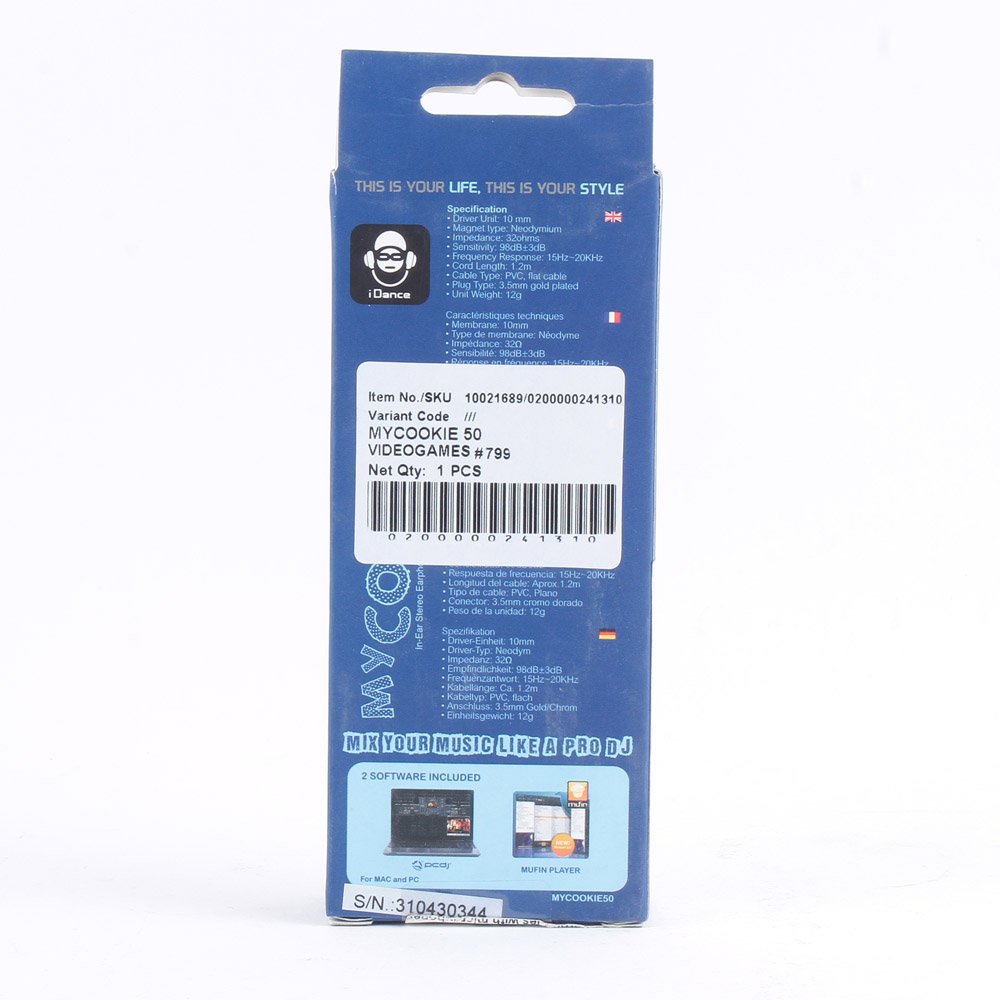
Image 2: Back view of the iDance Mycookie 50 earphones retail packaging, showing detailed specifications and features in multiple languages.
3. Product Overview
The iDance Mycookie 50 earphones are designed for mobile listening, featuring a wired connection and an in-line microphone for communication. They offer clear audio with a focus on bass, precision highs, and natural vocals, suitable for various audio devices.
- In-Ear Design: Provides passive sound isolation for an immersive listening experience.
- Neodymium Drivers: Equipped with 10mm neodymium driver units for enhanced sound quality.
- Flat Cable: Designed to minimize tangling.
- In-line Condenser Microphone: For hands-free calls and voice commands.
- Ergonomic Fit: Lightweight design with customized ear cups for secure and comfortable wear.

Image 3: A pair of blue iDance Mycookie 50 in-ear earphones with their flat cable and in-line microphone control.

Image 4: Close-up view of the iDance Mycookie 50 earphones, highlighting the in-line microphone and control unit on the cable.
4. Setup
4.1 Connecting to Your Device
- Locate the 3.5mm audio jack on your smartphone, tablet, MP3 player, or other compatible audio device.
- Insert the 3.5mm connector of the iDance Mycookie 50 earphones firmly into the audio jack of your device.
- Ensure the connection is secure for optimal audio transmission.
4.2 Fitting the Earphones
Proper fit is crucial for both sound quality and comfort. The Mycookie 50 comes with two sizes of silicone gel ear bud sleeves to ensure a secure fit.
- Select the ear bud sleeve size that best fits your ear canal. A good fit will create a seal, enhancing bass response and passive noise isolation.
- Gently insert each earphone into its respective ear (left earphone into left ear, right earphone into right ear).
- Adjust the earphones until they feel comfortable and secure.

Image 5: A close-up view of a single iDance Mycookie 50 earbud, showing the silicone tip and ergonomic design for in-ear placement.
5. Operation
5.1 Audio Playback
Once connected, you can play audio from your device. The earphones will reproduce sound from your connected source.
- Volume Control: Adjust the volume directly on your connected device.
- Playback Control: The in-line control unit may offer basic playback functions (e.g., play/pause, skip track) depending on your device's compatibility. Refer to your device's manual for specific functionality with wired headsets.
5.2 Using the In-line Microphone
The iDance Mycookie 50 earphones feature an in-line condenser microphone for hands-free communication.
- Answering/Ending Calls: Press the button on the in-line control unit once to answer an incoming call. Press it again to end an active call.
- Voice Assistant: On compatible devices, pressing and holding the button may activate your device's voice assistant (e.g., Siri, Google Assistant).
- Microphone Placement: Ensure the microphone is positioned close to your mouth for clear voice transmission during calls.
6. Maintenance
6.1 Cleaning
- Earbuds: Gently remove the silicone ear bud sleeves. Wash them with mild soap and water, rinse thoroughly, and allow them to air dry completely before reattaching.
- Earphone Body and Cable: Wipe the earphone bodies and cable with a soft, dry, lint-free cloth. Avoid using harsh chemicals or abrasive materials.
- Avoid Moisture: Do not immerse the earphones in water or expose them to excessive moisture.
6.2 Storage
- When not in use, store the earphones in a clean, dry place, away from direct sunlight and extreme temperatures.
- Avoid tightly winding the cable to prevent damage. The flat cable design helps reduce tangling.
7. Troubleshooting
If you encounter issues with your iDance Mycookie 50 earphones, refer to the following common problems and solutions:
| Problem | Possible Cause | Solution |
|---|---|---|
| No sound or low volume |
|
|
| Microphone not working |
|
|
| Poor sound quality / Static |
|
|
8. Specifications
| Model | Mycookie 50 |
| Driver Unit | 10 mm Neodymium |
| Frequency Response | 15Hz - 20KHz |
| Sensitivity | 98 dB/mW at 1kHz |
| Connectivity | Wired, 3.5mm Jack |
| Microphone | In-line Condenser Microphone |
| Cable Type | Flat Cable |
| Compatible Devices | iPod, iPhone, iPad, Tablet devices, MP3 Player, Smartphone |
| Material | Plastic |
| Item Weight | 60 g |
| Manufacturer | iDance |
9. Warranty and Support
iDance products are manufactured to high quality standards. This product is covered by a limited warranty against defects in materials and workmanship from the date of purchase. Please retain your proof of purchase for warranty claims.
For technical support, warranty inquiries, or service, please contact your local iDance distributor or refer to the official iDance website for contact information.