
Flotec N5209840
Pentair Flotec Waterpress 750 Pressure Booster Group
User Instruction Manual
Model: N5209840 | Brand: Flotec
1. Introduction
This manual provides essential information for the safe and efficient operation, installation, and maintenance of your Pentair Flotec Waterpress 750 Pressure Booster Group. Please read this manual thoroughly before installation and use, and keep it for future reference.
The Waterpress 750 is a self-priming jet pump with a durable cast iron body and a 20-liter steel tank. It is designed to provide consistent water pressure for domestic hydraulic systems and automated irrigation. The unit comes equipped with a standard Schuko plug power cable.
2. Safety Information
WARNING: Failure to follow these safety instructions could result in electric shock, fire, serious injury, or death.
- Always disconnect the power supply before performing any maintenance or installation work.
- Ensure the electrical installation complies with local regulations and standards.
- Do not operate the pump with flammable or explosive liquids.
- Protect the unit from frost and direct sunlight.
- Keep children and unauthorized persons away from the operating unit.
- Ensure proper ventilation around the pump during operation.
- Do not run the pump dry. This will cause severe damage.
3. Product Overview
The Pentair Flotec Waterpress 750 is a compact and robust pressure booster group designed for reliable water supply.

Figure 3.1: Overall view of the Waterpress 750 unit, showing the blue pressure tank and the black pump motor assembly.

Figure 3.2: Side view of the unit, highlighting the pump body and pressure gauge.

Figure 3.3: Detail of the pump head, showing the pressure gauge and the flexible connection to the tank.

Figure 3.4: The optional Pentair Flotec Logic-Drop device, which can be used for automatic pump control.
Key Components:
- Self-priming Jet Pump: Efficiently draws water from a source.
- Cast Iron Pump Body: Ensures durability and longevity.
- 20-Liter Steel Pressure Tank: Maintains consistent water pressure and reduces pump cycling.
- Pressure Gauge: Displays current system pressure.
- Flexible Connection Hose: Connects the pump to the pressure tank.
- Schuko Plug Power Cable: For electrical connection.
4. Specifications
| Attribute | Value |
|---|---|
| Manufacturer | FLOTEC |
| Model Number | N5209840 |
| Dimensions (L x W x H) | 46.5 x 28 x 50 cm |
| Weight | 14.9 Kilograms |
| Color | Black |
| Material | Cast Iron, Steel |
| Power Source | Corded Electric |
| Voltage | 230 Volts |
| Power | 600 Watts |
| Max Flow Rate | 2700 Liters per hour |
| Max Head (H.max) | 42m / 4.2 bar |
| Tank Volume | 20 Liters |
| Suction/Discharge Port | 1"F |
5. Setup and Installation
Proper installation is crucial for the performance and longevity of your Waterpress 750. Refer to the diagrams for visual guidance.

Figure 5.1: Detailed installation steps and connection diagrams for the pressure booster group.
Installation Steps:
- Location: Choose a dry, well-ventilated, and frost-free location close to the water source and power supply. The pump should be placed on a stable, level surface to minimize vibration.
- Water Source Connection: Connect the suction line (inlet) to your water source. Ensure the suction line is airtight to prevent air ingress, which can cause the pump to lose prime. A foot valve with a filter is recommended at the end of the suction line in the water source.
- Discharge Line Connection: Connect the discharge line (outlet) from the pump to your domestic water system or irrigation system. Use appropriate fittings and sealants to prevent leaks.
- Priming the Pump: Before first use, the pump must be primed. Unscrew the priming plug (usually located on top of the pump body) and fill the pump casing completely with water until it overflows. Replace the priming plug securely.
- Electrical Connection: Plug the Schuko power cable into a grounded electrical outlet. Ensure the voltage matches the pump's requirements (230 Volts).
- Check for Leaks: After all connections are made, slowly open any valves in the discharge line and check for any leaks.
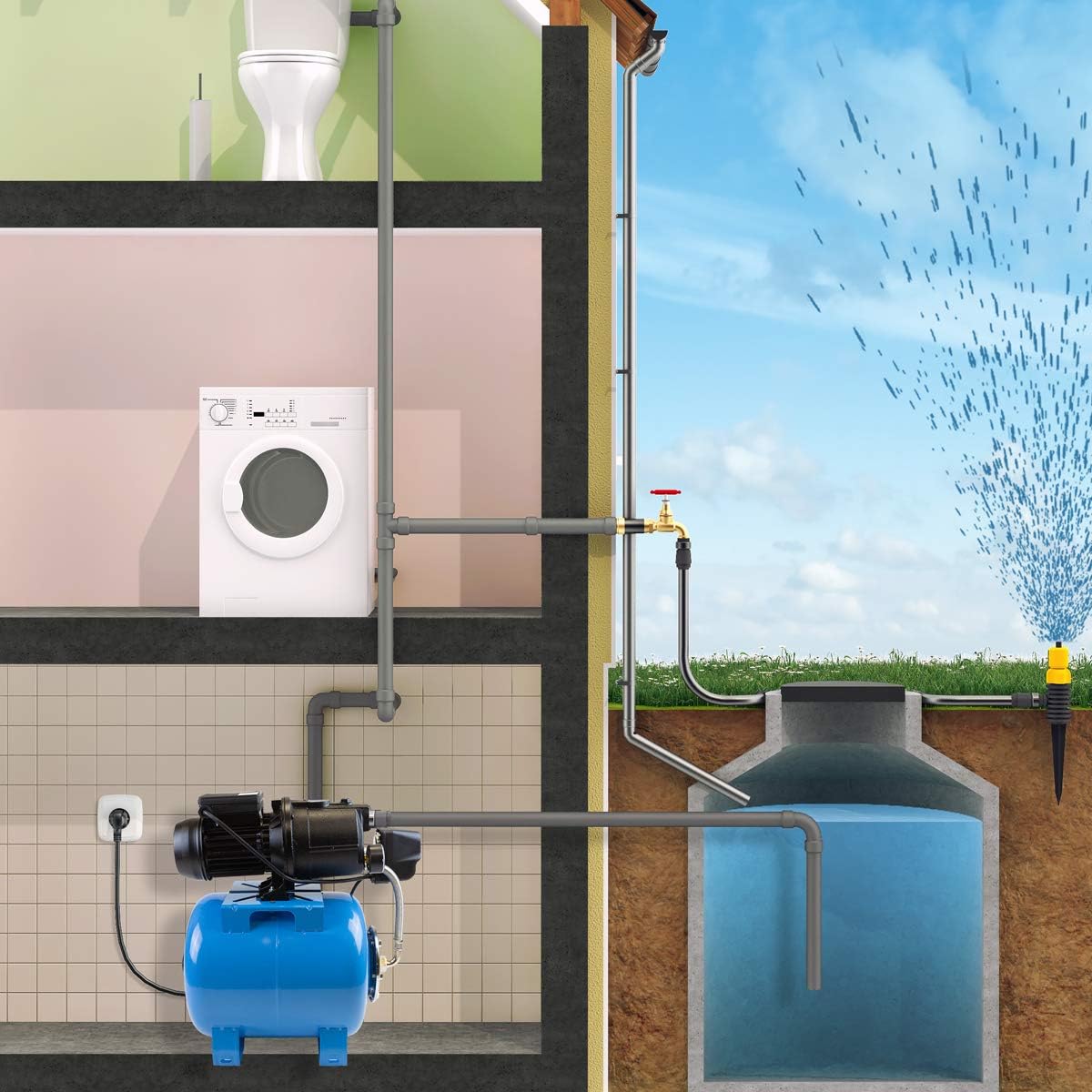
Figure 5.2: Example application diagram illustrating the Waterpress 750's integration into a domestic water supply and irrigation system.
6. Operating Instructions
- Initial Start-up: After installation and priming, ensure all valves are open. Plug in the pump. The pump will start and build pressure in the tank. It will automatically shut off once the preset pressure is reached.
- Automatic Operation: The Waterpress 750 operates automatically. When water is drawn from the system (e.g., opening a tap), the pressure in the tank drops, and the pump will automatically switch on to restore pressure. When water demand stops, the pump will switch off.
- Monitoring: Periodically check the pressure gauge to ensure the system is operating within expected pressure ranges.
- Shutting Down: To temporarily shut down the pump, simply unplug it from the power outlet. For long-term storage, follow the maintenance steps for winterization.
7. Maintenance
Regular maintenance ensures optimal performance and extends the lifespan of your Waterpress 750.
- Pressure Tank Pre-charge: The air pressure in the tank should be checked periodically (e.g., every 6-12 months) when the pump is unplugged and the system is depressurized. The pre-charge pressure should typically be around 1.5 bar (22 PSI). Adjust with an air pump if necessary.
- Filter Cleaning: If a pre-filter is installed on the suction line, clean it regularly to prevent clogging and maintain flow.
- Check for Leaks: Regularly inspect all connections and hoses for signs of leaks. Tighten or replace components as needed.
- Winterization: If the pump is in an area subject to freezing temperatures, it must be drained completely to prevent damage. Disconnect the power, open all drain plugs, and allow all water to escape. Store in a dry, frost-free location.
- General Cleaning: Keep the exterior of the pump clean and free from dust and debris to ensure proper ventilation.
8. Troubleshooting
| Problem | Possible Cause | Solution |
|---|---|---|
| Pump does not start | No power; Thermal overload; Motor fault | Check power supply/circuit breaker; Allow motor to cool; Contact qualified technician |
| Pump runs but no water/low pressure | Pump not primed; Air in suction line; Clogged suction filter; Low water level at source | Re-prime pump; Check suction line for leaks; Clean filter; Ensure adequate water supply |
| Pump cycles frequently | Leaking system; Low air pressure in tank; Damaged tank diaphragm | Check for leaks in plumbing; Adjust tank pre-charge pressure; Replace tank if diaphragm is damaged |
| Excessive noise/vibration | Air in pump; Loose mounting; Foreign object in pump | Re-prime pump; Secure mounting bolts; Disconnect power and inspect impeller (if safe to do so) |
9. Warranty and Support
For warranty information and technical support, please refer to the documentation provided with your purchase or contact Pentair Flotec customer service. Keep your proof of purchase for warranty claims.
For further assistance, please visit the official Flotec website or contact your local distributor.
Related documentsN5209840


Ask a question about this manual
Ask about setup, troubleshooting, compatibility, parts, safety, or missing instructions. Manuals+ will review the question and use this page’s manual context to help answer it.