
Humanscale ECEB
Humanscale Element Disk Task Light Instruction Manual
Model: ECEB
1. Introduction
The Humanscale Element Disk Task Light is an advanced lighting solution designed for optimal workspace illumination and energy efficiency. Featuring innovative Thin Film LED Technology, it provides a consistent, ultra-wide light footprint, reducing eye strain. Its sleek design and intelligent features make it an ideal addition to any modern office or home environment.
This manual provides detailed instructions for the setup, operation, maintenance, and troubleshooting of your Element Disk Task Light.
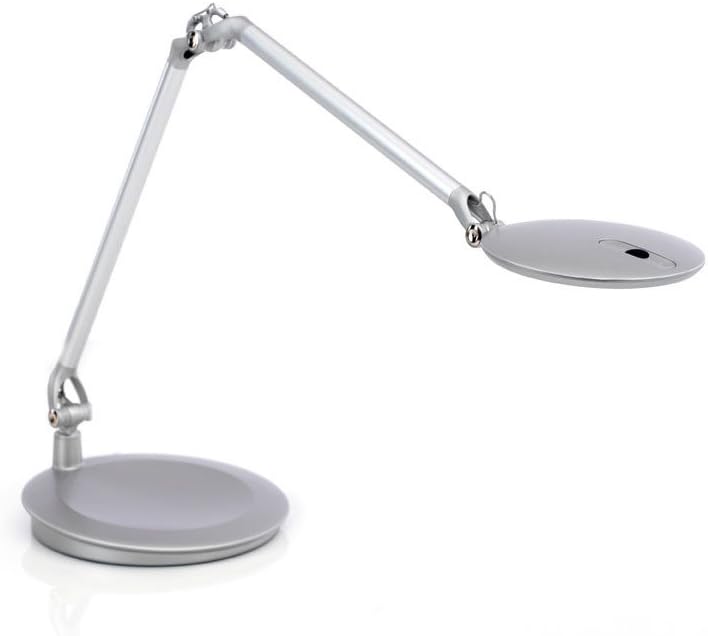
Figure 1: Humanscale Element Disk Task Light with desktop base.
2. What's in the Box
- Element Disk Task Light unit
- Desktop Base
3. Setup
The Humanscale Element Disk Task Light with Desktop Base requires minimal assembly. Follow these steps to set up your light:
- Unpack: Carefully remove all components from the packaging. Ensure all parts listed in "What's in the Box" are present.
- Position the Base: Place the desktop base on a stable, flat surface where you intend to use the task light.
- Connect Power: Plug the power cord from the light into a standard 120V AC electrical outlet.
- Adjust Position: Gently adjust the lamp arm and head to your desired position. The internal counterbalance system allows for effortless, one-touch positioning.

Figure 2: Element Disk Task Light in use on a desk.
4. Operating Instructions
Power On/Off and Dimming
- Power Button: Locate the power button on the lamp head. Press once to turn the light on or off.
- Dimmer Switch: The dimmer switch provides seven adjustable illumination levels. Press the dimmer button repeatedly to cycle through the brightness settings.
- Smart Dimming Memory: The light features smart dimming memory, which saves the last selected lighting level even after the light has been shut off.
Occupancy Sensor
The Element Disk Task Light is equipped with a built-in PIR occupancy sensor. This sensor automatically turns the unit off when the user is not in the area and turns it back on when the user returns, promoting energy efficiency.
- The sensor detects presence within its range. If no presence is detected for a period, the light will automatically turn off.
- Upon detecting presence again, the light will automatically turn back on to the last remembered brightness setting.
Adjustability and Positioning
The lamp's internal counterbalance system allows for effortless, one-touch positioning. You can easily adjust the height, angle, and reach of the light head to direct illumination precisely where needed. When not in use, the Element Disk folds into a compact nesting position for easy storage and a clean desk appearance.
Integrated Power Ports
The desktop base includes convenient power ports for charging your devices:
- Two USB Ports: Use these ports to charge smartphones, tablets, and other USB-powered devices.
- One Power Outlet (120VAC 8AMPS MAX): Provides a standard electrical outlet for powering other small electronic devices.
5. Maintenance
To ensure the longevity and optimal performance of your Humanscale Element Disk Task Light, follow these simple maintenance guidelines:
- Cleaning: Use a soft, dry cloth to wipe down the lamp's surfaces. For stubborn marks, a slightly damp cloth with mild soap can be used, followed by drying thoroughly. Avoid abrasive cleaners or solvents, as they may damage the finish.
- LED Care: The LED light source is designed for long life and does not require replacement. Do not attempt to open the lamp head or replace the LEDs.
- Cable Management: Ensure the power cord is not kinked or placed under heavy objects to prevent damage.
6. Troubleshooting
If you encounter any issues with your Element Disk Task Light, please refer to the following common troubleshooting steps:
| Problem | Possible Cause | Solution |
|---|---|---|
| Light does not turn on. | No power, loose connection, or sensor issue. |
|
| Light flickers or dims unexpectedly. | Unstable power supply or sensor interference. |
|
| Dimming function is not working. | Button malfunction or internal issue. |
|
| USB or power ports are not working. | Device compatibility, power issue, or port malfunction. |
|
If these steps do not resolve the issue, please contact Humanscale Customer Support for further assistance.
7. Specifications
| Feature | Detail |
|---|---|
| Brand | Humanscale |
| Model | ECEB (Element Disc) |
| Finish Type | Silver |
| Base Material | Aluminum |
| Product Dimensions | 28"D x 8"W x 25"H |
| Item Weight | 5.6 Pounds |
| Lamp Type | Desk Lamp |
| Light Source Type | LED (Thin Film LED Technology) |
| Color Temperature | 3000 Kelvin |
| Brightness | 315 Lumen |
| Wattage | 7.00 Watts |
| Voltage | 120 Volts |
| Switch Type | Dimmer, Touch |
| Special Features | Energy Efficient, Dimmable, PIR Occupancy Sensor, Integrated USB & Power Ports |
| Power Source | Corded Electric |
| Assembly Required | No |
8. Warranty and Support
For warranty information, product support, or to purchase additional protection plans, please visit the official Humanscale website or contact their customer service department. Keep your purchase receipt as proof of purchase.
Humanscale Customer Support: Refer to the contact information provided with your product packaging or on the Humanscale official website.
Online Resources: www.humanscale.com
Ask a question about this manual
Ask about setup, troubleshooting, compatibility, parts, safety, or missing instructions. Manuals+ will review the question and use this page’s manual context to help answer it.