
Casio W-S220C-7BVCF
Casio W-S220C-7BVCF Digital Solar Watch User Manual
Model: W-S220C-7BVCF
Introduction
This manual provides detailed instructions for the Casio W-S220C-7BVCF Digital Solar Watch. Designed for active lifestyles, this timepiece features solar power, 100-meter water resistance, and advanced functions like a 120-lap memory stopwatch and dual countdown timers for interval training. Please read this manual thoroughly to ensure proper use and care of your watch.
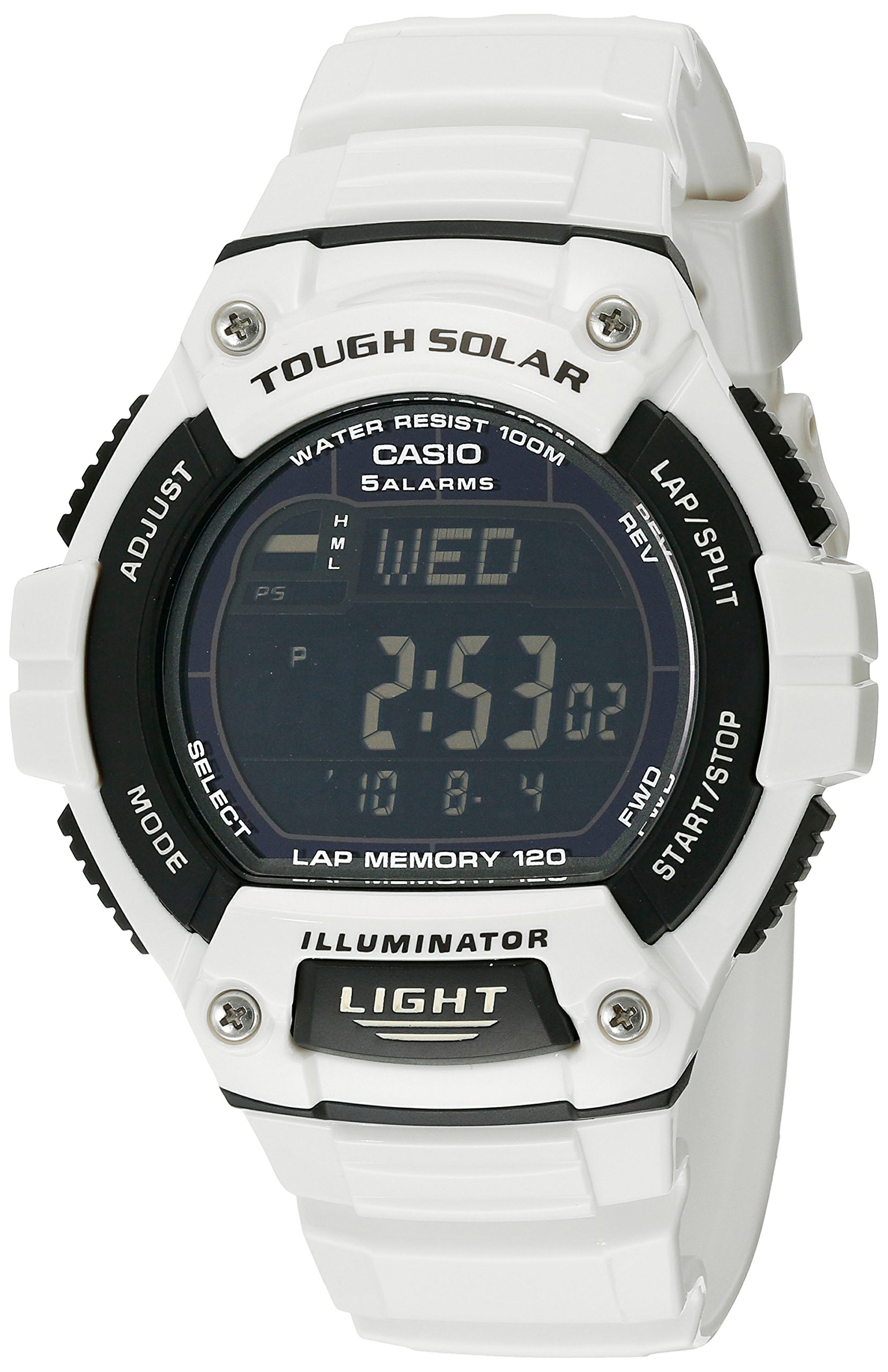
Image: The Casio W-S220C-7BVCF watch displayed on a wrist, showing its digital interface and white band.
Setup
Initial Charging
Your Casio W-S220C-7BVCF watch is equipped with Tough Solar power, utilizing a solar rechargeable battery. Before initial use, or if the display is blank or dim, expose the watch face to bright light for several hours. Direct sunlight is most effective. Ensure the watch is not covered by clothing during charging. A full charge provides approximately 11 months of operation without further light exposure under normal use.

Image: An illustration highlighting the solar charging capability of Casio watches.
Time and Date Setting
To set the current time and date:
- In Timekeeping Mode, press and hold the ADJUST button until the city code starts to flash. This indicates the setting mode.
- Use the SELECT button to cycle through the settings (city code, daylight saving time, 12/24-hour format, seconds, hour, minute, year, month, day).
- Use the START/STOP and LAP/SPLIT buttons (or FWD/REV) to change the flashing value.
- Once all settings are correct, press the ADJUST button to exit the setting mode.
Operating Instructions
Button Functions
Your watch features five buttons for various operations:
- ADJUST: Used to enter and exit setting modes, and to adjust settings.
- MODE: Cycles through the different operational modes (Timekeeping, Stopwatch, Timer, Alarm, World Time).
- SELECT: Used to select items within a setting mode or to change display information.
- START/STOP (FWD): Starts and stops the stopwatch or timer. Also used to advance values during setting.
- LAP/SPLIT (REV): Records lap/split times in stopwatch mode. Also used to reverse values during setting.
- LIGHT: Activates the LED backlight for illumination.

Image: Front view of the Casio W-S220C-7BVCF watch, clearly showing the digital display and the labels for each button.
Timekeeping Mode
This is the default mode, displaying the current time, day of the week, and date. Press the SELECT button to toggle between different display formats, such as day of the week and month/day.
Stopwatch Mode
The stopwatch measures elapsed time, split times, and two finishes. It has a 1/100 second accuracy and a 120-lap memory. To use:
- Press MODE until you reach the Stopwatch Mode.
- Press START/STOP to begin timing.
- Press LAP/SPLIT to record lap or split times.
- Press START/STOP again to stop timing.
- Press ADJUST to reset the stopwatch to zero.
Timer Mode
The watch features two countdown timers designed for interval training. These timers operate sequentially.
- In Timekeeping Mode, press MODE until you reach the Timer Mode.
- Press and hold ADJUST until the timer setting starts to flash.
- Use SELECT to choose between Timer 1 and Timer 2 settings.
- Use START/STOP and LAP/SPLIT to set the desired countdown times for each timer.
- Press ADJUST to exit the setting mode.
- To start the timers, press START/STOP. Timer 1 will count down, then automatically transition to Timer 2 after an alert.
- Press START/STOP again to pause, and to resume. Press ADJUST to reset the timers.
Alarm Mode
The watch includes four daily alarms and one snooze alarm. An hourly time signal can also be activated.
- Press MODE until you reach the Alarm Mode.
- Use SELECT to cycle through the alarms (AL1, AL2, AL3, AL4, SNZ, SIG).
- To set an alarm, press and hold ADJUST when the desired alarm is displayed.
- Use START/STOP and LAP/SPLIT to set the alarm time.
- Press ADJUST to confirm and exit.
- Press START/STOP to toggle the alarm or hourly signal on/off.
World Time Mode
View the current time in 31 time zones (48 cities + UTC). To use:
- Press MODE until you reach the World Time Mode.
- Use START/STOP (FWD) and LAP/SPLIT (REV) to scroll through different city codes.
- Press SELECT to toggle Daylight Saving Time (DST) on or off for the selected city.
LED Light (Illuminator)
Press the LIGHT button to illuminate the display for easy reading in low-light conditions. The light duration is preset.
Video: A detailed product video showcasing the Casio W-S220C-7BVCF watch from various angles, demonstrating its design and features.
Maintenance
Cleaning
Regularly clean your watch with a soft, dry cloth. For stubborn dirt on the resin band and case, use a mild soap solution and a soft brush, then rinse thoroughly with fresh water and dry completely. Avoid using harsh chemicals or abrasive cleaners.
Water Resistance
Your watch is water resistant to 100 meters (330 feet). This means it is suitable for swimming, showering, and snorkeling. However, to maintain water resistance, do not operate any buttons while the watch is submerged in water. Avoid exposing the watch to hot water or steam, as this can compromise the seals.
Battery Care
To ensure optimal performance of the solar rechargeable battery, expose the watch to light regularly. If the watch is stored in darkness for extended periods, the battery level may drop, and some functions might be disabled to conserve power. The battery level indicator on the display shows the current charge status.
Troubleshooting
Common Issues and Solutions
- Blank or Dim Display: This usually indicates insufficient light exposure. Place the watch in a brightly lit area, preferably direct sunlight, to charge the solar battery.
- Incorrect Time/Date: The time or date may need manual adjustment. Refer to the "Time and Date Setting" section for instructions. Ensure the correct home city and Daylight Saving Time (DST) settings are selected.
- Buttons Unresponsive: If buttons are not responding, the battery level might be very low. Charge the watch as described in "Initial Charging." If the issue persists after charging, a full reset might be necessary (refer to the official Casio manual for specific reset procedures, as this may clear all settings).
Specifications
| Feature | Detail |
|---|---|
| Model Number | W-S220C-7BVCF (Module: 3271) |
| Case Diameter | 48.97 mm |
| Case Thickness | 13.57 mm |
| Band Width | 24.58 mm |
| Water Resistance | 100 Meters (330 Feet) |
| Power Source | Tough Solar (Solar Powered) |
| Display Type | Digital |
| Movement Type | Quartz |
| Band Material | Resin |
| Case Material | Resin |
| Crystal | Mineral |
| Approx. Battery Life | 11 months on full charge (without further light exposure) |
| Additional Features | LED Light with Afterglow, 4 Daily Alarms + 1 Snooze, Hourly Time Signal, World Time (31 Time Zones), 1/100-second Stopwatch, 2 Countdown Timers, Full Auto-Calendar (to 2099), 12/24-Hour Formats, Button Operation Tone On/Off, Battery Level Indicator, Power Saving Function |
Warranty Information
This Casio watch is covered by a manufacturer's warranty. For specific terms, conditions, and duration of the warranty, please refer to the warranty card included with your product or visit the official Casio website. Keep your proof of purchase for warranty claims.
Customer Support
For further assistance, detailed operational guides, frequently asked questions, or to contact customer service, please visit the official Casio website. You can also refer to the module number 3271 (found in the specifications) when searching for specific manual downloads or support resources online.
Official Casio Website: www.casio.com
Related documentsW-S220C-7BVCF


Ask a question about this manual
Ask about setup, troubleshooting, compatibility, parts, safety, or missing instructions. Manuals+ will review the question and use this page’s manual context to help answer it.