
Introduction
This manual provides comprehensive instructions for the Olympus Manual Adapter 2, an accessory designed to enhance the functionality of your Olympus OM101 and OM88 SLR film cameras. This adapter allows photographers to gain manual control over the camera's shutter speed and lens aperture settings, offering greater creative flexibility.
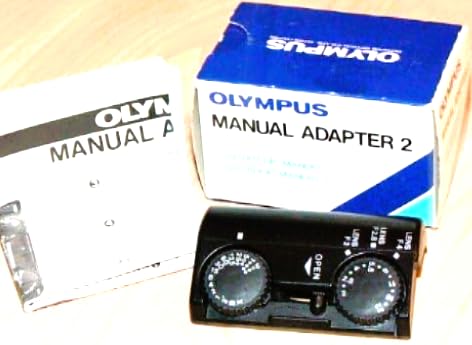
Image of the Olympus Manual Adapter 2, a compact black accessory designed to connect to Olympus OM101 and OM88 SLR film cameras.
Safety Information
- Read all instructions carefully before use.
- Keep the adapter away from moisture and extreme temperatures.
- Handle with care to avoid damage to the adapter or camera.
- Ensure the adapter is securely attached before operating the camera.
Package Contents
Verify that all items are present in the package:
- Olympus Manual Adapter 2
Setup
Attaching the Manual Adapter 2 to your Camera
- Ensure your Olympus OM101 or OM88 SLR film camera is powered off.
- Align the Manual Adapter 2 with the camera's lens mount. The adapter is designed to fit precisely.
- Gently twist the adapter clockwise until it clicks into place, indicating a secure connection.
- Once the adapter is attached, you can then mount your desired lens onto the adapter, following standard lens attachment procedures.
The Olympus Manual Adapter 2 connects to the camera body, allowing for manual control. Ensure proper alignment and secure attachment.
Operating Instructions
Manual Control Overview
The Manual Adapter 2 enables you to manually set both the shutter speed and lens aperture on your OM101 or OM88 camera. This bypasses the camera's automatic exposure modes, giving you full creative control.
Setting Shutter Speed
Refer to your camera's specific manual for instructions on how to manually set the shutter speed. The adapter facilitates this manual operation by allowing the camera to accept external input for exposure settings.
Setting Lens Aperture
The lens aperture is typically controlled directly on the lens itself via an aperture ring. Ensure your lens has a manual aperture ring for this functionality. The adapter allows the camera to register the aperture set on the lens.
Exposure Metering
When using the Manual Adapter 2, the camera's built-in light meter may still provide readings, but you will need to adjust shutter speed and aperture manually based on these readings to achieve correct exposure. It is recommended to use an external light meter or practice with film to understand exposure settings.
Maintenance
- Clean the adapter regularly with a soft, dry, lint-free cloth.
- Avoid using harsh chemicals or abrasive materials.
- Store the adapter in a dry, dust-free environment when not in use.
- Inspect the contacts and mounting surfaces periodically for any dust or debris that could affect connection.
Troubleshooting
Adapter Not Attaching Securely
- Ensure correct alignment with the camera mount. Do not force the adapter.
- Check for any obstructions on the camera mount or adapter.
Camera Not Responding to Manual Settings
- Verify the adapter is fully seated and locked into place.
- Confirm that your camera model (OM101 or OM88) is compatible with this adapter.
- Ensure your lens has a manual aperture ring if you are attempting to control aperture via the lens.
- Consult your camera's manual for specific instructions on operating in manual mode.
Specifications
| Feature | Detail |
|---|---|
| Model Number | Manual Adapter 2 |
| Brand | Olympus |
| Compatible Cameras | Olympus OM101, Olympus OM88 SLR Film Cameras |
| Function | Enables manual control of shutter speed and lens aperture |
| Item Weight | 1 Grams (0.035 ounces) |
| Package Dimensions | 3 x 1 x 1 inches |
| UPC | 050332863606 |
| Manufacturer | OptiCover |
Warranty and Support
Specific warranty information for the Olympus Manual Adapter 2 is not provided in the product details. Please refer to the manufacturer's official website or contact OptiCover directly for warranty terms and support.
For further assistance, you may visit the official Olympus store on Amazon: Olympus Store


