
Introduction
This manual provides comprehensive instructions for the setup, operation, and maintenance of your Lowell JM Oval Alarm Clock, model JA7020. Please read this manual carefully before using the product to ensure proper function and longevity.
Product Overview
The Lowell JM Oval Alarm Clock is a compact and functional device designed to display time and provide an alarm function. Its simple design makes it suitable for various settings.
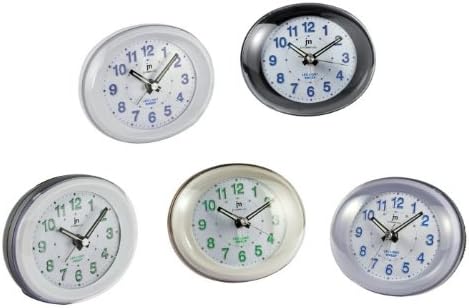
Image 1: Front view of the Lowell JM Oval Alarm Clock, showcasing its oval shape and analog display. The image displays multiple color variations of the clock, including white, black, silver, and cream, each with a clear face, hour, minute, and second hands, and numerical hour markers.
Package Contents
- Lowell JM Oval Alarm Clock (Model JA7020)
- Instruction Manual (this document)
Note: Batteries are not included and must be purchased separately.
Setup
- Unpacking: Carefully remove the alarm clock from its packaging. Retain packaging for future storage or transport if needed.
- Battery Installation:
Locate the battery compartment on the back of the clock. Open the compartment cover. Insert the required batteries (typically 1x AA battery, not included) according to the polarity indicators (+/-). Close the battery compartment cover securely.
- Placement: Place the alarm clock on a stable, flat surface away from direct sunlight, extreme temperatures, and high humidity.
Operating Instructions
Setting the Time
- Locate the time setting knob on the back of the clock.
- Rotate the knob clockwise or counter-clockwise until the hour and minute hands display the correct current time.
Setting the Alarm
- Locate the alarm setting knob on the back of the clock.
- Rotate the alarm setting knob to move the alarm hand to your desired alarm time.
- Locate the alarm ON/OFF switch (usually a small slider or button) on the back or side of the clock. Slide or press it to the "ON" position to activate the alarm.
Stopping the Alarm
- When the alarm sounds, slide or press the alarm ON/OFF switch to the "OFF" position to silence it.
- To reactivate the alarm for the next day, ensure the alarm ON/OFF switch is set to the "ON" position after silencing it.
Maintenance
- Cleaning: Wipe the clock with a soft, dry cloth. Do not use abrasive cleaners, solvents, or chemical sprays, as these can damage the finish and internal components.
- Battery Replacement: Replace batteries when the clock starts losing time or the alarm function weakens. Always use fresh batteries of the specified type. Remove old batteries promptly to prevent leakage.
- Storage: If storing the clock for an extended period, remove the batteries to prevent leakage and potential damage.
Troubleshooting
| Problem | Possible Cause | Solution |
|---|---|---|
| Clock not working / Hands not moving | Dead or incorrectly installed batteries. | Check battery polarity. Replace with fresh batteries. |
| Alarm not sounding | Alarm switch is OFF; alarm time not set correctly; weak batteries. | Ensure alarm switch is ON. Verify alarm hand is set to desired time. Replace batteries. |
| Clock losing time | Weak batteries. | Replace with fresh batteries. |
Specifications
- Brand: LoWell
- Model: JA7020
- Type: Analog Alarm Clock
- Dimensions (L x W x H): Approximately 22 x 3.81 x 21 cm (8.66 x 1.5 x 8.27 inches)
- Weight: Approximately 160 g (0.35 lbs)
- Power Source: Battery (not included)
- Features: Time display, Alarm function
Warranty and Support
For warranty information or technical support, please refer to the retailer where the product was purchased or visit the official LoWell website. Please have your model number (JA7020) and purchase details ready when contacting support.