
1. Introduction and Overview
The Soundstream ST4.10000D is a compact 4-channel car amplifier designed to deliver significant audio power in a small footprint. This amplifier is ideal for installations where space is limited, providing 90 watts RMS per channel at 4 ohms, or up to 250 watts per channel when bridged at 4 ohms. Its design incorporates a Mosfet power supply and offers flexible input options, including both preamp and speaker-level inputs, along with variable high- and low-pass filters for precise sound tuning.

Figure 1: Front view of the Soundstream ST4.10000D amplifier, showcasing its compact design and branding.
2. Safety Information
Please read all instructions carefully before installing and operating your amplifier. Failure to follow these guidelines may result in damage to the amplifier, your vehicle, or personal injury.
- Always disconnect the vehicle's negative battery terminal before making any power connections to prevent electrical shorts.
- Ensure proper ventilation around the amplifier. Do not mount it in an enclosed space where heat cannot dissipate.
- Use appropriate gauge wiring for power, ground, and speaker connections as specified in the installation section.
- Protect all wiring from sharp edges and moving parts. Use grommets where wires pass through metal.
- Avoid mounting the amplifier in locations exposed to moisture or excessive vibration.
- If you are unsure about any installation steps, consult a qualified car audio professional.
3. Package Contents
Verify that all items are present in the package:
- Soundstream ST4.10000D Amplifier
- User Manual (this document)
4. Product Features
Key features of the Soundstream ST4.10000D amplifier include:
- Power Output: 90 watts RMS x 4 channels at 4 ohms (125 watts RMS x 4 at 2 ohms)
- Bridged Power: 250 watts x 2 channels bridged at 4 ohms
- Power Supply: Mosfet power supply for efficient operation
- Input Options: Preamp (RCA) and speaker-level inputs for versatile connectivity
- Crossover Filters: Variable high-pass and low-pass filters (35-250 Hz, 12 dB/octave) for precise audio shaping
5. Setup and Installation
Proper installation is crucial for optimal performance and longevity of your amplifier. Follow these general steps:
5.1 Mounting Location
Choose a mounting location that provides adequate ventilation and is protected from moisture and direct sunlight. The compact size of the ST4.10000D allows for flexible placement, such as under seats, behind dashboards, or in trunk compartments. Ensure the mounting surface is solid and secure.
5.2 Wiring Connections
Refer to the diagram below for proper wiring of power, ground, remote, and speaker outputs.

Figure 2: Rear panel of the amplifier showing power input, fuse, and speaker output terminals. Note the Power (PW) and Protect (PT) indicator lights.
- Power (B+): Connect a direct wire from the positive terminal of your vehicle's battery. Use an appropriate gauge wire (e.g., 8-gauge or 4-gauge depending on total system power) and install an inline fuse (not supplied) within 18 inches of the battery.
- Ground (GND): Connect a short wire (less than 3 feet) from the amplifier's ground terminal to a clean, unpainted metal surface on the vehicle's chassis. Ensure a good electrical connection.
- Remote (REM): Connect this terminal to the remote turn-on output of your head unit. This wire signals the amplifier to turn on and off with your stereo.
- Speaker Outputs: Connect your speakers to the "SPEAKERS OUT" terminals. Ensure correct polarity (+ to + and - to -). For bridged operation, follow the indicated bridging connections on the amplifier panel.
5.3 Input and Control Settings
The amplifier features adjustable gain and crossover settings for optimal sound performance.
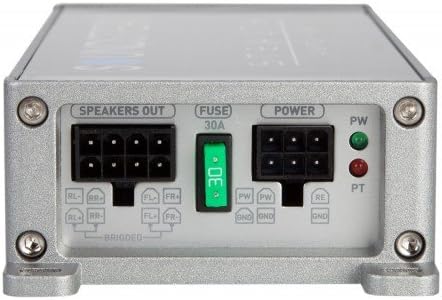
Figure 3: Front panel of the amplifier showing High/Low level inputs, Gain controls for Front and Rear channels, and X-OVER (crossover) settings.
- HI/LO Input: Connect your audio source here. Use RCA cables for preamp outputs from your head unit, or speaker-level inputs if your head unit does not have RCA outputs.
- Gain Control: Adjust the "GAIN" knobs for the Front and Rear channels to match the output voltage of your head unit. Start with the gain at minimum and slowly increase it until you hear distortion, then back off slightly.
- X-OVER (Crossover):
- HPF (High-Pass Filter): Allows frequencies above the set point to pass through. Useful for full-range speakers to prevent low bass distortion.
- LPF (Low-Pass Filter): Allows frequencies below the set point to pass through. Essential for subwoofers.
- FULL: Bypasses the crossover, allowing all frequencies to pass.
6. Operating Instructions
Once properly installed, operating your Soundstream ST4.10000D amplifier is straightforward:
- Power On/Off: The amplifier will automatically turn on when your head unit is powered on (via the remote wire connection) and turn off when the head unit is off.
- Indicator Lights:
- PW (Power): A green LED indicates the amplifier is powered on and operating normally.
- PT (Protect): A red LED indicates the amplifier has entered protection mode due to an issue (e.g., overheating, short circuit, low voltage). Refer to the Troubleshooting section.
- Volume Control: Adjust the overall system volume using your head unit's volume control. The amplifier's gain controls are for matching input levels, not for daily volume adjustment.
7. Maintenance
To ensure long-term performance of your amplifier:
- Cleaning: Periodically wipe the amplifier's exterior with a soft, dry cloth. Do not use harsh chemicals or abrasive cleaners.
- Connections: Occasionally check all wiring connections (power, ground, remote, speaker, RCA) to ensure they are secure and free from corrosion. Loose connections can lead to poor performance or damage.
- Ventilation: Ensure that the amplifier's cooling fins are not obstructed by debris or other objects. Proper airflow is essential for heat dissipation.
8. Troubleshooting
If you experience issues with your amplifier, consult the following table before seeking professional service:
| Problem | Possible Cause | Solution |
|---|---|---|
| No Power (PW light off) |
|
|
| Protection Mode (PT light on) |
|
|
| No Sound |
|
|
| Distorted Sound |
|
|
9. Specifications
Detailed technical specifications for the Soundstream ST4.10000D amplifier:
| Specification | Value |
|---|---|
| Model Number | ST4.1200D |
| Item Dimensions (L x W x H) | 7.5 x 3.88 x 1.5 inches |
| Item Weight | 2.1 pounds |
| Number of Channels | 4 |
| Output Power (RMS @ 4 ohms) | 90 watts x 4 |
| Output Power (RMS @ 2 ohms) | 125 watts x 4 |
| Output Power (Bridged @ 4 ohms) | 250 watts x 2 |
| Voltage | 16 Volts (Max Supply 14 Volts DC) |
| Crossover Filters | Variable High-Pass and Low-Pass (35-250 Hz, 12 dB/octave) |
| Mounting Type | Surface Mount |
10. Warranty and Support
For warranty information and technical support, please refer to the official Soundstream website or contact their customer service department. Keep your purchase receipt as proof of purchase for any warranty claims.
For the most up-to-date support resources, visit: www.soundstream.com