
LDG Electronics Z-100PLUS
LDG Electronics Z-100PLUS Automatic Antenna Tuner User Manual
Model: Z-100PLUS
Introduction
The LDG Electronics Z-100PLUS is a semi-automatic antenna tuner designed for efficient operation across the entire HF spectrum plus 6 meters. It handles power levels up to 125 watts and is capable of tuning a wide variety of coax-fed antennas, including dipoles, verticals, Yagis, G5RV, OCF, and Cobra antennas. This manual provides essential information for the proper setup, operation, and maintenance of your Z-100PLUS tuner.
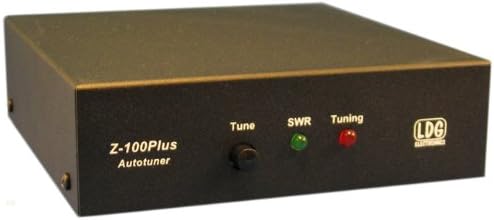
Figure 1: Front view of the LDG Z-100PLUS Automatic Antenna Tuner.
Setup and Connections
Before operating your Z-100PLUS tuner, ensure all connections are secure and correct.
- Power Connection: Connect the supplied 6-foot DC power cable to the tuner's power input (7 to 18 Volts DC, 100 mA). Ensure the power supply is stable and within the specified voltage range.
- Antenna Connection: Connect your coax-fed antenna to the "Ant" SO-239 connector on the rear panel.
- Transceiver Connection: Connect your transceiver's antenna output to the "Tx" SO-239 connector on the rear panel.
- Ground Connection (Optional but Recommended): For optimal performance and safety, connect a good RF ground to the "Gnd" terminal.
- Radio Interface (Optional): If your radio supports it, connect the radio interface cable to the "Radio Interface" port for integrated tuning control.

Figure 2: Rear view of the LDG Z-100PLUS showing antenna, transceiver, ground, and power connections.
Operating Instructions
The Z-100PLUS features simple controls for efficient antenna tuning.

Figure 3: Front panel of the LDG Z-100PLUS showing the Tune button and indicator lights.
- Tune Button: Press the "Tune" button to initiate an automatic tuning cycle. The tuner will adjust its internal components to achieve the lowest possible SWR (Standing Wave Ratio).
- SWR Indicator (Green LED): This LED illuminates when the SWR is low and acceptable, indicating a good match.
- Tuning Indicator (Red LED): This LED illuminates during the tuning process. It will turn off or change color (depending on model) once tuning is complete and a good match is found.
- Memory Function: The Z-100PLUS stores up to 2000 memories sorted by frequency. When you transmit on a frequency that has been previously tuned, the tuner will recall the settings instantly, eliminating the need for a new tuning cycle.
- Power Handling: The tuner is designed for RF power from 0.1 to 125 watts for SSB and CW modes, and up to 30 watts for PSK. Avoid exceeding these power limits to prevent damage.
Maintenance
The LDG Z-100PLUS is designed for reliable operation with minimal maintenance.
- Cleaning: Keep the unit clean and free of dust. Use a soft, dry cloth to wipe the exterior. Do not use liquid cleaners or solvents.
- Ventilation: Ensure adequate airflow around the unit to prevent overheating, especially during prolonged operation at high power.
- Connections: Periodically check all cable connections (power, antenna, transceiver) to ensure they are secure and free from corrosion.
- Storage: If storing the unit for an extended period, disconnect all cables and store it in a cool, dry place.
Troubleshooting
If you encounter issues with your Z-100PLUS, refer to the following common problems and solutions:
| Problem | Possible Cause | Solution |
|---|---|---|
| Tuner does not power on. | No power, incorrect voltage, faulty cable. | Check power supply connection and voltage (7-18V DC). Ensure power cable is not damaged. |
| Tuner fails to achieve low SWR. | Antenna issue, incorrect frequency, excessive power. | Check antenna connections. Ensure antenna is suitable for the frequency. Reduce transmit power during tuning. Verify antenna impedance is within tuner's range (6-800 ohms, 16-150 ohms on 6M). |
| Tuning takes too long or cycles repeatedly. | Poor antenna match, RF interference. | Ensure a good ground connection. Check for strong local RF interference. Consider antenna system improvements. |
| Memory recall not working. | Frequency drift, memory corruption. | Perform a manual tune on the frequency. The tuner will store the new settings. |
Specifications
- RF Power: 0.1 to 125 watts SSB and CW, 30 watts PSK.
- Impedance Range: 6 to 800 ohms (16 to 150 ohms on 6 meters).
- Frequency Coverage: 1.8 to 54 MHz (continuous coverage for MARS).
- Memories: 2000 memories, frequency sorted.
- Connectors: SO-239 for antenna and transceiver.
- Power Requirement: 7 to 18 Volts DC, 100 mA.
- Dimensions (L x W x H): 5.5 x 5.5 x 1.5 inches (13.97 x 13.97 x 3.81 cm).
- Weight: 16 ounces (1 pound / 0.45 kg).
- Manufacturer: LDG.
- Color: Black.
Warranty and Support
The LDG Z-100PLUS Automatic Antenna Tuner comes with a 2-year warranty. For technical support, service, or warranty claims, please contact LDG Electronics directly or refer to their official website for the most current contact information.
Manufacturer: LDG
Official Website: www.ldgelectronics.com
Ask a question about this manual
Ask about setup, troubleshooting, compatibility, parts, safety, or missing instructions. Manuals+ will review the question and use this page’s manual context to help answer it.