
1. Introduction
The Aruba HPE 2530 Switch Series provides fully managed Layer 2 edge switches designed for cost-effective, reliable, and secure connectivity in business networks. The J9773A 2530-24G-PoE+ model features 24 Gigabit Ethernet ports with Power over Ethernet Plus (PoE+) capabilities and four Small Form-Factor Pluggable (SFP) slots for fiber connectivity. This manual provides essential information for the proper installation, operation, and maintenance of your switch.
2. Safety Information
Observe the following safety precautions to prevent injury and damage to the product:
- Ensure proper grounding of the switch.
- Do not operate the switch in environments with excessive moisture or extreme temperatures.
- Use only the power supply provided or specified by the manufacturer.
- Avoid blocking ventilation openings to prevent overheating.
- Disconnect power before cleaning or servicing the device.
3. Setup
3.1 Unpacking the Switch
Carefully remove the switch and all accessories from the packaging. Verify that all components listed in the packing list are present and undamaged. Retain the packaging for future transport or storage.
3.2 Mounting Options
The Aruba HPE 2530-24G-PoE+ Switch supports multiple mounting configurations:
- Desktop Placement: Place the switch on a flat, stable surface, ensuring adequate ventilation around the unit.
- Rack Mounting: Use the provided rack-mount kit to install the switch in a standard 19-inch equipment rack. Secure the switch using the appropriate screws.
- Wall Mounting: Utilize the wall-mount brackets (if included or purchased separately) to secure the switch to a sturdy wall. Ensure the wall can support the weight of the switch and connected cables.
3.3 Connecting Power
Connect the power cord to the AC power inlet on the rear panel of the switch, then plug the other end into a grounded electrical outlet. Ensure the power source meets the voltage requirements specified in the product specifications.
3.4 Connecting Network Cables
Connect Ethernet cables (RJ-45) from your network devices (computers, IP phones, access points) to the 24 Gigabit Ethernet ports on the front panel. For fiber optic connections, insert SFP transceivers into the four SFP slots and connect appropriate fiber cables.
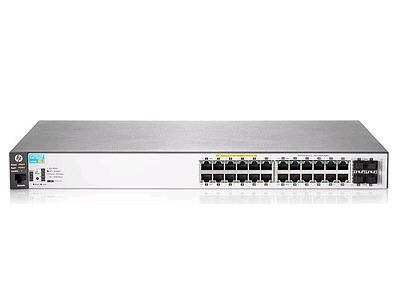
Figure 1: Front view of the Aruba HPE J9773A 2530-24G-PoE+ Switch. This image displays the 24 RJ-45 Gigabit Ethernet ports, which support PoE+, and the four SFP slots for fiber uplink connections. The status LEDs for each port are also visible.
3.5 Initial Power-On
After connecting power and network cables, the switch will power on automatically. Observe the system LEDs to confirm proper boot-up. The Power LED should illuminate steadily, and port LEDs will indicate link status.
4. Operating the Switch
4.1 Management Access
The switch can be managed via several interfaces:
- Console Port: Connect a serial cable to the console port for direct command-line interface (CLI) access.
- Web Interface (GUI): Access the switch's web-based management interface by entering its IP address into a web browser.
- SNMP: The switch supports Simple Network Management Protocol for remote monitoring and management through network management systems.
4.2 Layer 2 Capabilities
The 2530-24G-PoE+ switch provides comprehensive Layer 2 features, including VLANs, Link Aggregation (LACP), Spanning Tree Protocol (STP), and Quality of Service (QoS) for traffic prioritization.
4.3 Power over Ethernet Plus (PoE+)
The 24 RJ-45 ports support IEEE 802.3at PoE+, providing up to 30W of power per port to compatible devices such as IP cameras, wireless access points, and VoIP phones. Ensure that the total power budget of the switch is not exceeded.
4.4 Enhanced Access Security
The switch offers features like 802.1X authentication, MAC-based authentication, and ACLs (Access Control Lists) to secure network access and protect against unauthorized users.
5. Maintenance
5.1 Firmware Updates
Regularly check the manufacturer's website for the latest firmware updates. Applying updates can improve performance, add new features, and address security vulnerabilities. Follow the provided instructions carefully when performing firmware upgrades.
5.2 Cleaning
Keep the switch clean and free of dust. Use a soft, dry cloth to wipe the exterior. Do not use liquid or aerosol cleaners directly on the switch. Ensure ventilation openings are clear of obstructions.
5.3 Environmental Considerations
Maintain the operating environment within the specified temperature and humidity ranges to ensure optimal performance and longevity of the switch.
6. Troubleshooting
6.1 No Power
- Verify the power cord is securely connected to both the switch and the electrical outlet.
- Check the power outlet with another device to ensure it is functional.
- Inspect the power cord for any damage.
6.2 No Link on Port
- Ensure the Ethernet cable is properly connected at both ends.
- Check the cable for damage; try a different cable.
- Verify the connected device is powered on and functioning correctly.
- Check the port status in the switch's management interface.
6.3 PoE+ Not Working
- Confirm the connected device is PoE+ compatible.
- Check the PoE status and power budget in the switch's management interface.
- Ensure the total power draw of all connected PoE devices does not exceed the switch's power budget.
6.4 System Reset
If the switch becomes unresponsive, a system reset may be necessary. Consult the full product documentation for specific reset procedures, as this may involve a factory default reset which will erase all configurations.
7. Specifications
| Feature | Specification |
|---|---|
| Model Number | J9773A |
| Brand | HP (Aruba) |
| Switch Type | Managed PoE Layer 2 |
| Network Ports | 24 x 10/100/1000Base-T RJ-45 (PoE+) |
| Uplink Ports | 4 x 1GB SFP |
| PoE+ Standard | IEEE 802.3at |
| Data Transfer Rate | 1 Gigabits Per Second |
| Form Factor | Desktop, Rack-mountable, Wall Mountable |
| Dimensions (L x W x H) | 22.2" x 18.4" x 4.6" |
| Item Weight | 16.4 Pounds |
| Voltage | 240 Volts (AC Input) |
| Compatible Devices | Camera, IP phone, IoT device |
8. Warranty Information
The Aruba HPE 2530-24G-PoE+ Switch includes a product lifetime warranty. For detailed terms and conditions, please refer to the official warranty statement available on the HPE Aruba Networking website or contact customer support.
9. Support
For technical assistance, product documentation, or to report issues, please visit the official HPE Aruba Networking support website or contact their customer service. Have your product model number (J9773A) and serial number ready when seeking support.
Online Support: www.arubanetworks.com/support/


