Introduction
This manual provides essential instructions for the safe and efficient operation, maintenance, and troubleshooting of your Bissell Perfect Sweep Turbo Cordless Rechargeable Sweeper. Please read all instructions carefully before using the appliance.
Important Safety Information
To reduce the risk of fire, electric shock, or injury, always follow basic precautions, including the following:
- Read all instructions before using your sweeper.
- Do not immerse in water or other liquids.
- Do not use with damaged cord or plug.
- Do not use outdoors or on wet surfaces.
- Do not allow to be used as a toy. Close attention is necessary when used by or near children.
- Use only as described in this manual. Use only manufacturer's recommended attachments.
- Do not handle charger or appliance with wet hands.
- Do not put any object into openings. Do not use with any opening blocked; keep free of dust, lint, hair, and anything that may reduce airflow.
- Keep hair, loose clothing, fingers, and all parts of body away from openings and moving parts.
- Do not pick up anything that is burning or smoking, such as cigarettes, matches, or hot ashes.
- Do not pick up hard or sharp objects such as glass, nails, screws, coins, etc.
- Do not use without dirt cup in place.
- Do not use to pick up flammable or combustible materials (lighter fluid, gasoline, kerosene, etc.) or use in areas where they may be present.
- Do not unplug by pulling on cord. To unplug, grasp the charger, not the cord.
- Do not charge the unit outdoors.
- Use only the charger supplied by the manufacturer to recharge.
- Store the appliance indoors.
- Use only on dry, indoor surfaces.
- Keep openings free of dust, lint, hair, etc.
- Turn off all controls before unplugging.
- Exercise extra care when cleaning on stairs.
Product Overview
The Bissell Perfect Sweep Turbo is a cordless, rechargeable sweeper designed for quick clean-ups on various floor types. Its lightweight design and powerful rotating brush make it suitable for daily dirt and unexpected messes.
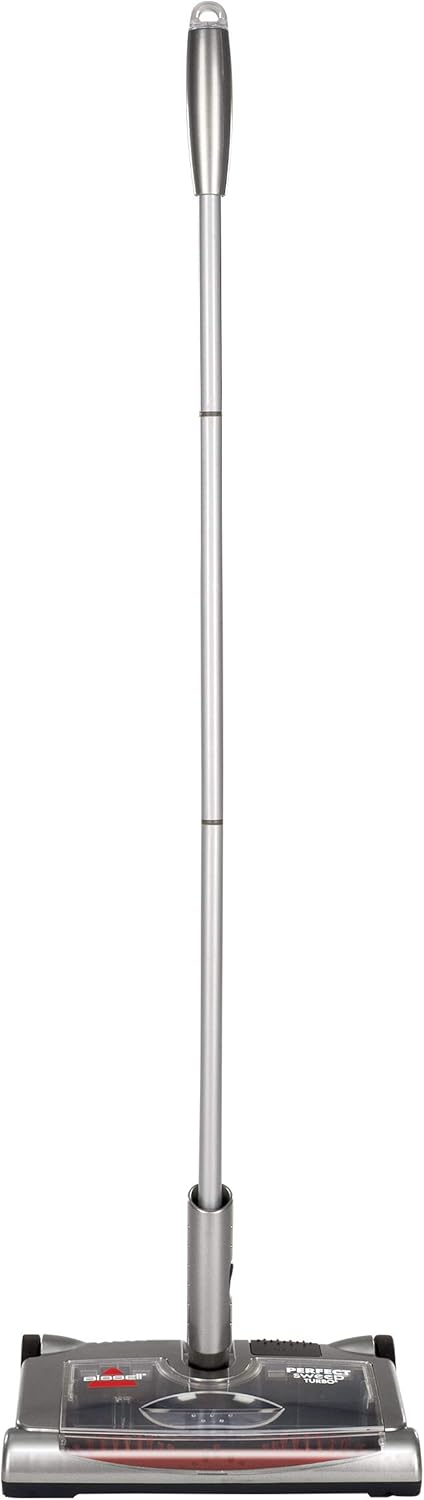
Figure 1: Bissell Perfect Sweep Turbo Cordless Rechargeable Sweeper.
Key Components:
- Handle: Ergonomic handle for comfortable use.
- Power Switch: Located on the sweeper head for easy activation.
- Charging Port: For connecting the power adapter to recharge the battery.
- Dirt Cup: Transparent, removable container for collecting debris.
- Brush Roll: Motorized brush for effective sweeping on multiple surfaces.
- Rubber Wheels: Designed for smooth gliding across various floor types.
Setup and Initial Charging
Assembly:
The sweeper handle typically comes in multiple sections that screw together. Align the sections and twist clockwise until secure. Insert the assembled handle into the designated slot on the sweeper head.
Initial Charging:
Before first use, fully charge the sweeper for at least 16 hours. The charging port is located on the side or back of the sweeper head. A red indicator light will illuminate during charging. The light may not change color or turn off when fully charged, depending on the model.

Figure 2: Location of the charging port on the sweeper.
Operating Instructions
Turning On/Off:
To turn the sweeper on, press the power button located on the top of the sweeper head, often with your foot. Press it again to turn the unit off.
Sweeping Surfaces:
The Perfect Sweep Turbo is designed for use on various surfaces, including hard floors, carpets, and area rugs. Glide the sweeper over the desired area to pick up debris. The rotating brush effectively captures dirt and crumbs.

Figure 3: Sweeper in use on a hard floor, effectively collecting debris.

Figure 4: Sweeper transitioning from hard floor to carpet, demonstrating multi-surface capability.

Figure 5: The low-profile design allows the sweeper to easily reach under furniture for thorough cleaning.

Figure 6: Visual representation of the sweeper's versatility across hard floors, carpet, and area rugs.
Video Demonstrations:
Demonstration of Sweeper Performance
Video 1: This video demonstrates the Bissell Perfect Sweep Turbo in action, showcasing its ability to pick up various types of debris on different floor surfaces. It highlights the ease of use and effective cleaning performance.
Cleaning Pet Hair with the Sweeper
Video 2: Watch how the Bissell Perfect Sweep Turbo efficiently picks up pet hair from hard floors and carpets, making it a useful tool for pet owners.
Easy Carpet Cleaning
Video 3: This video illustrates the ease of cleaning carpets with the Bissell Perfect Sweep Turbo, demonstrating its maneuverability and effectiveness on carpeted surfaces.
Maintenance
Emptying the Dirt Cup:
The transparent dirt cup allows you to see when it needs emptying. To empty, simply pull the dirt cup straight out from the front of the sweeper head. Dispose of the collected debris and slide the dirt cup back into place until it clicks securely.

Figure 7: Demonstrates how to easily remove and empty the dirt cup.
Cleaning the Brush Roll:
Periodically check the brush roll for tangled hair, strings, or other debris that may reduce performance. Turn off the sweeper and remove the dirt cup. Carefully remove any obstructions from the brush roll. A damp cloth can be used to wipe down the brush and surrounding areas.

Figure 8: View of the sweeper's underside, highlighting the brush roll for cleaning and maintenance.
Troubleshooting
| Problem | Possible Cause | Solution |
|---|---|---|
| Sweeper will not turn on. | Battery is not charged. | Charge the unit for at least 16 hours. |
| Sweeper not picking up debris. | Dirt cup is full. | Empty the dirt cup. |
| Brush roll is clogged. | Remove hair and debris from the brush roll. | |
| Sweeper stops during operation. | Battery is low. | Recharge the sweeper. |
Specifications
- Brand: Bissell
- Model Name: Bissell Perfect Sweep Turbo Rechargeable Carpet Sweeper
- Model Number: 28806
- Color: Gray
- Recommended Uses: Carpet, Hard Floor, Rug
- Bristle Material: Synthetic
- Handle Material: Metal
- Special Feature: Lightweight, Wheels
- Product Dimensions: 12.75"W x 43.5"H
- Item Weight: 4 Pounds
- Dirt Cup Capacity: 480 ml
- Assembly Required: Yes
- Batteries Required: No (Rechargeable battery included)
Warranty and Support
This product comes with a Limited 1-year warranty. For warranty claims, technical support, or to purchase replacement parts, please visit the official Bissell website or contact their customer service. You can find more information and support at the Bissell Store on Amazon.


