
1. Product Overview
The Beetel X66N is a 2.4GHz digital cordless phone designed for reliable communication. It features a phone book, caller ID, speakerphone functionality, and an illuminated keypad for ease of use.
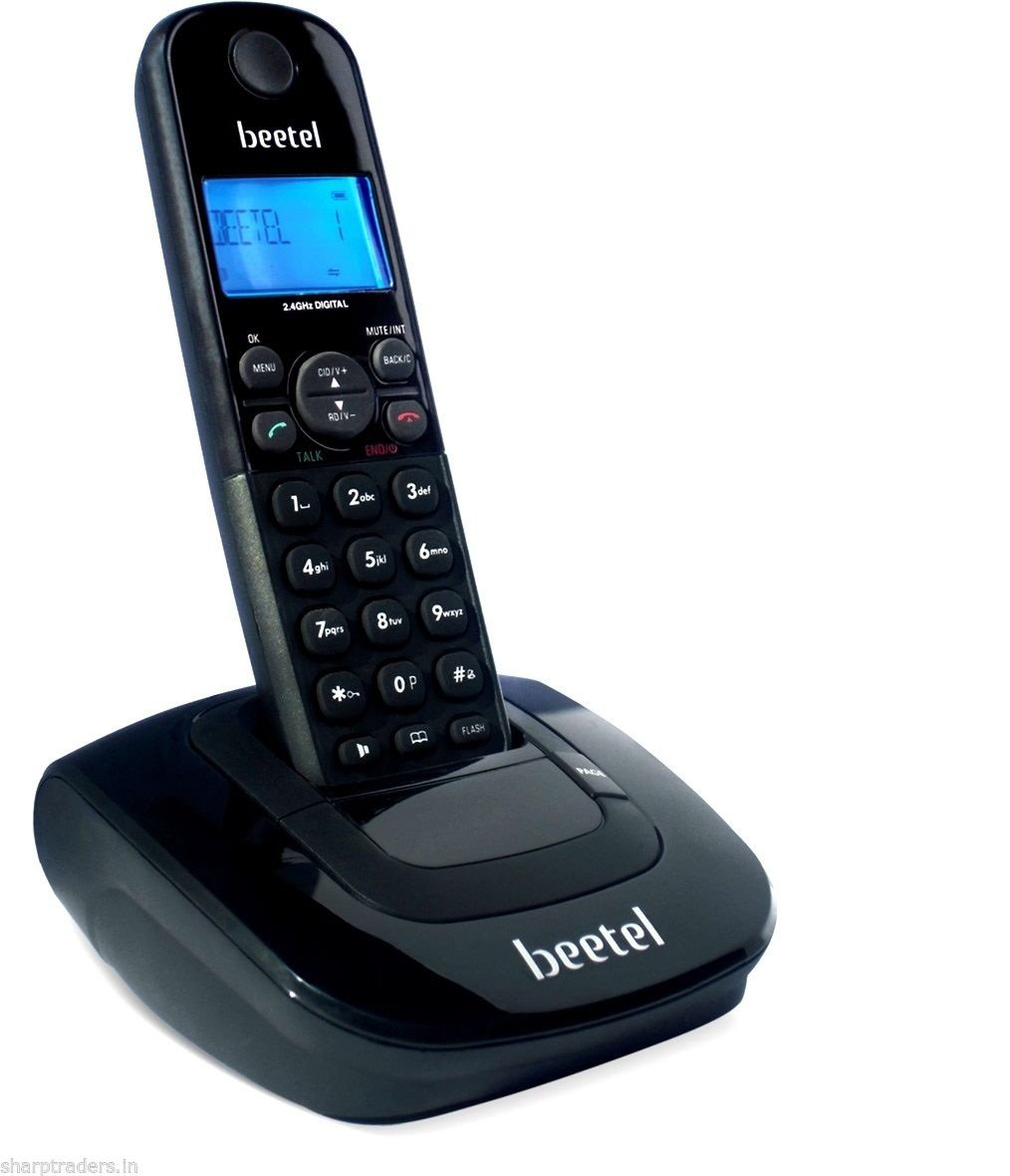
Image 1.1: Beetel X66N Cordless Phone, showing the handset and base unit.
Key Features:
- 2.4GHz Digital Technology
- 50-entry Phone Book Memory
- 20-entry Caller Line Identification (CLI) Memory
- 10-entry Outgoing Call Memory
- Two-way Speakerphone
- 10 Selectable Ring Tones
- Backlight LCD Display
- Illuminated Keypad
- Up to 8 hours Talk-Time
- Up to 4 days Stand-by Time
- Conference Call Capability
2. Setup Guide
2.1 Package Contents
Before proceeding, ensure all items are present:
- Beetel X66N Handset
- Base Unit
- Power Adapter
- Telephone Line Cord
- Rechargeable AAA Batteries (2x)
- User Manual (this document)
2.2 Battery Installation
- Locate the battery compartment cover on the back of the handset.
- Slide the cover downwards and remove it.
- Insert the two AAA rechargeable batteries, observing the correct polarity (+ and -) as indicated inside the compartment.
- Replace the battery compartment cover, sliding it upwards until it clicks into place.
2.3 Connecting the Base Unit
- Connect one end of the telephone line cord to the LINE jack on the base unit.
- Connect the other end of the telephone line cord to your telephone wall jack.
- Plug the small end of the power adapter into the DC IN jack on the base unit.
- Plug the large end of the power adapter into a standard electrical outlet.
- Place the handset on the base unit to begin charging. The display should indicate charging.
Important: Allow the handset to charge for at least 12-15 hours before initial use, even if the display indicates a full charge. This ensures optimal battery performance.
3. Operating Instructions
3.1 Making a Call
- Pick up the handset from the base or press the TALK button.
- Dial the desired phone number using the keypad.
- To end the call, press the END button or place the handset back on the base.
3.2 Receiving a Call
When the phone rings:
- Press the TALK button.
- Alternatively, if the Auto Answer feature is enabled, simply lift the handset from the base.
3.3 Using the Speakerphone
During a call, press the SPEAKER button to activate the two-way speakerphone. Press it again to switch back to the handset earpiece.
3.4 Phone Book
The phone book stores up to 50 entries. To access, add, or edit entries:
- Press the MENU button.
- Navigate to 'PHONE BOOK' using the arrow keys and press SELECT.
- Follow the on-screen prompts to add new entries, search for contacts, or edit existing ones.
3.5 Caller ID (CLI)
The phone stores the last 20 incoming calls. To review:
- Press the CID button.
- Use the arrow keys to scroll through the call list.
- To call back a number, press the TALK button while the number is displayed.
3.6 Ringtones
The phone offers 10 different ringtones. To change the ringtone:
- Press the MENU button.
- Navigate to 'SETTINGS' or 'RING TONE' and press SELECT.
- Scroll through the available ringtones and press SELECT to confirm your choice.
4. Maintenance
4.1 Cleaning
To clean the phone, use a soft, slightly damp cloth. Do not use abrasive cleaners or solvents. Ensure the phone is disconnected from power before cleaning.
4.2 Battery Care
- Always use the provided rechargeable AAA batteries. Using non-rechargeable batteries can damage the phone.
- If the phone will not be used for an extended period, remove the batteries to prevent leakage.
- Replace batteries when their performance significantly degrades (e.g., shorter talk time, frequent low battery warnings).
4.3 General Care
- Avoid exposing the phone to extreme temperatures, direct sunlight, or high humidity.
- Keep the phone away from water and other liquids.
- Do not drop the phone or subject it to strong impacts.
5. Troubleshooting
If you encounter issues with your Beetel X66N, refer to the following common problems and solutions:
5.1 No Dial Tone / Cannot Make or Receive Calls
- Ensure the telephone line cord is securely connected to both the base unit and the wall jack.
- Verify that the power adapter is correctly plugged into the base unit and a working electrical outlet.
- Check if your landline service is active by testing with another phone, if available.
- Ensure the handset batteries are charged.
5.2 Low Sound Volume / Unclear Voices
- Adjust the earpiece or speakerphone volume during a call using the volume buttons on the handset.
- Ensure the handset is held correctly to your ear.
- Check for any obstructions on the earpiece or microphone.
- If using the speakerphone, ensure you are within close proximity to the handset.
5.3 Handset Not Charging
- Ensure the handset is correctly seated on the base unit. The charging indicator on the display should be active.
- Verify that the power adapter is connected to the base unit and a live power outlet.
- Clean the charging contacts on both the handset and the base unit with a dry cloth.
- Check if the batteries are inserted with correct polarity.
- If batteries are old, they may need replacement.
5.4 Interference During Calls
- Move the base unit and handset away from other electronic devices, especially Wi-Fi routers, microwaves, and cordless phones operating on different frequencies.
- Ensure the base unit is not placed near large metal objects.
6. Specifications
| Brand | Beetel |
| Model | X66N |
| Type | 2.4GHz Digital Cordless Phone |
| Display Type | Backlight LCD |
| Phone Book Memory | 50 entries |
| CLI Memory | 20 entries |
| Outgoing Memory | 10 entries |
| Talk-Time | Up to 8 hours |
| Stand-by Time | Up to 4 days |
| Batteries | 2 x AAA Rechargeable (Lithium Ion) |
| Power Source | Corded Electric |
| Product Dimensions (LxWxH) | 18.2 x 16 x 6.8 cm |
| Item Weight | 400 g |
7. Warranty and Support
For warranty information and customer support, please refer to the documentation provided at the time of purchase or contact your retailer. Warranty terms and conditions may vary by region and seller.
Please retain your proof of purchase for any warranty claims.