
Introduction
This manual provides essential information for the proper use and maintenance of your Motorola Solutions PMLN6129A 2-Wire Surveillance Kit. Please read these instructions carefully before using the product to ensure optimal performance and safety. This kit is designed for discreet communication with compatible two-way radios.
Product Overview
The Motorola Solutions PMLN6129A is a 2-wire surveillance kit engineered for discreet and reliable communication. It features a streamlined design with durable, rugged cables built to withstand demanding working conditions. The kit includes a quick-disconnect, comfortable translucent tube for the earpiece, allowing for easy sharing between users or shifts.
Key Features:
- Durable, Rugged Cables: Designed to endure tough environments.
- Two-Wire Design: One wire for receiving transmissions and a separate wire with a combined microphone and Push-to-Talk (PTT) button.
- Quick-Disconnect Translucent Tube: Enhances comfort and allows for hygienic sharing.
- IMPRES Technology: Facilitates communication between the radio and audio accessory for optimal audio performance, enhanced audio gain, and customization.
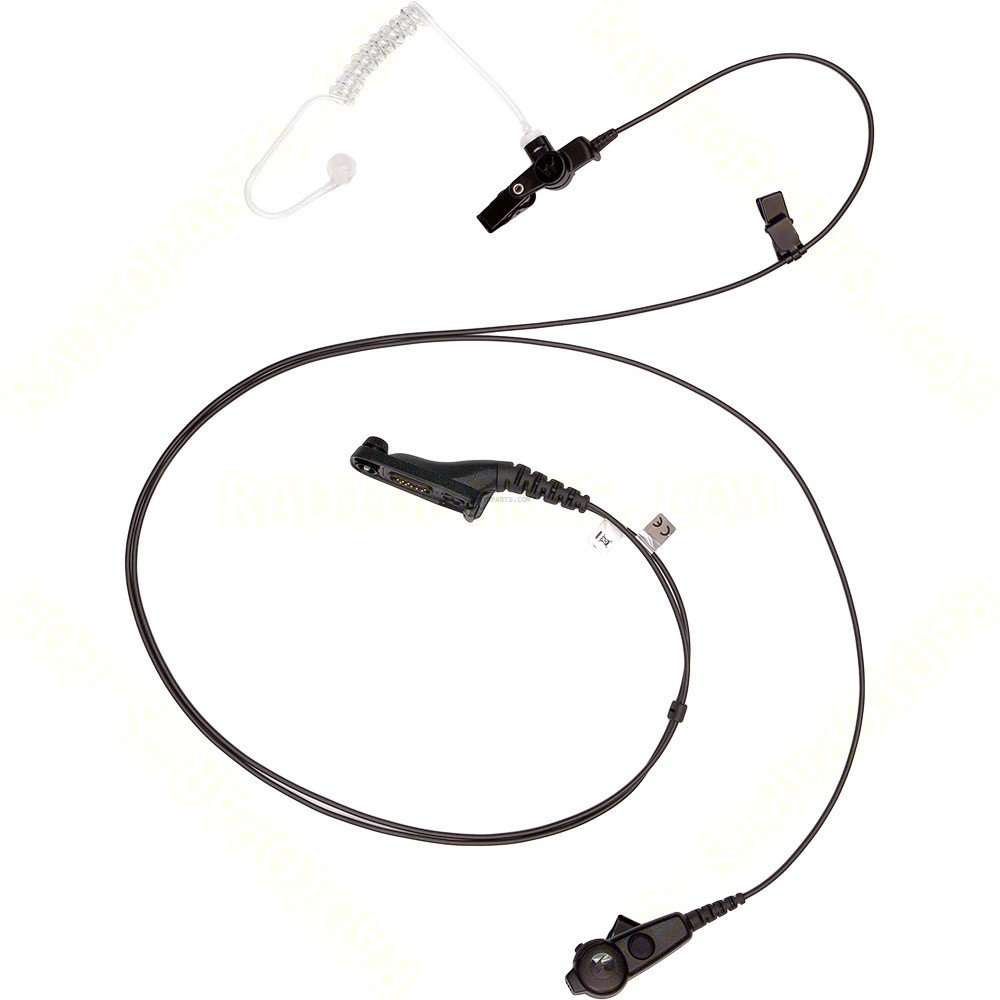
Image showing the Motorola Solutions PMLN6129A 2-Wire Surveillance Kit, featuring the earpiece with translucent acoustic tube, the microphone, and the push-to-talk button.
Package Contents
Upon unpacking, please verify that all items are present and in good condition:
- Motorola Solutions PMLN6129A 2-Wire Surveillance Kit
- Instruction Manual (this document)
Setup
- Connect to Radio: Locate the accessory port on your compatible two-way radio. Align the connector of the PMLN6129A kit with the radio's port and firmly insert it until it clicks into place. Ensure a secure connection.
- Attach Translucent Tube: If not already attached, connect the translucent acoustic tube to the earpiece. Gently push the tube's connector onto the earpiece's output nozzle.
- Earpiece Placement: Insert the earpiece comfortably into your ear. Adjust the acoustic tube for optimal fit and sound delivery.
- Cable Routing: Route the cables discreetly under clothing, ensuring they do not snag or interfere with movement. Position the microphone and Push-to-Talk (PTT) button in an easily accessible location.
Operating Instructions
- Receiving Transmissions: Audio from your radio will be transmitted directly to the earpiece. Adjust your radio's volume for a clear listening level.
- Transmitting (Push-to-Talk - PTT): To speak, press and hold the PTT button located on the cable. Speak clearly into the microphone. Release the PTT button when you have finished speaking to return to receive mode.
- IMPRES Technology: The kit utilizes IMPRES technology, which automatically optimizes audio performance and gain when connected to compatible Motorola IMPRES radios. This ensures consistent and high-quality communication.
Compatibility
The Motorola Solutions PMLN6129A 2-Wire Surveillance Kit is compatible with the following Motorola two-way radio series:
- APX 2000, APX 4000
- DP3400, DP3401, DP3600, DP3601
- DP4400/DP4401, DP4600/DP4601, DP4800/DP4801
- XPR 6300, XPR 6350, XPR 6380, XPR 6500, XPR 6550, XPR 6580
Ensure your radio model is listed above for proper functionality. For other models, consult your radio's documentation or Motorola Solutions.
Maintenance
Cleaning:
- Earpiece and Translucent Tube: Regularly clean the earpiece and translucent tube with a mild disinfectant wipe or a soft cloth dampened with rubbing alcohol. Ensure the tube is dry before reassembly.
- Cables and PTT: Wipe down cables and the PTT button with a damp cloth. Avoid using harsh chemicals or abrasive cleaners.
Storage:
- Store the kit in a clean, dry place away from extreme temperatures and direct sunlight.
- Avoid tightly coiling the cables to prevent damage.
Troubleshooting
If you encounter issues with your surveillance kit, please refer to the following common troubleshooting steps:
- No Audio in Earpiece:
- Ensure the kit is securely connected to the radio.
- Check the radio's volume level.
- Verify the translucent tube is properly attached to the earpiece.
- Test with another compatible accessory if available to isolate the issue.
- Cannot Transmit (PTT not working):
- Ensure the PTT button is fully depressed when attempting to transmit.
- Check the radio's settings to ensure external PTT is enabled, if applicable.
- Verify the kit's connection to the radio.
- Unclear or Distorted Audio:
- Check for any kinks or damage to the acoustic tube.
- Ensure the earpiece is clean and free of debris.
- Adjust the radio's audio settings.
If problems persist after attempting these steps, please contact Motorola Solutions customer support or your product vendor.
Specifications
| Feature | Specification |
|---|---|
| Model Name | PMLN6129A |
| Brand | Motorola Solutions |
| Cable Type | 2-Wire |
| Connector Type | Audio Connectors / Radio Connectors |
| Special Feature | Two-Wire with Push-to-Talk |
| Recommended Uses | Surveillance and discreet communication |
| Item Weight | 1 Ounce |
| Product Dimensions | 47 x 1 x 1 inches |
| Outer Material | Plastic |
Warranty Information
Motorola Solutions typically offers a 12-month warranty on its accessories. However, warranty terms and conditions may vary based on the region and point of purchase. Please retain your proof of purchase. For specific warranty details and claims, refer to the documentation included with your product or contact Motorola Solutions directly. If purchased through a reseller, consult their warranty policy.
Support
For technical assistance, product inquiries, or further support, please contact Motorola Solutions customer service. You can typically find contact information on the official Motorola Solutions website or through your authorized dealer.
Motorola Solutions Official Website: www.motorolasolutions.com


