
Dorman 1611604
Dorman 1611604 Driver Side Tail Light Assembly Instruction Manual
Brand: Dorman | Model: 1611604
Product Overview
The Dorman 1611604 Driver Side Tail Light Assembly is a direct replacement component designed to match the fit, function, and appearance of the original tail light on specific vehicle applications. This assembly is engineered to address common failures such as burned-out bulbs, moisture intrusion, and corrosion that can affect the original equipment.
Compatibility: This tail light assembly is compatible with select Honda Pilot models from 2009 to 2015. Always verify fitment for your specific vehicle year and trim before installation.
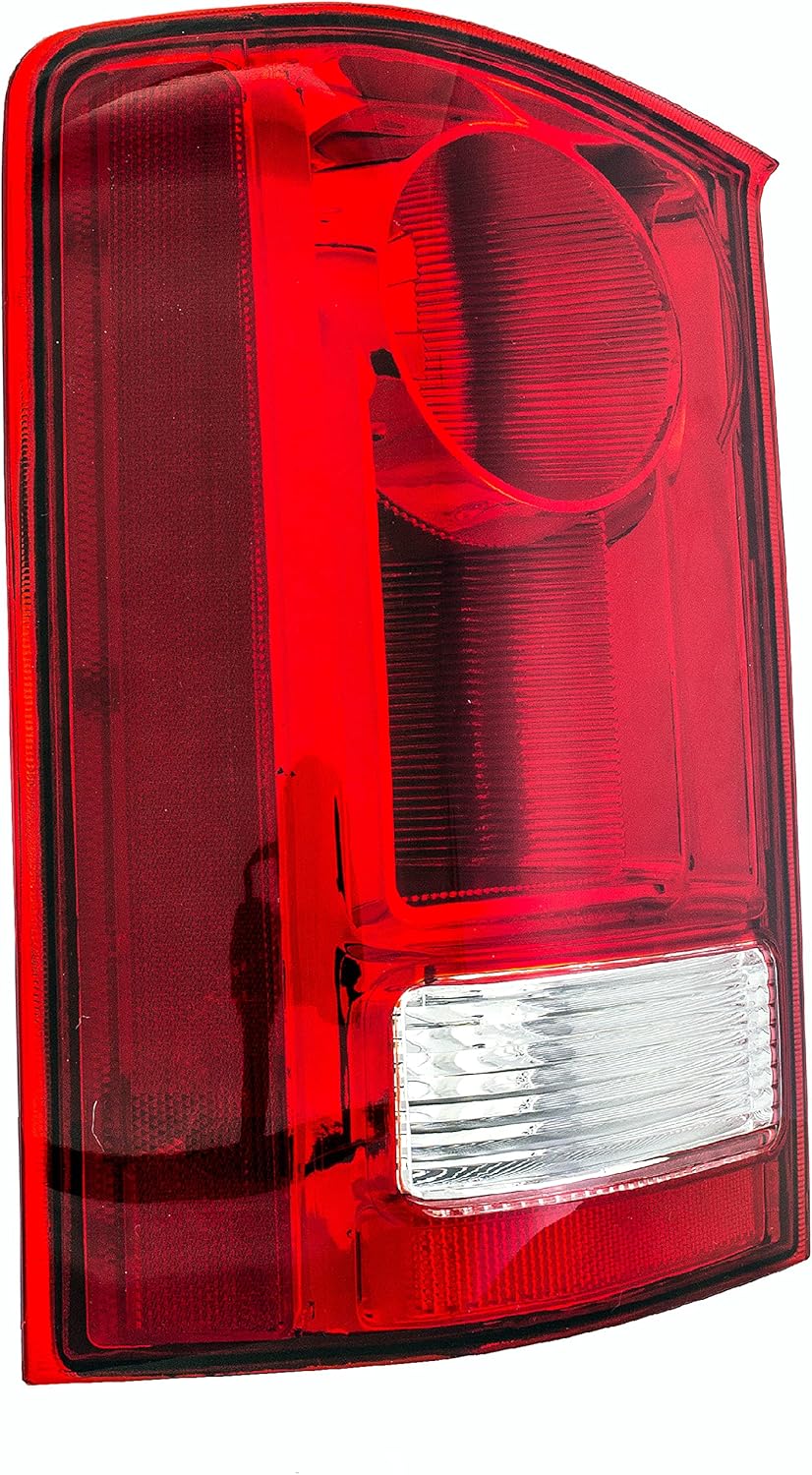
Figure 1: Front view of the Dorman 1611604 Driver Side Tail Light Assembly.
Installation (Setup)
Installation of the Dorman 1611604 Tail Light Assembly is designed to be straightforward, often requiring only simple hand tools. Most assemblies can be installed in less than an hour.
Installation Steps:
- Preparation: Ensure the vehicle's ignition is off and the parking brake is engaged. For safety, disconnect the vehicle's battery if working with electrical components.
- Access: Depending on your vehicle's design, you may need to access the tail light assembly from inside the trunk or by removing exterior trim panels. Refer to your vehicle's service manual for specific access instructions.
- Disconnect Old Assembly: Carefully disconnect the electrical connector from the existing tail light assembly. Remove any mounting screws, nuts, or clips securing the old assembly.
- Remove Old Assembly: Gently pull the old tail light assembly away from the vehicle. Be mindful of any remaining clips or alignment pins.
- Inspect Area: Clean the mounting area and inspect for any signs of moisture damage or corrosion. Address any issues before installing the new part.
- Install New Assembly: Position the Dorman 1611604 Tail Light Assembly into the opening. Ensure all mounting points align correctly.
- Secure Assembly: Reinstall all mounting screws, nuts, or clips removed in step 3. Tighten securely but do not overtighten.
- Connect Wiring: Connect the plug-and-play wiring harness of the new assembly to the vehicle's electrical connector. Ensure a secure connection.
- Test Functionality: Reconnect the vehicle's battery (if disconnected). Test the brake lights, turn signals, and running lights to ensure proper operation.

Figure 2: Rear view of the Dorman 1611604 Tail Light Assembly, highlighting the wiring connection.
Video 1: Overview of the Dorman Third Brake Light Assembly, including common issues and installation insights. This video demonstrates the importance of the third brake light and the ease of replacing it with a Dorman assembly.
Operation
The Dorman 1611604 Driver Side Tail Light Assembly functions as a direct replacement for your vehicle's original tail light. It integrates seamlessly with your vehicle's electrical system to provide essential lighting for safety and compliance.
- Brake Light Function: Illuminates brightly when the brake pedal is pressed, signaling deceleration to following vehicles.
- Running Light Function: Provides continuous illumination when the vehicle's headlights or parking lights are on, enhancing visibility.
- Turn Signal Function: Flashes to indicate an intended turn or lane change.
- Reverse Light Function: Illuminates when the vehicle is in reverse gear, providing visibility for backing up.
This assembly utilizes long-lasting LED bulbs, which offer superior durability and longevity compared to traditional incandescent bulbs, even if your original vehicle used incandescent bulbs.
Maintenance
The Dorman 1611604 Tail Light Assembly is designed for durability and minimal maintenance. The upgraded seals help prevent moisture intrusion, a common issue with original units.
- Regular Inspection: Periodically check the tail light assembly for any signs of physical damage, cracks, or dimming lights. Ensure all light functions (brake, running, turn, reverse) are operating correctly.
- Cleaning: Keep the lens clean from dirt, dust, and road grime using a soft cloth and mild automotive cleaner. Avoid abrasive materials that could scratch the lens.
- Seal Integrity: While the seals are upgraded, it is good practice to occasionally check around the edges of the assembly for any signs of water leakage or condensation inside the lens.
Troubleshooting
If you experience issues with your Dorman 1611604 Tail Light Assembly after installation, consider the following troubleshooting steps:
- Light Not Illuminating:
- Check Connection: Ensure the electrical connector is fully seated and secure.
- Check Fuses: Consult your vehicle's owner's manual for the location of the fuse box and check the relevant fuse for the tail lights. Replace if blown.
- Vehicle Wiring: Inspect the vehicle's wiring harness for any cuts, pinches, or corrosion that might interrupt the electrical flow.
- Dim or Flickering Light:
- Electrical Connection: A loose or corroded electrical connection can cause dimming or flickering. Disconnect and reconnect the harness.
- Vehicle's Electrical System: Issues with the vehicle's alternator or battery can sometimes lead to inconsistent power delivery.
- Moisture Inside Lens:
- While the Dorman assembly features upgraded seals, extreme conditions or improper installation can sometimes lead to condensation. Ensure the assembly is properly seated and sealed against the vehicle body. If persistent, inspect the seals for damage.
If troubleshooting does not resolve the issue, it is recommended to consult a qualified automotive technician.
Specifications
| Brand | Dorman |
| Model Number | 1611604 |
| Specific Uses For Product | Rear Lights |
| Vehicle Service Type | Car |
| Compatible Years (Honda Pilot) | 2009, 2010, 2011, 2012, 2013, 2014, 2015 |
| Special Feature | Waterproof |
| Wattage | 35 watts |
| Auto Part Position | Rear |
| Lens Color | Red |
| Lens Material | Plastic |
| Item Dimensions (L x W x H) | 95.64 x 49.45 x 27.26 inches |
| Item Weight | 4.22 pounds |
| UPC | 747214079933 |
| Assembly Required (Product) | No |
| Automotive Fit Type | Vehicle Specific Fit |
| Manufacturer Part Number | 1611604 |
| OEM Part Numbers | 11629400; 7222-0044L; HD567-B000L; 33550-SZA-A01 |
Warranty and Support
For specific warranty information regarding the Dorman 1611604 Driver Side Tail Light Assembly, please refer to the documentation included with your purchase or visit the official Dorman website.
If you require further assistance, technical support, or have questions about product compatibility, please contact Dorman customer service or visit the Dorman Store on Amazon.
Ask a question about this manual
Ask about setup, troubleshooting, compatibility, parts, safety, or missing instructions. Manuals+ will review the question and use this page’s manual context to help answer it.