
Product Overview
The Watts Premier WP105381 VOC Filter is designed for use with Watts Premier RO Pure (WP531411, WP531407) or Zero/Pure Plus (WP531517, WP531417) under-sink reverse osmosis systems. This filter is specifically formulated to reduce Volatile Organic Compounds (VOCs) and other contaminants, filtering particles as small as 1-micron. It also serves as a final polishing filter to improve water taste.
Note: This product is not compatible with Watts 1/4 Turn Kwik-Change RO Systems.
Filter Types and Replacement Schedule
The Watts Premier RO Pure Plus Reverse Osmosis System utilizes a multi-stage filtration process. The WP105381 is a 1-micron VOC Carbon Block Filter.
- 5 Micron Sediment Filter (Red Label): Replaced every 6 months.
- 5 Micron Pre-Carbon Filter (Yellow Label): Replaced every 6 months.
- 50 GPD RO Membrane Filter (Green Label): Replaced every 2 to 5 years.
- 1 Micron VOC Carbon Block Filter (Silver Label - WP105381): Replaced once a year.
Official video: Overview of Watts Premier RO Pure Plus Filter Kits and their replacement schedule.
Filter Replacement Instructions
The Watts Premier RO Pure Plus system features a push-button release mechanism for easy filter replacement. No special tools are required, and the water source does not need to be shut off for individual filter changes.
- Step 1: Press the Release Button. Locate the filter to be replaced. Press the small button on top of the filter housing firmly.
- Step 2: Pull the Old Filter Out. While holding the release button, gently pull the old filter cartridge downwards and out of the system.
- Step 3: Prepare the New Filter. Remove the new filter from its packaging. Ensure the O-rings are properly seated.
- Step 4: Push the New Filter In. Align the new filter with the housing and push it upwards until it clicks securely into place. Ensure the filter is fully seated.
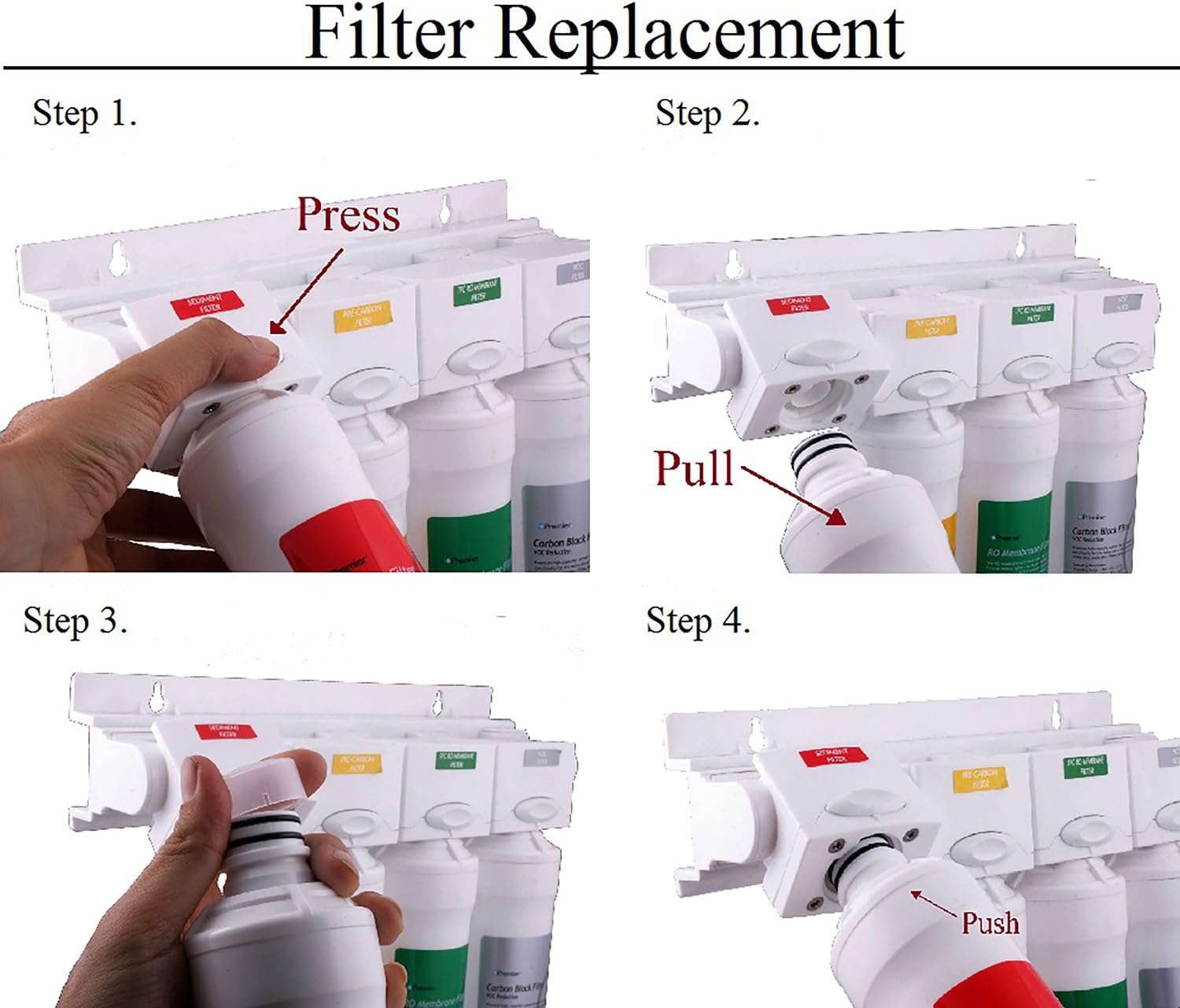
Image: Visual guide for replacing Watts Premier RO Pure Plus filters.
After replacing any filter, it is recommended to flush the system according to your RO system's manual to remove any air or carbon fines.
System Compatibility
This VOC filter (WP105381) is designed for specific Watts Premier RO Pure and Zero/Pure Plus systems that feature push-button release filters with color-coded caps. It is crucial to verify your existing system's filter type before purchasing replacements.

Image: Visual guide for identifying compatible Watts Premier RO systems for WP105381 filters.
Compatible Systems: Watts Premier RO Pure (WP531411, WP531407) and Zero/Pure Plus (WP531517, WP531417) systems with push-button, color-coded filters.
Incompatible Systems: Watts 1/4 Turn Kwik-Change RO Systems or systems with filters that do not have push-buttons or feature bird designs on the labels.
Specifications
| Model Number | WP105381 |
| Filter Type | 1-Micron VOC Carbon Block Filter |
| Compatibility | Watts Premier RO Pure (WP531411, WP531407) and Zero/Pure Plus (WP531517, WP531417) systems |
| Replacement Frequency | Annually (once a year) |
| Flow Rate | 0.5 GPM (1.89 lpm) |
| Material | Plastic |
| External Testing Certification | NSF, ANSI |
| Item Weight | 0.5 Pounds |
Troubleshooting
- Low Water Flow: Check if filters are due for replacement. Ensure proper installation of all filters. Verify water pressure to the RO system.
- Unusual Taste or Odor: Replace all filters, especially the carbon block and VOC filters, if due. Flush the system thoroughly after replacement.
- Leaking: Ensure all filters are securely seated and O-rings are not damaged. Check all connections for tightness.
For persistent issues, consult the complete Watts Premier RO system manual or contact Watts Premier customer support.
Support
For additional support, product information, or warranty details, please visit the official Watts Premier website or contact their customer service department.
Watts Premier Store: Visit Store