
Fotopro QP-903L
Fotopro QP-903L Extendable Handheld Monopod Instruction Manual
Model: QP-903L
1. Introduction
This manual provides instructions for the safe and effective use of your Fotopro QP-903L Extendable Handheld Monopod. Please read this manual thoroughly before operating the device and retain it for future reference.
The Fotopro QP-903L is an extendable monopod designed for use with compact digital cameras and mobile phones. It features a durable aluminum alloy construction, a non-slip foam handle, and a universal 1/4-inch screw for device attachment.
2. Safety Information
- Do not exceed the maximum load capacity of 450g.
- Ensure all connections are secure before use to prevent accidental drops.
- Avoid using the monopod in extreme weather conditions or near water unless specifically designed for such environments.
- Keep out of reach of children.
- Do not attempt to disassemble or modify the monopod.
3. Package Contents
Verify that all items are present in your package:
- Fotopro QP-903L Extendable Handheld Monopod
- Adjustable Smartphone Adapter (if included with your specific purchase)
- Wrist Strap

Image: Fotopro QP-903L Monopod in its retail packaging, showing the monopod and a smartphone adapter.
4. Product Features
- Material: Aluminum alloy and plastic
- Socket Size: Universal 1/4 inch screw
- Max Load: 450g
- Minimum Length: 30 cm
- Maximum Length: 95 cm
- Maximum Diameter: 2.2 cm
- Wrist Strap Length: 15 cm
- Segments: 4 extendable segments
- Handle: Non-slip soft foam handle
- Ball Head: Adjustable ball head for 180-degree positioning

Image: The Fotopro QP-903L monopod fully extended, showing its length and the camera mount at the top.
5. Setup
5.1 Attaching a Camera
- Locate the 1/4-inch screw at the top of the monopod.
- Align the tripod socket on your compact camera with the screw.
- Gently rotate your camera clockwise onto the screw until it is securely fastened. Do not overtighten.

Image: A close-up view of the universal 1/4-inch screw interface and the protective rubber pad at the top of the monopod, designed for attaching cameras.
5.2 Attaching a Smartphone
If your package includes a smartphone adapter:
- Attach the smartphone adapter to the 1/4-inch screw on the monopod, rotating clockwise until secure.
- Open the spring-loaded clamp of the smartphone adapter.
- Carefully insert your smartphone into the adapter, ensuring it is held firmly. The adapter is suitable for phones with a width between 5.5 cm and 8.5 cm.
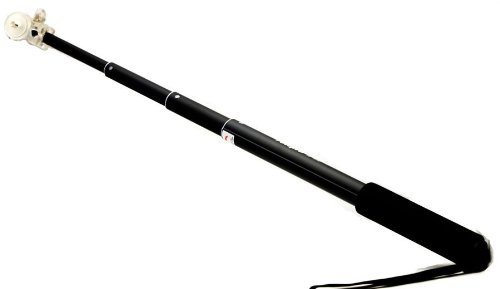
Image: A black smartphone adapter with dimensions indicated, showing it can hold devices between 5.5 cm and 8.5 cm in width.
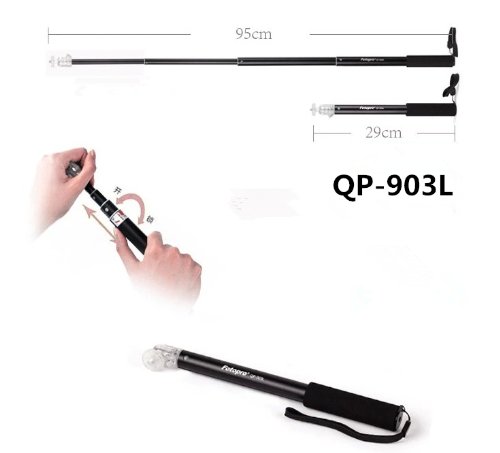
Image: The monopod with a smartphone attached via an adapter, demonstrating how a phone is mounted for use.
6. Operating Instructions
6.1 Extending and Retracting the Monopod
- To extend: Hold the handle firmly and pull the top section upwards. The segments will extend and lock into place. Continue pulling each segment until the desired length is achieved, up to 95 cm.
- To retract: Push each segment back into the main body until the monopod is fully collapsed to its minimum length of 30 cm.

Image: An illustration demonstrating the extension and retraction mechanism of the monopod, showing how to twist and pull to adjust its length from 29cm to 95cm.
6.2 Adjusting the Angle
The monopod features an adjustable ball head:
- Gently loosen the locking mechanism on the ball head (if present, some models are friction-based).
- Adjust your camera or smartphone to the desired angle (up to 180 degrees).
- Tighten the locking mechanism to secure the angle.
6.3 Using the Wrist Strap
For added security, loop the wrist strap around your wrist while holding the monopod to prevent accidental drops.
7. Maintenance
- Clean the monopod with a soft, dry cloth. Do not use abrasive cleaners or solvents.
- Store the monopod in a dry place, away from direct sunlight and extreme temperatures.
- Periodically check all connections and screws for tightness.
8. Troubleshooting
| Problem | Possible Cause | Solution |
|---|---|---|
| Monopod segments do not extend/retract smoothly. | Dirt or debris in the segments. | Clean the segments with a dry cloth. Avoid forcing the extension/retraction. |
| Device feels loose on the monopod. | Screw not tightened sufficiently or smartphone adapter not secure. | Ensure the 1/4-inch screw is tightened. For smartphones, verify the adapter is holding the phone firmly. |
| Ball head does not hold position. | Locking mechanism is loose. | Tighten the ball head locking mechanism. |
9. Specifications
| Feature | Detail |
|---|---|
| Model Number | QP-903L |
| Brand | Fotopro |
| Material | Aluminum alloy, Plastic |
| Socket Size | 1/4 inch universal screw |
| Maximum Load Capacity | 450g |
| Minimum Length (Collapsed) | 30 cm |
| Maximum Length (Extended) | 95 cm |
| Maximum Diameter | 2.2 cm |
| Wrist Strap Length | 15 cm |
| Number of Segments | 4 |
| Compatible Phone Width | 5.5 cm - 8.5 cm (with adapter) |
| UPC | 532021569315 |

Image: A table showing the specifications of the Fotopro QP-903L monopod, including collapsed length (29cm), extended length (95cm), diameter (2.2cm), wrist strap length (15cm), and load capacity (450g).
10. Warranty and Support
For warranty information and customer support, please refer to the documentation provided with your purchase or contact Fotopro customer service directly. Contact details for the importer are:
Importer: Big Trends
Address: D50, G-3 Hari Alokik Height, Subhash Marg, C-Scheme, Jaipur
Please retain your proof of purchase for warranty claims.
Related documentsQP-903L

Ask a question about this manual
Ask about setup, troubleshooting, compatibility, parts, safety, or missing instructions. Manuals+ will review the question and use this page’s manual context to help answer it.