
Clint CLINT-OD14W-W
Clint ODIN Wireless Hi-Fi Speaker User Manual
Model: CLINT-OD14W-W
Introduction
Welcome to the world of Clint Asgard speakers. The ODIN is a large wireless hi-fi stereo speaker designed for streaming your favorite music. It is part of the Asgard series, connecting to your home Wi-Fi network (2.4 GHz) for ultimate operating range throughout your home. Its size makes it ideal for medium to larger rooms. The ODIN supports and is certified for various streaming protocols including Apple AirPlay, Spotify Connect, and DLNA. Through the Asgard app (iOS or Android), you can access features like MultiRoom functionality, TIDAL music service, thousands of internet radio stations, and music servers on your home network.
Important Safety Information
Please read all safety instructions carefully before using this product. Keep this manual for future reference.
- Do not expose the speaker to water or moisture.
- Do not block any ventilation openings.
- Do not place near heat sources such as radiators, heat registers, stoves, or other apparatus (including amplifiers) that produce heat.
- Only use attachments/accessories specified by the manufacturer.
- Unplug this apparatus during lightning storms or when unused for long periods of time.
- Refer all servicing to qualified service personnel. Servicing is required when the apparatus has been damaged in any way.
- Ensure the power supply voltage matches the voltage indicated on the unit.
Package Contents
Please check that all items are present in the box:
- Clint ODIN Wireless Hi-Fi Speaker
- Power Cable
- User Manual (this document)
Product Overview
Familiarize yourself with the different parts of your Clint ODIN speaker.
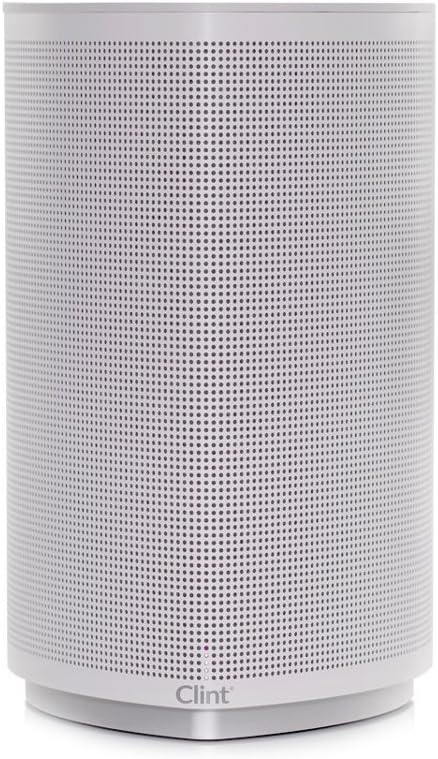
Figure 1: Front View of the ODIN Speaker. This image displays the elegant, minimalist design of the speaker with its full-front perforated grille and the subtle Clint branding at the base.

Figure 2: Side View of the ODIN Speaker. This perspective highlights the speaker's cylindrical form and the wrap-around grille design.
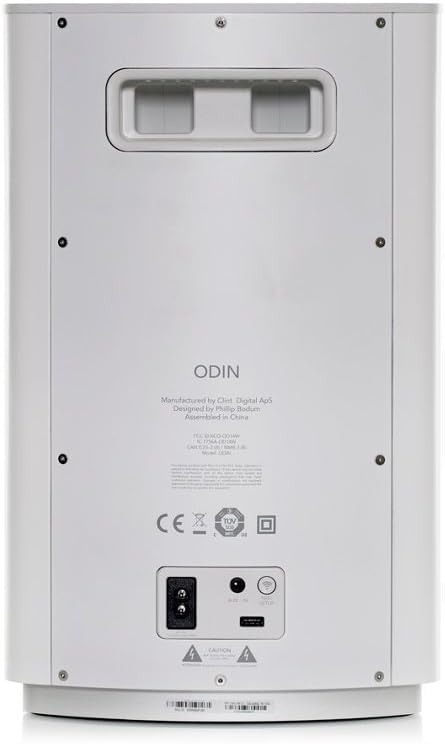
Figure 3: Rear Panel of the ODIN Speaker. This image details the connectivity options including the power input, a USB port (5V 2.4A output), and a 3.5mm auxiliary input. Regulatory compliance markings are also visible.
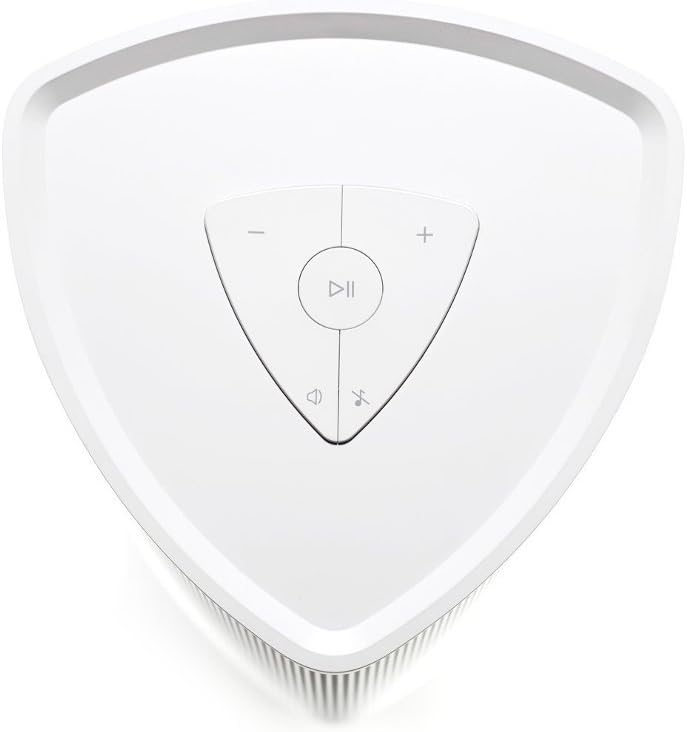
Figure 4: Top Control Panel of the ODIN Speaker. This overhead view shows the intuitive touch controls for playback (play/pause), volume adjustment (+/-), and mute/unmute.
Setup
1. Placement
The ODIN speaker is designed for floor placement. For optimal sound performance, place the speaker in a central location within your room, away from obstructions that might block the sound.
2. Power Connection
- Locate the power input on the rear panel of the ODIN speaker (refer to Figure 3).
- Connect the provided power cable to the speaker's power input.
- Plug the other end of the power cable into a standard wall outlet.
- The speaker will power on automatically or indicate readiness for setup.
3. Network Connection (Wi-Fi)
The ODIN speaker connects to your home Wi-Fi network for wireless streaming and MultiRoom functionality. A 2.4 GHz Wi-Fi network is required.
- Download the Clint Asgard app from the App Store (iOS) or Google Play Store (Android) on your smartphone or tablet.
- Open the Asgard app and follow the on-screen instructions to connect your ODIN speaker to your Wi-Fi network. This typically involves selecting your Wi-Fi network and entering the password.
- Ensure your mobile device is connected to the same Wi-Fi network you intend to connect the speaker to.
Note: If you experience difficulty connecting, ensure your Wi-Fi signal is strong and that you are entering the correct password. Refer to the Troubleshooting section if issues persist.
4. Connecting Devices
The ODIN speaker supports multiple ways to play audio:
- Apple AirPlay: For Apple devices (iPhone, iPad, Mac), select the ODIN speaker from the AirPlay menu in your audio source application.
- Spotify Connect: If you are a Spotify Premium user, select the ODIN speaker from the "Devices Available" list within the Spotify app.
- DLNA: For compatible Android devices and media servers, stream audio to the ODIN speaker via DLNA.
- 3.5mm Audio Input: Connect any device with a 3.5mm audio output (e.g., MP3 player, PC) directly to the AUX input on the rear of the speaker using a 3.5mm audio cable (not included).
Operating Instructions
1. Basic Controls (Top Panel)
Use the touch controls on the top panel (refer to Figure 4) for quick adjustments:
- Play/Pause Button: Press to play or pause the current audio.
- Volume Up (+): Press to increase the volume.
- Volume Down (-): Press to decrease the volume.
- Mute Button: Press to mute or unmute the audio.
2. Using the Clint Asgard App
The Asgard app provides comprehensive control and access to advanced features:
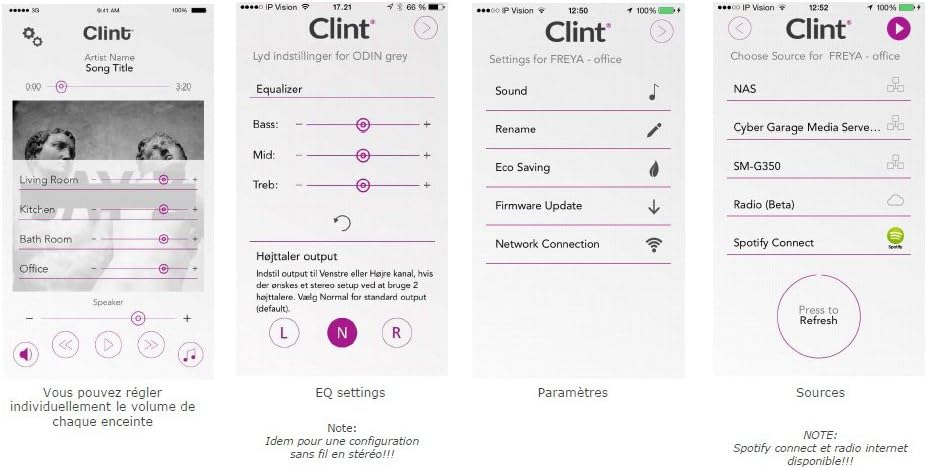
Figure 5: Clint Asgard App Interface. This image displays various screens of the app, including individual speaker volume control, equalizer settings (Bass, Mid, Treble), general settings (Eco Saving, Firmware Update, Network Connection), and source selection (NAS, Spotify Connect, Internet Radio).
- MultiRoom Functionality: Group multiple Clint Asgard speakers together to play the same music in different rooms, or play different music on each speaker.
- Music Services: Access integrated music services like TIDAL directly from the app.
- Internet Radio: Browse and play thousands of internet radio stations.
- Music Servers: Stream music from servers on your home network.
- Equalizer Settings: Adjust Bass, Mid, and Treble levels for personalized sound (as shown in Figure 5).
- Firmware Updates: Keep your speaker's software up-to-date via the app for optimal performance and new features.
3. Eco Saving Function
The ODIN speaker features an Eco Saving function. If the speaker is not used for 20 minutes, it will automatically enter standby mode to conserve power. It will wake up automatically when an audio signal is detected or when controlled via the app.
Maintenance
- Cleaning: Use a soft, dry cloth to clean the exterior of the speaker. Do not use liquid cleaners or aerosol sprays.
- Storage: If storing the speaker for an extended period, unplug it from the power outlet and store it in a cool, dry place.
- Ventilation: Ensure the speaker's ventilation openings are not blocked to prevent overheating.
Troubleshooting
| Problem | Possible Cause | Solution |
|---|---|---|
| Speaker does not power on. | Power cable not connected properly; no power from outlet. | Ensure the power cable is securely connected to both the speaker and a working wall outlet. Test the outlet with another device. |
| Cannot connect to Wi-Fi or connection drops frequently. | Incorrect Wi-Fi password; weak Wi-Fi signal; router issues; interference. |
|
| No sound from speaker. | Volume too low; speaker muted; incorrect audio source selected; source device not playing. |
|
| App cannot find the speaker. | Speaker not connected to Wi-Fi; app or speaker needs restart. |
|
Specifications
| Feature | Detail |
|---|---|
| Model Name | CLINT ODIN WIFI BLANC CRAIE |
| Model Number | CLINT-OD14W-W |
| Brand | Clint |
| Connectivity Technology | Wi-Fi (2.4 GHz), 3.5mm AUX |
| Wireless Protocols Supported | Apple AirPlay, Spotify Connect, DLNA |
| Amplifier Output Power | 2 x 25 Watts (50 Watts total) with DSP |
| Audio Output Mode | Stereo |
| USB Port Output | Up to 5V 2.4A |
| Eco Saving Function | Automatic standby after 20 minutes of inactivity |
| Compatible Devices | Home cinema, Desktop computer, Laptop, Smartphone, Tablet |
| Color | Chalk White |
| Material | Steel |
| Item Weight | 8 Kilograms |
| Product Dimensions (L x W x H) | 24.3 x 24.3 x 29 cm |
| Speaker Type | Wireless |
| Mounting Type | Floor Mount |
Warranty and Support
Clint products are designed and manufactured to the highest quality standards. For information regarding warranty coverage, technical support, or service, please refer to the official Clint website or contact your local retailer. Keep your proof of purchase for warranty claims.
Ask a question about this manual
Ask about setup, troubleshooting, compatibility, parts, safety, or missing instructions. Manuals+ will review the question and use this page’s manual context to help answer it.