
Introduction
This manual provides detailed instructions for the proper installation, operation, and maintenance of your BLOW AVH-8603 Car Radio. Please read this manual thoroughly before using the device to ensure safe and optimal performance. Keep this manual for future reference.
Safety Information
- Ensure proper wiring and connections to prevent short circuits or damage. Consult a professional for installation if unsure.
- Do not operate the device in a manner that distracts you from driving. Always prioritize road safety.
- Avoid exposing the unit to extreme temperatures, direct sunlight, or moisture.
- Do not attempt to disassemble or modify the unit. This may void the warranty and cause damage.
- Keep the volume at a level that allows you to hear external traffic sounds.
Product Overview
The BLOW AVH-8603 is a modern car radio designed for audio playback and communication. It features a 1 DIN universal size and includes multiple connectivity options.

Image: The BLOW AVH-8603 car radio unit, showing the front panel, included remote control, metal mounting frame, and wiring harness. A smartphone displaying music app icons is also shown, illustrating Bluetooth connectivity.
Key Features:
- Bluetooth Connectivity: For hands-free calling and audio streaming.
- Multiple Media Inputs: USB ports, micro SD card slot, and AUX input.
- FM Radio with RDS: Automatic tuning, station search, and Radio Data System functionality.
- High Power Output: 4x60W maximum power.
- Detachable Panel: For security.
- ISO Connector: Standardized wiring for easy installation.
- Remote Control: Included for convenient operation.
- LCD Display: Large and clear display for information.
- Equalizer: Sound settings adjustment.
Setup and Installation
Proper installation is crucial for the performance and safety of your car radio. It is recommended to have the unit installed by a qualified technician.
Installation Steps:
- Prepare the Vehicle: Disconnect the vehicle's negative battery terminal to prevent electrical shorts.
- Remove Existing Unit: Carefully remove the old car radio from the dashboard.
- Install Mounting Sleeve: Insert the metal mounting sleeve (included) into the dashboard opening and secure it.
- Connect Wiring:
- Connect the ISO wiring harness from the vehicle to the radio's ISO connector.
- Ensure all power, ground, speaker, and antenna connections are secure.
- Connect the amplifier output (RCA cables) if using an external amplifier.

Image: Rear view of the BLOW AVH-8603 car radio, highlighting the ISO connector for power and speaker wiring, as well as the RCA outputs for external amplifiers and antenna input.

Image: The metal mounting frame and the included wiring harness (ISO connectors) for the BLOW AVH-8603 car radio, essential components for installation.
- Slide in the Unit: Carefully slide the car radio into the mounting sleeve until it locks into place.
- Reconnect Battery: Reconnect the vehicle's negative battery terminal.
- Test Functionality: Turn on the unit and test all functions (radio, USB, Bluetooth, etc.) to ensure correct installation.
Operating Instructions
Front Panel Controls:
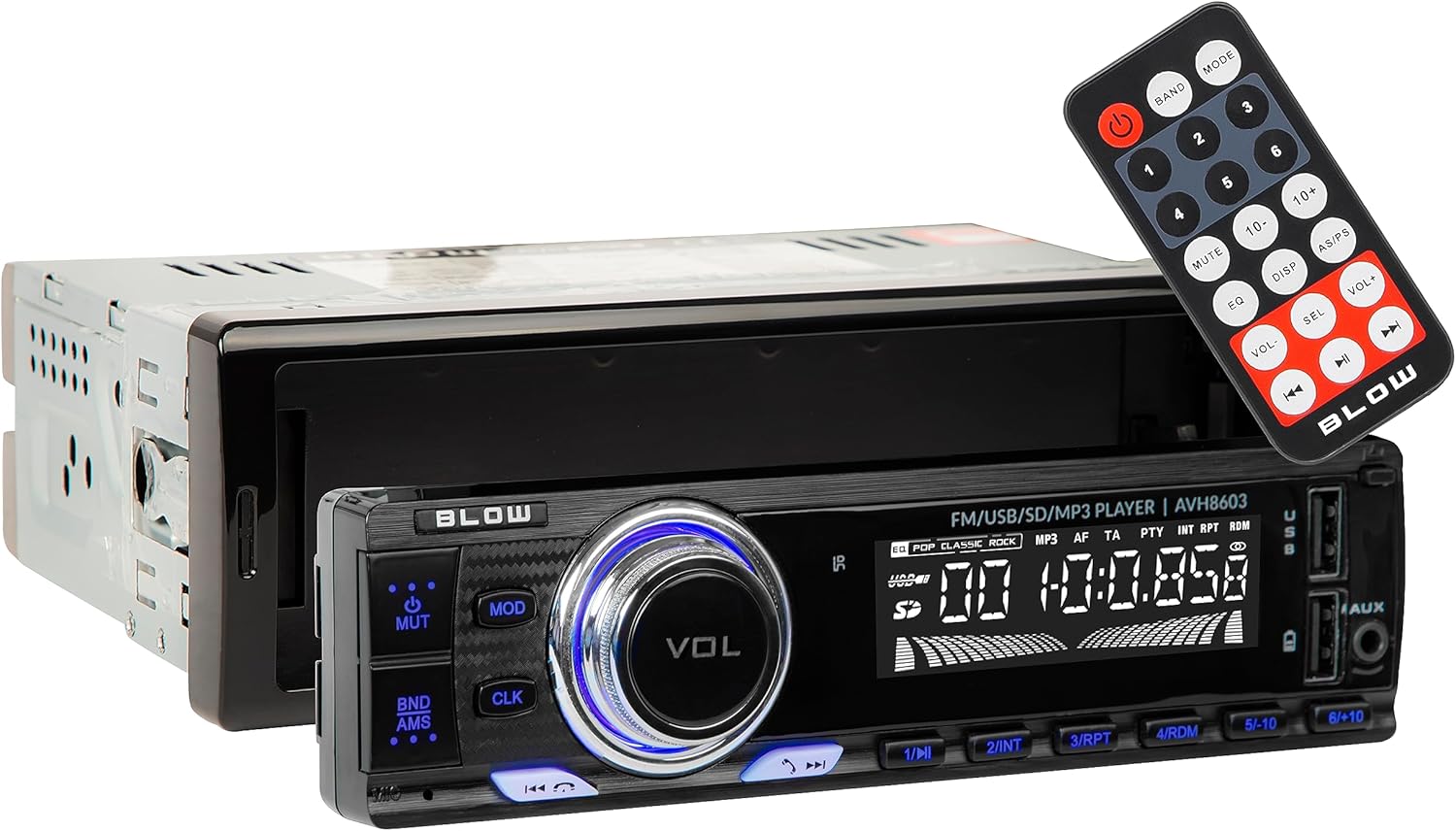
Image: The front panel of the BLOW AVH-8603 car radio, showing the main display, volume knob, control buttons, USB ports, SD card slot, and AUX input. The remote control is also visible.
- Power Button (PWR): Press to turn the unit on/off.
- Volume Knob (VOL): Rotate to adjust volume. Press to access audio settings (Bass, Treble, Balance, Fader, EQ).
- MODE Button: Press to switch between radio (FM), USB, SD, AUX, and Bluetooth modes.
- CLK Button: Press to display the clock. Hold to set the time.
- BND/AMS Button: In radio mode, press to switch between FM bands (FM1, FM2, FM3). Hold to automatically scan and save stations.
- MUTE Button: Mutes or unmutes audio.
- Navigation Buttons (<< / >>): In radio mode, short press for manual tuning, long press for automatic seek. In media mode, short press for track skip, long press for fast forward/rewind.
- Preset Buttons (1-6): In radio mode, short press to select a saved station. Hold to save the current station to that preset number.
- USB Ports: Insert USB flash drives for MP3 playback.
- SD Card Slot: Insert micro SD cards for MP3 playback.
- AUX Input: Connect external audio devices using a 3.5mm audio cable.

Image: A close-up view of the two USB ports and the AUX input jack located on the front panel of the BLOW AVH-8603 car radio, used for connecting various media devices.
Detachable Panel:
For security, the front panel of the AVH-8603 can be detached. Press the release button (usually on the left side) and gently pull the panel off. To reattach, align the panel with the main unit and press until it clicks into place.

Image: The main unit of the BLOW AVH-8603 car radio with the front panel removed, revealing the connection points and a hidden USB port, which is part of the detachable panel mechanism.
Radio Operation (FM/RDS):
- Press the MODE button until "FM" appears on the display.
- Press BND/AMS to select FM1, FM2, or FM3 band.
- Short press << or >> to manually tune to a frequency.
- Long press << or >> to automatically seek the next strong station.
- To save a station, tune to the desired frequency, then long press one of the Preset Buttons (1-6) until the display confirms saving.
- The RDS (Radio Data System) function will automatically display station information (e.g., station name, program type) if available.
Media Playback (USB/SD/AUX):
- USB/SD: Insert a USB flash drive into a USB port or a micro SD card into the SD slot. The unit will automatically switch to USB/SD mode and begin playback. If not, press MODE to select.
- AUX: Connect an external audio device (e.g., smartphone, MP3 player) to the AUX input using a 3.5mm audio cable. Press MODE to select AUX mode.
- Use << and >> buttons to skip tracks.
- Use 1/PAU to pause/play.
Bluetooth Operation:
- Pairing:
- Press the MODE button until "BT" or "BLUETOOTH" appears on the display.
- On your mobile device, enable Bluetooth and search for available devices.
- Select "BLOW AVH-8603" (or similar name) from the list.
- If prompted for a password, enter "0000".
- Once paired, the display will show "CONNECTED".
- Hands-Free Calling:
- When a call comes in, the radio will display the caller ID (if supported).
- Press the Answer button (often the green phone icon or a specific button on the remote/front panel) to answer.
- Press the End Call button (often the red phone icon or a specific button) to end the call.
- Bluetooth Audio Streaming (A2DP):
- After pairing, select music on your mobile device. The audio will stream through the car radio.
- Use the << and >> buttons on the radio or remote to control track playback.
Maintenance
- Cleaning: Use a soft, dry cloth to clean the unit's surface. Do not use abrasive cleaners or solvents.
- Detachable Panel Care: When the panel is detached, store it in a protective case to prevent scratches or damage.
- Fuse Replacement: If the unit does not power on, check the fuse located at the rear of the unit. Replace it with a fuse of the same rating (e.g., 10A).
Troubleshooting
| Problem | Possible Cause | Solution |
|---|---|---|
| No power | Blown fuse, incorrect wiring, loose power connection. | Check and replace fuse. Verify power and ground connections. |
| No sound | Volume too low, mute activated, incorrect speaker wiring, faulty speakers. | Increase volume. Deactivate mute. Check speaker connections. Test with different speakers if possible. |
| Radio reception is poor | Antenna not connected, weak signal area, damaged antenna. | Ensure antenna is securely connected. Try a different location. Inspect antenna for damage. |
| USB/SD not playing | Unsupported file format, corrupted files, incompatible device, incorrect mode. | Ensure files are MP3 format. Try a different USB/SD card. Select correct mode (USB/SD). |
| Bluetooth pairing fails | Device not in pairing mode, incorrect password, interference. | Ensure radio is in Bluetooth mode. Restart both devices. Try pairing in a different location. Enter "0000" if prompted for a password. |
Specifications
| Feature | Detail |
|---|---|
| Brand | BLOW |
| Model | AVH-8603 |
| Maximum Power Output | 4 x 60W (240W total) |
| Radio Bands | FM (87.5 ~ 108 MHz) |
| Signal-to-Noise Ratio | >=50dB |
| Channel Separation (1kHz) | >=22dB |
| Frequency Response | (100Hz~10kHz) +/- 6dB |
| Impedance | 4 Ohm |
| Power Supply | 12V DC |
| Connectivity | Bluetooth, USB (2 ports), micro SD, AUX (3.5mm) |
| Special Features | RDS, Detachable Panel, LCD Display, Equalizer, Remote Control |
| Dimensions (Product) | 60 x 60 x 85 cm (approximate, based on provided data) |
| Weight (Product) | 600 g |
Warranty and Support
Your BLOW AVH-8603 Car Radio is covered by a manufacturer's warranty. Please refer to the warranty card included with your product for specific terms and conditions. For technical support, service, or warranty claims, please contact your retailer or the official BLOW customer service.
For more information, visit the official BLOW website or contact their support channels.
