
1. Introduction
This manual provides essential information for the safe and efficient use of your FUJITSU 800 W Modular Hot Plug Titanium Power Supply Unit (PSU), Model S26113-F615-L10. This high-efficiency power supply is designed for server environments, offering reliable power delivery and hot-plug capability for seamless maintenance and upgrades. Please read this manual thoroughly before installation and operation.
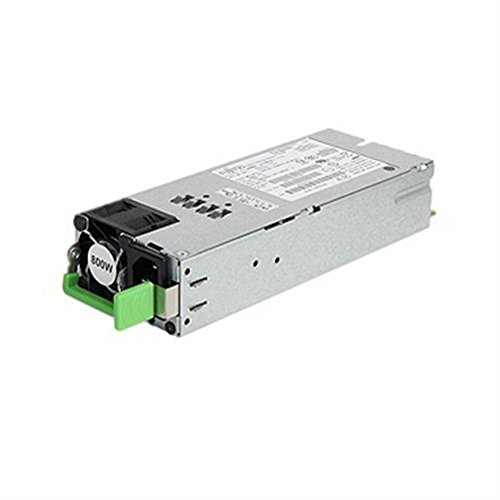
Figure 1: FUJITSU 800 W Modular Power Supply Unit. This image shows the typical appearance of the power supply, a rectangular metal enclosure with various connectors and a cooling fan.
2. Safety Information
Always observe the following safety precautions to prevent injury and damage to the equipment:
- Electrical Hazard: Disconnect all power sources before installing or removing the power supply unit. Failure to do so can result in electric shock or severe injury.
- Qualified Personnel: Installation and servicing should only be performed by qualified and authorized personnel.
- Proper Grounding: Ensure the server system is properly grounded to prevent electrical hazards.
- Ventilation: Do not block ventilation openings on the power supply or server chassis. Adequate airflow is crucial for proper cooling and preventing overheating.
- Environmental Conditions: Operate the power supply within the specified environmental conditions (temperature, humidity) to ensure optimal performance and longevity.
- Hot-Plug Caution: While designed for hot-plugging, always follow the server manufacturer's specific instructions for hot-swapping components to avoid data loss or system instability.
3. Product Overview
The FUJITSU 800 W Modular Hot Plug Titanium Power Supply Unit is a high-performance component designed for critical server applications. Key features include:
- Model: S26113-F615-L10
- Output Wattage: 800 Watts
- Efficiency: Titanium-rated for high energy efficiency, reducing operational costs and heat generation.
- Form Factor: ATX compatible, designed for specific server chassis.
- Cooling Method: Fan-cooled, with one integrated fan for optimal thermal management.
- Compatibility: Specifically designed for PRIMERGY RX300 S8 servers and other compatible server systems.
- Hot-Plug Capability: Allows for replacement or installation without powering down the server, enhancing system uptime.
4. Setup and Installation
Follow these general steps for installing the hot-plug power supply unit. Always refer to your server's specific documentation for detailed instructions.
- Preparation: Ensure the server is in a stable environment. If replacing an existing PSU, identify the faulty unit.
- Safety First: While hot-plug capable, it is recommended to wear anti-static wrist straps to prevent electrostatic discharge (ESD) damage to sensitive components.
- Locate Bay: Identify the correct hot-plug power supply bay in your server chassis.
- Remove Blank/Faulty Unit: If a blank panel or faulty PSU is present, unlatch it and carefully pull it straight out of the bay.
- Insert New PSU: Align the new FUJITSU 800 W PSU with the empty bay. Gently slide the unit into the bay until it clicks into place and the latch secures it. Do not force the unit.
- Verify Connection: Ensure the PSU is fully seated and the latch is closed.
- Power On/Verify: The server should automatically detect the new power supply. Check the server's front panel indicators or management interface for confirmation of proper operation (e.g., green status LED).
5. Operating Instructions
The FUJITSU 800 W PSU operates automatically once installed and the server is powered on. It provides stable power to the server components. Key operational aspects include:
- Automatic Power Delivery: The PSU continuously supplies power to the server components as required.
- Status Indicators: Most servers provide LED indicators on the PSU or server chassis to show the power supply's status (e.g., green for normal, amber for fault). Consult your server's manual for specific LED meanings.
- Hot-Plug Functionality: In a redundant configuration, a single PSU can be removed and replaced while the server remains operational, powered by the remaining PSU(s).
6. Maintenance
Regular maintenance helps ensure the longevity and reliable operation of your power supply unit:
- Dust Removal: Periodically inspect the PSU's fan and ventilation openings for dust accumulation. Use compressed air to gently clean dust from the fan and vents. Ensure the server is powered off and disconnected from the mains if removing the PSU for cleaning.
- Environmental Control: Maintain a clean, cool, and dry environment for your server. High temperatures and humidity can degrade PSU performance and lifespan.
- Cable Management: Ensure internal server cables do not obstruct airflow to the PSU or its fan.
- Firmware Updates: Keep your server's system firmware (BIOS/UEFI, BMC) updated, as these updates can sometimes include improvements for power supply management.
7. Troubleshooting
If you encounter issues with your power supply, consider the following troubleshooting steps:
- No Power/Server Not Booting:
- Verify the power cable is securely connected to both the PSU and the power outlet.
- Check the power outlet for functionality.
- If in a redundant configuration, check if other PSUs are functioning.
- Ensure the PSU is fully seated in its bay.
- PSU Status LED is Amber/Red:
- An amber or red LED typically indicates a fault. Consult your server's manual for specific error codes or patterns.
- Attempt to reseat the PSU.
- If the fault persists, the PSU may need replacement.
- Unusual Fan Noise:
- Excessive fan noise can indicate dust buildup or a failing fan bearing. Clean the fan as described in the Maintenance section.
- Ensure the server's ambient temperature is within operating limits.
- System Instability/Random Shutdowns:
- While not always PSU-related, a failing power supply can cause these symptoms.
- Check server logs for power-related errors.
- If multiple PSUs are present, test them individually if possible.
If troubleshooting steps do not resolve the issue, contact Fujitsu technical support or your authorized service provider.
8. Specifications
| Feature | Specification |
|---|---|
| Model Name | S26113-F615-L10 |
| Brand | Fujitsu |
| Compatible Devices | PRIMERGY RX300 S8, Server |
| Connection Type | ATX |
| Output Wattage | 800 Watt |
| Form Factor | ATX |
| Cooling Method | Fan |
| Number of Fans | 1 |
| Item Dimensions (LxWxH) | 44 x 24 x 17 centimeters |
| Maximum Input Voltage | 100 Volt (AC) |
| Minimum Input Voltage | 100 Volt (AC) |
| Manufacturer | Fujitsu Technology Solutions |
| Global Trade Item Number (GTIN) | 04053026542630 |
| ASIN | B00JHAL562 |
9. Warranty and Support
This FUJITSU Power Supply Unit is covered by a manufacturer's warranty. For specific warranty terms and conditions, please refer to the documentation provided with your server system or visit the official Fujitsu website. For technical support, service, or warranty claims, please contact Fujitsu customer service or your authorized Fujitsu reseller. Ensure you have your product model number (S26113-F615-L10) and serial number ready when contacting support.
You can find more information and support resources on the official Fujitsu website: www.fujitsu.com
