
1. Important Safety Instructions
WARNING: Read all safety warnings, instructions, illustrations, and specifications provided with this power tool. Failure to follow all instructions listed below may result in electric shock, fire, and/or serious injury.
- Work Area Safety: Keep work area clean and well lit. Do not operate power tools in explosive atmospheres, such as in the presence of flammable liquids, gases, or dust.
- Electrical Safety: Power tool plugs must match the outlet. Never modify the plug in any way. Avoid body contact with earthed or grounded surfaces.
- Personal Safety: Always wear eye protection, hearing protection, and a dust mask. Dress properly. Do not wear loose clothing or jewelry.
- Power Tool Use and Care: Do not force the power tool. Use the correct power tool for your application. Disconnect the plug from the power source before making any adjustments, changing accessories, or storing power tools.
- Specific Grinder Safety:
- Always use the guard. Ensure it is securely attached and positioned for maximum safety.
- Use only grinding wheels and accessories with a maximum operating speed equal to or greater than the maximum speed marked on the power tool.
- Hold the tool firmly with both hands. A control loss can lead to personal injury.
- Never place the tool down until the accessory has come to a complete stop.
- Be aware of kickback. Kickback is a sudden reaction to a pinched or snagged rotating wheel.
2. Product Overview
The Stanley FATMAX FME841-QS is a robust 2200W corded angle grinder designed for demanding cutting and grinding applications. It features a powerful motor, a large 230mm disc capacity, and an ergonomic design for intensive use.
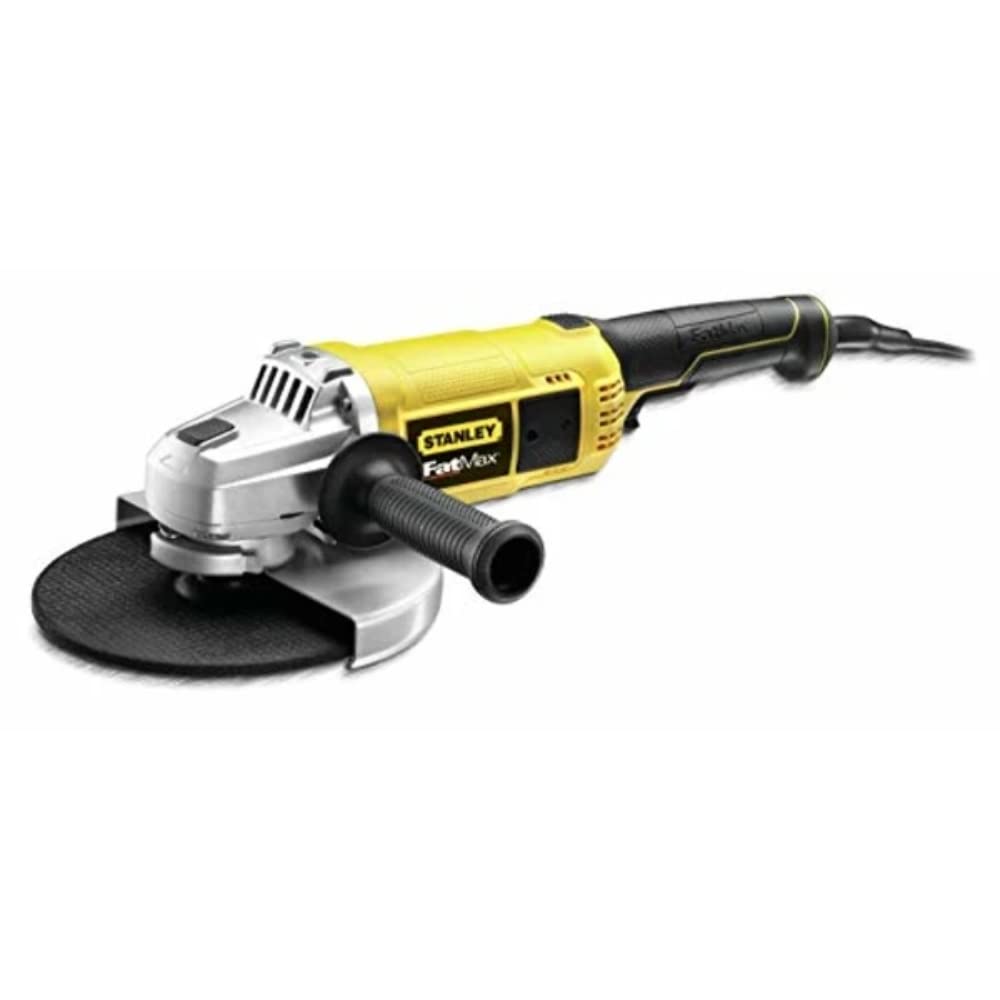
Figure 1: Stanley FATMAX FME841-QS 2200W 230mm Corded Angle Grinder. This image shows the overall design of the angle grinder, highlighting its robust construction and ergonomic handles.
Key Features:
- Powerful 2200W Motor: Delivers high performance for challenging tasks.
- 230mm Disc Capacity: Suitable for large-scale cutting and grinding.
- 3-Position Side Handle: Provides enhanced control and safety during operation.
- Tool-Free Guard Adjustment: Allows for quick and easy positioning of the protective guard.
- Aluminum Die-Cast Gear Housing: Ensures efficient heat dissipation and extended tool life.
- Spindle Lock: Facilitates quick and easy disc changes.
- Auto-Stop Carbon Brushes: Designed for increased motor durability.
3. Setup and Assembly
3.1 Attaching the Side Handle
The side handle can be attached to three different positions on the gear housing for optimal control and comfort, depending on the application and user preference.
- Identify the threaded holes on the left, right, and top of the gear housing.
- Screw the side handle firmly into the desired position.
Image description: An illustration showing the three possible attachment points for the side handle on the grinder's gear housing.
3.2 Adjusting the Guard
The protective guard is tool-free adjustable for quick and easy positioning.
- Loosen the guard locking lever.
- Rotate the guard to the desired position to protect against sparks and debris.
- Tighten the guard locking lever securely.
Image description: A close-up view of the tool-free guard adjustment mechanism, showing the lever and how to rotate the guard.
3.3 Installing/Changing the Grinding Disc
Always ensure the tool is unplugged from the power source before changing discs. Use only discs rated for 230mm diameter and appropriate RPM.
- Press and hold the spindle lock button.
- Using the provided key, loosen and remove the outer flange nut by turning it counter-clockwise.
- Remove the old grinding disc (if applicable).
- Place the new grinding disc onto the inner flange, ensuring it sits correctly.
- Replace the outer flange nut and tighten it firmly with the key while holding the spindle lock button. Do not overtighten.
- Release the spindle lock button.
Image description: A sequence of images demonstrating the steps for changing a grinding disc, including pressing the spindle lock, using the key, and securing the new disc.
4. Operating Instructions
4.1 Before Operation
- Ensure all safety instructions are understood and followed.
- Verify the grinding disc is correctly installed and secured.
- Adjust the guard for optimal protection.
- Wear appropriate personal protective equipment (PPE): safety glasses, hearing protection, gloves, and a dust mask.
- Ensure the workpiece is securely clamped or stable.
4.2 Switching On and Off
- To Switch On: Plug the tool into a suitable power outlet. Press the ON/OFF switch to the "ON" position. The tool will start.
- To Switch Off: Press the ON/OFF switch to the "OFF" position. The tool will stop.
Note: This tool may feature a lock-on button for continuous operation. If present, press the ON/OFF switch and then the lock-on button. To switch off, press the ON/OFF switch again.
4.3 Grinding and Cutting Techniques
- General Grinding: Hold the tool firmly with both hands. Apply light pressure, allowing the tool's weight and speed to do the work. Move the grinder smoothly across the workpiece.
- Cutting: For cutting, use a thin cutting disc. Hold the tool at a slight angle (15-30 degrees) to the workpiece. Do not apply excessive side pressure, as this can cause the disc to bind or break.
- Surface Grinding: For surface grinding, hold the tool at a shallow angle (5-10 degrees) to the workpiece. This allows for a larger contact area and smoother finish.
- Always work away from your body.
- Avoid overloading the tool. If the tool slows down significantly, reduce pressure.
Image description: Diagrams illustrating correct hand positions and angles for various grinding and cutting operations.
5. Maintenance
Regular maintenance ensures optimal performance and extends the life of your tool. Always unplug the tool before performing any maintenance.
5.1 Cleaning
- Keep the ventilation openings clean to prevent overheating. Use a soft brush or compressed air to remove dust and debris.
- Wipe the tool housing with a damp cloth. Do not use harsh chemicals or abrasive cleaners.
5.2 Carbon Brushes
This tool is equipped with auto-stop carbon brushes, which automatically shut off the tool when they are worn out. This prevents damage to the motor. When the tool stops, the carbon brushes need to be replaced by a qualified service technician.
5.3 General Inspection
- Periodically inspect the power cord for damage. If damaged, have it replaced by an authorized service center.
- Check all screws and fasteners for tightness.
- Ensure the guard operates freely and locks securely.
6. Troubleshooting
| Problem | Possible Cause | Solution |
|---|---|---|
| Tool does not start | No power supply; Worn carbon brushes; Faulty switch | Check power connection; Have carbon brushes replaced by service center; Have switch checked by service center. |
| Excessive vibration | Damaged or unbalanced disc; Loose flange nut | Replace disc; Tighten flange nut securely. |
| Tool overheats | Blocked ventilation openings; Overloading the tool | Clean ventilation openings; Reduce pressure and allow tool to cool. |
| Sparks excessively | Worn carbon brushes; Incorrect disc for material | Have carbon brushes replaced; Ensure correct disc is used. |
If you encounter problems not listed here or if the suggested solutions do not resolve the issue, please contact an authorized Stanley service center.
7. Technical Specifications
| Model Number | FME841-QS |
| Power Input | 2200 Watts |
| Voltage | 230 Volts |
| Disc Diameter | 230 mm |
| Spindle Thread | M14 (Standard for 230mm grinders) |
| Weight | 4.3 Kilograms |
| Dimensions (L x W x H) | 30 x 17.9 x 12.6 cm |
| Material | Aluminum Die-Cast (Housing) |
| Power Source | Corded Electric |
| Country of Origin | China |
8. Warranty and Support
Stanley products are manufactured to high quality standards and are guaranteed for a period of 12 months from the date of purchase against faulty materials or workmanship. This guarantee does not affect your statutory rights.
For warranty claims, technical support, or to locate an authorized service center, please contact your local Stanley dealer or visit the official Stanley website. Please have your model number (FME841-QS) and proof of purchase available.
Online Support: www.stanleytools.com
