
BLACK+DECKER LCC140
BLACK+DECKER 40V MAX Cordless String Trimmer, Edger, and Leaf Blower Combo (LCC140) Instruction Manual
Model: LCC140
1. Introduction
This manual provides essential instructions for the safe operation, assembly, maintenance, and troubleshooting of your BLACK+DECKER 40V MAX Cordless String Trimmer, Edger, and Leaf Blower Combo (LCC140). Please read this manual thoroughly before using the product to ensure proper function and to prevent injury.

Figure 1: The BLACK+DECKER LCC140 Combo Kit, featuring the string trimmer and leaf blower.
Video 1: Official overview of the BLACK+DECKER 40V MAX Trimmer, Edger, and Sweeper (LCC140) combo kit.
2. Important Safety Information
Always adhere to safety guidelines when operating power tools. Failure to do so may result in serious injury or property damage.
- Always wear eye protection and gloves when using the tools.
- Be aware of flying debris and potential cut hazards.
- Do not use near flammable materials.
- Maintain a safe distance from others while operating the equipment.
- Keep children and pets away from the work area.
- Ensure the battery is fully charged before use and removed during assembly or maintenance.
3. Package Contents
Your BLACK+DECKER LCC140 combo kit includes the following items:
- 13-inch String Trimmer/Edger
- Handheld Leaf Blower/Sweeper
- 40V MAX* Lithium-Ion Battery (2.0 Ah)
- Battery Charger
- Debris Shield for Trimmer
- Auxiliary Handle for Trimmer
- Instruction Manual
4. Assembly
4.1 String Trimmer Assembly
- Attach Debris Shield: Align the debris shield with the trimmer head and snap it into place. Secure it with the provided screw using a Phillips head screwdriver.
- Install Auxiliary Handle: Pinch the handle clamps and slide the auxiliary handle onto the trimmer shaft until it snaps into position. Adjust its position for comfortable use.

Figure 2: The BLACK+DECKER 40V MAX Cordless String Trimmer, ready for assembly.
4.2 Leaf Blower Assembly
- Attach Blower Tube: Align the blower tube with the main housing of the leaf blower. Push firmly until it clicks securely into place.

Figure 3: The BLACK+DECKER 40V MAX Cordless Leaf Blower, ready for tube attachment.
5. Charging the Battery
The 40V MAX* Lithium-Ion battery provides power for both tools. Ensure it is fully charged before initial use.
- Insert Battery into Charger: Slide the battery into the charger until it clicks into place.
- Connect Charger: Plug the charger into a standard electrical outlet. The indicator light on the charger will illuminate to show charging status.
- Monitor Charging: The light will typically flash green while charging and turn solid green when fully charged.
- Remove Battery: Once fully charged, unplug the charger and press the release button on the battery to remove it.

Figure 4: The 40V MAX Lithium-Ion battery, showing its power indicator.
6. Operating the String Trimmer/Edger
6.1 Inserting/Removing Battery
- Insert: Slide the charged battery into the tool's battery port until it clicks.
- Remove: Press the battery release button and pull the battery out.
6.2 Adjusting Length and Handle
- Shaft Length: Twist the locking collar on the shaft to loosen, adjust the shaft to your desired length, then twist to tighten.
- Auxiliary Handle: Press the orange button on the auxiliary handle to adjust its angle and position for optimal comfort and control.
6.3 Trimming and Edging Modes
The trimmer easily converts to an edger for clean lines along sidewalks and driveways.
- Switching Modes: Rotate the trimmer head 180 degrees to switch between trimming and edging functions. A small wheel on the debris shield assists in guiding the edger.

Figure 5: The string trimmer configured for edging, showing the guide wheel.
6.4 Operation and Power Settings
- Starting: Press the safety button on the side of the handle, then squeeze the trigger to start the trimmer.
- Power Control: The trimmer features a variable speed motor with settings from 1 to 6. Adjust the setting based on the thickness of the vegetation and desired runtime. Higher settings provide more power but reduce battery life.
- Automatic Line Feed: The patented Auto Feed System automatically feeds more string as needed, eliminating the need for bumping.
7. Operating the Leaf Blower
7.1 Inserting/Removing Battery
- Insert: Slide the charged battery into the blower's battery port until it clicks.
- Remove: Press the battery release button and pull the battery out.
7.2 Operation and Speed Control
- Starting: Squeeze the trigger to start the blower.
- Two-Speed Control: The blower offers two-speed control for versatile use. Use lower speeds for light debris around delicate areas like flower beds, and higher speeds (up to 120 MPH) for tougher debris on hard surfaces.
- Built-in Scraper: Utilize the built-in scraper on the blower nozzle to loosen stubborn debris before blowing.
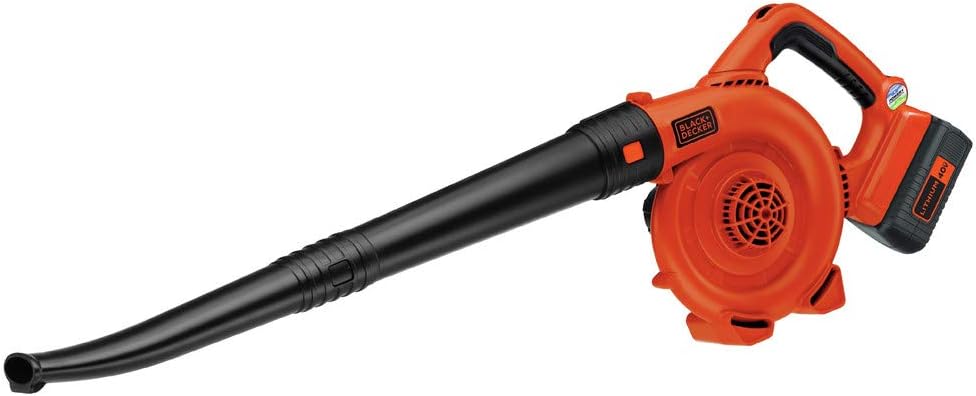
Figure 6: A user operating the BLACK+DECKER 40V MAX Cordless Leaf Blower to clear leaves from a deck.
8. Maintenance
- Cleaning: Regularly clean the tools with a damp cloth. Ensure all vents are free from debris to prevent overheating.
- String Replacement: The trimmer uses an automatic line feed system. When the line runs out, replace the spool with a compatible BLACK+DECKER replacement spool. Refer to the trimmer's specific instructions for detailed replacement steps.
- Battery Care: Store batteries in a cool, dry place away from direct sunlight. Do not store fully discharged batteries for extended periods.
9. Troubleshooting
| Problem | Possible Cause | Solution |
|---|---|---|
| Tool does not start | Battery not inserted correctly or discharged; Safety button not pressed. | Ensure battery is fully inserted and charged. Press safety button before squeezing trigger. |
| Trimmer line not feeding | Line tangled or empty spool. | Check for tangles. Replace spool if empty. |
| Reduced power/runtime | Battery low or tool operating at highest power setting. | Recharge battery. Adjust power setting to a lower level for extended runtime. |
10. Specifications
- Brand: BLACK+DECKER
- Model Number: LCC140
- Power Source: Battery Powered (40V MAX* Lithium-Ion)
- String Trimmer Cutting Width: 13 inches
- String Trimmer Speed: Up to 7000 RPM
- Leaf Blower Air Speed: Up to 120 MPH
- Item Weight: 13.4 Pounds (combined)
- Product Dimensions: 43.3"L x 13"W (Trimmer)
- Assembly Required: Yes
11. Warranty and Support
For warranty information, technical support, or to purchase replacement parts, please refer to the official BLACK+DECKER website or contact their customer service directly. Keep your purchase receipt as proof of purchase for warranty claims.
Online Support: Visit the BLACK+DECKER Store on Amazon for additional product information and support resources.
Related documentsLCC140


Ask a question about this manual
Ask about setup, troubleshooting, compatibility, parts, safety, or missing instructions. Manuals+ will review the question and use this page’s manual context to help answer it.