
Introduction
Thank you for purchasing the Icom HM-202 Compact Speaker Microphone. This manual provides essential information for the safe and effective use of your device. The HM-202 is designed for use with Icom IC-M72 and IC-M73 handheld radios, offering reliable communication with its waterproof design.
Important Safety Information
Please read all instructions carefully before use. Failure to follow these guidelines may result in injury or damage to the product.
- Do not attempt to disassemble or modify the HM-202. Unauthorized modifications can void your warranty and pose safety risks.
- Ensure the microphone is securely connected to your compatible radio before use.
- While waterproof to IPX7, avoid prolonged submersion or exposure to high-pressure water jets.
- Keep out of reach of small children.
Package Contents
Verify that all items listed below are included in your package:
- Icom HM-202 Compact Speaker Microphone
- User Manual (this document)
Product Overview
The Icom HM-202 is a compact speaker microphone designed for clear audio transmission and reception in various environments. Its robust construction and waterproof rating make it suitable for marine and outdoor use.

Figure 1: Front view of the Icom HM-202 Compact Speaker Microphone, showing the speaker grille, microphone, and coiled cable.
Components:
- Speaker Grille: For audio output.
- Microphone: For voice input.
- PTT (Push-to-Talk) Button: Activates transmission.
- Coiled Cable: Provides flexibility and extends reach.
- Connector: For connecting to compatible Icom radios (e.g., IC-M72, IC-M73).
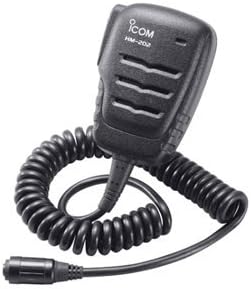
Figure 2: Side view of the Icom HM-202 Compact Speaker Microphone, highlighting the coiled cable and radio connector.
Setup and Connection
- Identify Compatible Radio: Ensure your radio is an Icom IC-M72 or IC-M73 handheld model.
- Locate Accessory Jack: On your compatible Icom radio, locate the accessory jack, typically covered by a rubber cap.
- Connect Microphone: Carefully align the HM-202's connector with the radio's accessory jack. Push firmly until it clicks into place, ensuring a secure and waterproof seal.
- Verify Connection: Gently tug on the cable to confirm it is securely attached. A loose connection can affect performance and waterproof integrity.
Operating Instructions
- Power On Radio: Turn on your connected Icom handheld radio.
- Adjust Volume: Adjust the radio's volume control to a comfortable listening level. Audio will now be routed through the HM-202's speaker.
- Transmit (PTT): To transmit, press and hold the Push-to-Talk (PTT) button located on the side of the HM-202. Speak clearly into the microphone, which is integrated into the unit.
- Receive: Release the PTT button to return to receive mode. Audio from incoming transmissions will be heard through the HM-202's speaker.
- Clip Usage: Use the rotating clip on the back of the microphone to attach it to your lapel, collar, or other convenient location for hands-free operation.
Care and Maintenance
- Cleaning: Wipe the microphone with a soft, damp cloth. Do not use harsh chemicals or abrasive cleaners.
- Drying: After exposure to water, ensure the microphone and its connector are thoroughly dry before storage or reconnection to prevent corrosion.
- Storage: Store the HM-202 in a cool, dry place away from direct sunlight and extreme temperatures.
- Cable Care: Avoid sharp bends or kinks in the coiled cable to prevent internal wire damage.
Troubleshooting
| Problem | Possible Cause | Solution |
|---|---|---|
| No audio from speaker mic | Loose connection; Radio volume too low; Faulty unit. | Ensure connector is fully seated. Increase radio volume. Test with another compatible radio if possible. |
| Cannot transmit (PTT not working) | Loose connection; Radio not powered on; Faulty PTT button. | Check connection. Power on radio. If issue persists, contact support. |
| Static or poor audio quality | Loose connection; Environmental interference; Damaged cable. | Reseat connector. Move away from sources of interference. Inspect cable for damage. |
Specifications
- Model: HM-202
- Manufacturer: Icom
- Product Dimensions: 8 x 4 x 2 inches (approximate)
- Item Weight: 4.6 ounces
- Connectivity Technology: Wired (XLR type connector)
- Special Features: Built-in microphone, Waterproof (IPX7 rating)
- Compatible Radios: Icom IC-M72, IC-M73 handheld radios
- Polar Pattern: Unidirectional
- Microphone Form Factor: Handheld
- Included Components: Speaker Mic
- UPC: 731797014849
Warranty and Customer Support
Icom products are manufactured to high-quality standards. For warranty information, please refer to the warranty card included with your original purchase or visit the official Icom website.
For technical support, troubleshooting assistance, or service inquiries, please contact Icom customer support through their official channels. Have your product model (HM-202) and serial number (if applicable) ready when contacting support.
Online Resources: You may find additional support and FAQs on the Icom America Store Page or the official Icom website.