
1. Product Overview
The HCDZ Universal Replacement Remote Control is designed to provide seamless operation for various Vizio LCD, LED, and Plasma HDTV models, including E321MV, E322MV, and M370SL. This remote functions as a direct replacement, requiring no complex programming.
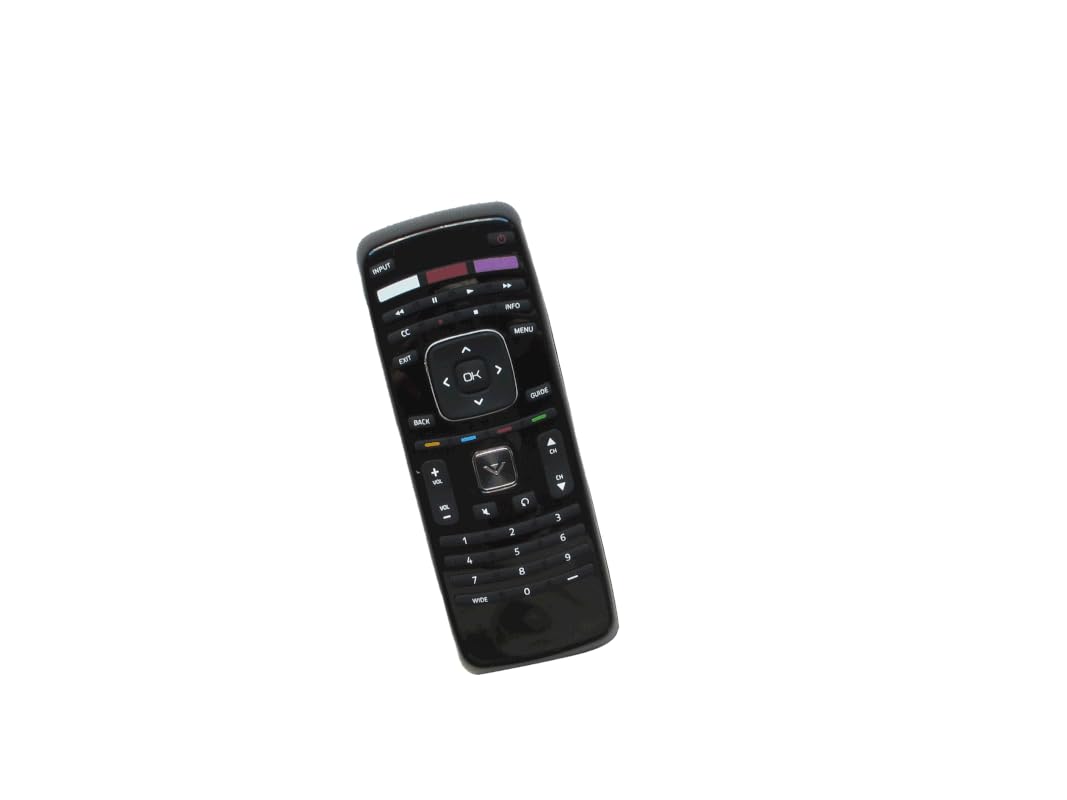
Image 1: Front view of the HCDZ Universal Replacement Remote Control. This image shows the layout of the buttons and the overall design of the remote.
Key Features:
- Infrared (IR) replacement remote control.
- No programming required; ready to use after battery insertion.
- Compatible with specific Vizio TV models (E321MV, E322MV, M370SL).
- Easy to use button control.
2. Setup
2.1 Inserting Batteries
To power your remote control, you will need two (2) AAA batteries (not included). Follow these steps to insert them correctly:
- Locate the battery compartment cover on the back of the remote control.
- Slide the cover downwards or press the latch (if present) to open the compartment.
- Insert two AAA batteries, ensuring the positive (+) and negative (-) terminals align with the markings inside the compartment.
- Slide the battery compartment cover back into place until it clicks securely.

Image 2: Back view of the remote control with the battery compartment open, showing two AAA batteries correctly inserted. The battery cover is shown detached.
2.2 First Use
Once the batteries are correctly inserted, the remote control is ready for immediate use. No programming or pairing is required. Simply point the remote at your Vizio TV and begin operating it.
3. Operating Instructions
This remote control provides standard functions for your Vizio TV. Familiarize yourself with the button layout for optimal use.
- Power Button: Turns the TV on or off.
- Volume Up/Down: Adjusts the audio volume.
- Channel Up/Down: Changes TV channels.
- Mute Button: Silences the TV audio.
- Input/Source Button: Cycles through available input sources (HDMI, AV, etc.).
- Navigation Buttons (Arrow Keys, OK/Enter): Used to navigate menus and confirm selections.
- Menu Button: Accesses the TV's main menu.
- Number Pad: Directly enters channel numbers.
For specific functions related to your Vizio TV model, refer to your television's original user manual.
4. Maintenance
4.1 Cleaning the Remote
To keep your remote control clean, wipe it periodically with a soft, dry cloth. Do not use liquid cleaners, abrasive pads, or chemical solvents, as these can damage the remote's surface or internal components.
4.2 Battery Replacement
Replace batteries when the remote's performance degrades or it stops responding. Always replace both batteries at the same time with new AAA alkaline batteries. Do not mix old and new batteries, or different types of batteries, as this can lead to leakage or malfunction.
5. Troubleshooting
5.1 Remote Not Responding
- Check Batteries: Ensure batteries are inserted correctly with the correct polarity (+/-). Replace with fresh AAA alkaline batteries if necessary.
- Line of Sight: Make sure there is a clear line of sight between the remote control and the TV's infrared sensor. Obstructions can block the signal.
- Remote Sensor: Ensure the TV's remote sensor is not blocked or dirty.
- Distance: Operate the remote within its effective range (up to 8 meters).
5.2 Intermittent Operation
- This often indicates low battery power. Replace the batteries.
- Ensure no strong light sources (like direct sunlight or bright fluorescent lights) are interfering with the IR signal.
6. Specifications
| Feature | Detail |
|---|---|
| Brand | HCDZ |
| Model Number | HCDZ-X09480 |
| Compatible Devices | Vizio E321MV, E322MV, M370SL LCD LED Plasma HDTV TV |
| Connectivity Technology | Infrared (IR) |
| Controller Type | Button Control |
| Power Source | 2 x AAA Batteries (Alkaline recommended) |
| Maximum Range | 8 Meters |
| Special Feature | Universal Replacement |
| UPC | 520329361014 |
7. Warranty and Support
7.1 Warranty Information
This HCDZ replacement remote control is typically covered by a standard manufacturer's warranty against defects in materials and workmanship. Please retain your proof of purchase for warranty claims. For specific warranty duration and terms, refer to the retailer's policy or contact HCDZ customer support.
7.2 Customer Support
Should you encounter any issues or have questions regarding your HCDZ Universal Replacement Remote Control, please contact the seller or HCDZ customer support for assistance. You can often find contact information on the product packaging or the retailer's website.
For general inquiries, you may visit the HCDZ Store on Amazon: HCDZ Store