
1. Introduction
Thank you for choosing the Philips AE1500 Pocket Size Portable Radio. This compact and lightweight radio allows you to enjoy your favorite AM and FM radio stations wherever you go. Its simple design and easy-to-use controls make it ideal for personal listening. This manual provides essential information for setting up, operating, and maintaining your radio.
2. Safety Information
- Battery Safety: Use only the specified battery type. Ensure correct polarity when inserting batteries. Do not mix old and new batteries, or different types of batteries. Remove batteries if the unit will not be used for an extended period.
- Water and Moisture: Do not expose the radio to rain, moisture, or extreme temperatures. Avoid placing the unit near water sources.
- Cleaning: Disconnect power before cleaning. Use a soft, dry cloth. Do not use liquid or aerosol cleaners.
- Servicing: Do not attempt to service this product yourself. Refer all servicing to qualified service personnel.
- Hearing Protection: Avoid listening at high volume levels for extended periods to prevent hearing damage.
3. Package Contents
Please check that your package contains the following items:
- Philips AE1500 Portable Radio
Note: Batteries are not included and must be purchased separately.
4. Product Overview
The Philips AE1500 is designed for portability and ease of use. Below is an image illustrating the key components of your radio.
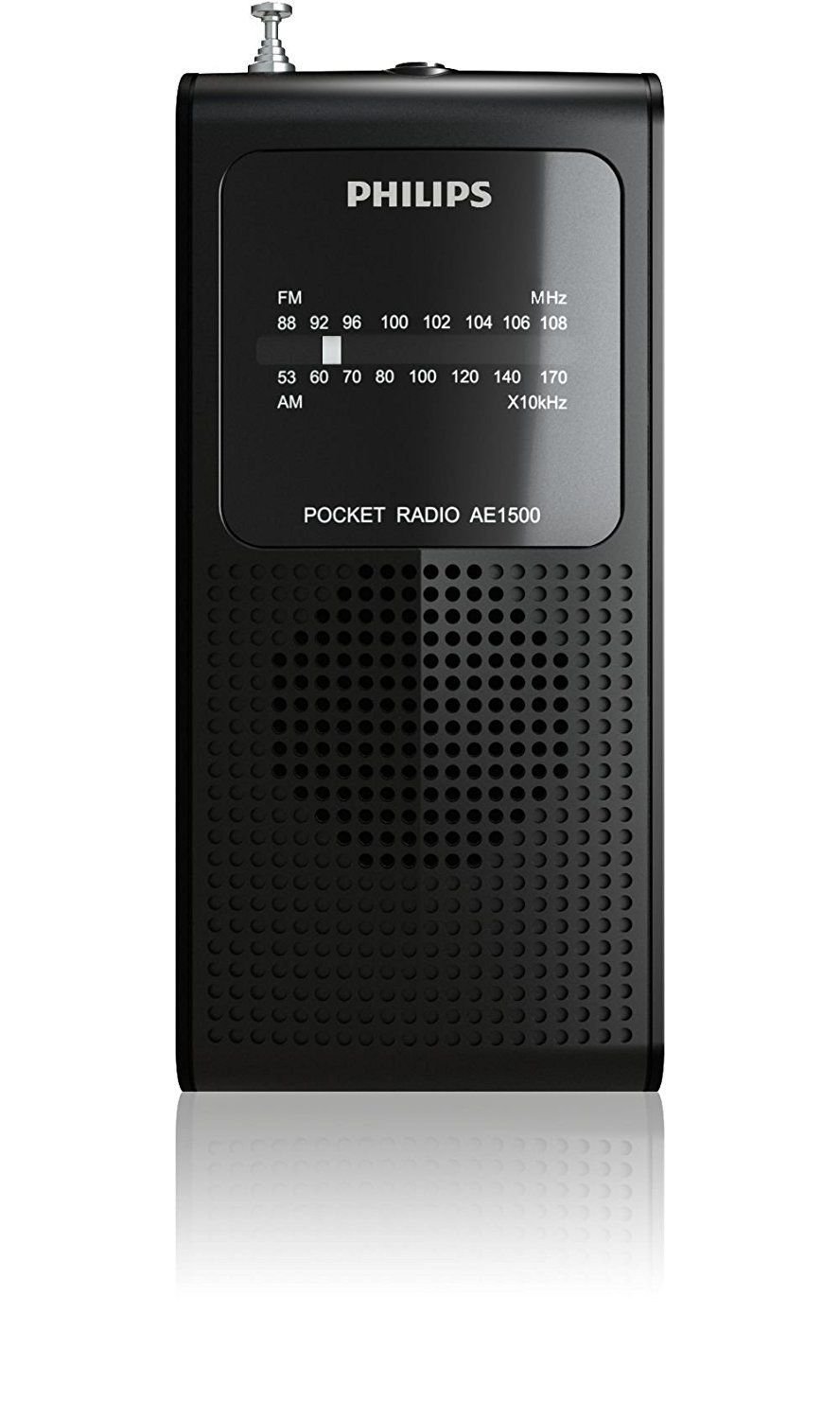
Figure 1: Front view of the Philips AE1500 Pocket Size Portable Radio. This image shows the speaker grille, tuning dial, and control buttons.
Controls and Features:
- AM/FM Selector: A switch located on the side to select between Amplitude Modulation (AM) and Frequency Modulation (FM) radio bands.
- Volume/On/Off Dial: A rotary dial that controls the power to the unit and adjusts the audio output level.
- Tuning Dial: A rotary dial used to scan and select radio frequencies.
- Headphone Jack: A 3.5mm stereo jack located on the top for connecting personal headphones.
- Telescopic Antenna: An extendable antenna for improving FM reception.
- Built-in Speaker: For audio playback without headphones.
5. Setup
5.1 Battery Installation
The Philips AE1500 radio operates on batteries (typically 2 x AAA batteries, not included).
- Locate the battery compartment cover on the back of the radio.
- Slide or lift the cover to open the compartment.
- Insert the batteries, ensuring the correct polarity (+ and -) as indicated inside the compartment.
- Close the battery compartment cover securely.
5.2 Antenna Adjustment
For optimal FM reception, extend the telescopic antenna fully. For AM reception, the radio has a built-in antenna, and you may need to rotate the entire unit for the best signal.
6. Operating Instructions
6.1 Powering On/Off and Volume Control
- To turn the radio ON, rotate the Volume/On/Off dial clockwise until you hear a click and the radio powers on.
- Continue rotating the dial clockwise to increase the volume.
- To decrease the volume, rotate the dial counter-clockwise.
- To turn the radio OFF, rotate the Volume/On/Off dial counter-clockwise until you hear a click and the radio powers off.
6.2 Selecting a Radio Band (AM/FM)
Use the AM/FM selector switch on the side of the radio to choose your desired band.
- Slide the switch to 'FM' for Frequency Modulation stations.
- Slide the switch to 'AM' for Amplitude Modulation stations.
6.3 Tuning to a Station
- Once the radio is on and the desired band is selected, slowly rotate the Tuning dial.
- Listen for your desired station. The tuning dial is sensitive, so make small adjustments for precise tuning.
- Adjust the antenna (FM) or the radio's orientation (AM) for the best reception.
6.4 Using Headphones
For private listening, you can connect standard 3.5mm headphones to the headphone jack located on the top of the radio. Once headphones are connected, the built-in speaker will automatically mute.
7. Maintenance
7.1 Cleaning
Wipe the exterior of the radio with a soft, dry cloth. Do not use abrasive cleaners, solvents, or strong chemicals, as these can damage the finish.
7.2 Battery Replacement
When the sound becomes distorted or the volume decreases significantly, it is time to replace the batteries. Follow the battery installation steps in Section 5.1.
7.3 Storage
If you do not plan to use the radio for an extended period, remove the batteries to prevent leakage and damage to the unit. Store the radio in a cool, dry place away from direct sunlight and extreme temperatures.
8. Troubleshooting
| Problem | Possible Cause | Solution |
|---|---|---|
| No sound or very low volume |
|
|
| Poor reception / Static |
|
|
| Radio does not turn on |
|
|
9. Specifications
| Feature | Specification |
|---|---|
| Model Number | AE1500/37 |
| Product Dimensions | 1.4 x 3.5 x 7 inches (3.56 x 8.89 x 17.78 cm) |
| Item Weight | 2.22 ounces (0.06 Kilograms) |
| Frequency | Up to 108 MHz (FM) |
| Connectivity Technology | Auxiliary (Headphone Jack) |
| Special Features | Headphone Jack |
| Color | Black |
| Power Source | Battery Powered (e.g., 2 x AAA, not included) |
| Tuner Technology | AM, FM |
| Radio Bands Supported | AM, FM |
| Manufacturer | Philips |
10. Warranty and Support
For warranty information and customer support, please refer to the documentation provided with your purchase or visit the official Philips support website. Keep your proof of purchase for warranty claims.
Online support and FAQs may be available on the Philips website. Please have your model number (AE1500) ready when contacting support.


