
1. Introduction
This instruction manual provides essential information for the safe and efficient operation of your Nuwave Pro Plus Infrared Oven. Please read all instructions thoroughly before initial use to ensure proper function and to prevent injury or damage. Keep this manual for future reference.
2. Important Safety Instructions
When using electrical appliances, basic safety precautions should always be followed to reduce the risk of fire, electric shock, and injury to persons, including the following:
- Read all instructions before operating the appliance.
- Do not touch hot surfaces. Use handles or knobs.
- To protect against electrical shock, do not immerse cord, plugs, or the appliance in water or other liquid.
- Close supervision is necessary when any appliance is used by or near children.
- Unplug from outlet when not in use and before cleaning. Allow to cool before putting on or taking off parts.
- Do not operate any appliance with a damaged cord or plug, or after the appliance malfunctions or has been damaged in any manner.
- The use of accessory attachments not recommended by the appliance manufacturer may cause injuries.
- Do not use outdoors.
- Do not let cord hang over edge of table or counter, or touch hot surfaces.
- Do not place on or near a hot gas or electric burner, or in a heated oven.
- Extreme caution must be used when moving an appliance containing hot oil or other hot liquids.
- Always attach plug to appliance first, then plug cord into the wall outlet. To disconnect, turn any control to 'off', then remove plug from wall outlet.
- Do not use appliance for other than intended use.
3. Product Components
The Nuwave Pro Plus Infrared Oven consists of several key components designed for efficient cooking.

Figure 3.1: The Nuwave Pro Plus Infrared Oven, shown with its instruction manual and a recipe CD.
- Power Head: Contains the heating element, fan, and control panel.
- Dome: A transparent, heat-resistant dome that covers the cooking area.
- Cooking Rack: Used to elevate food for even cooking.
- Base Pan: Collects drippings and holds the cooking rack.
- Digital Control Panel: For setting time, temperature, and other functions.

Figure 3.2: Close-up view of the heating element and internal fan located within the power head.
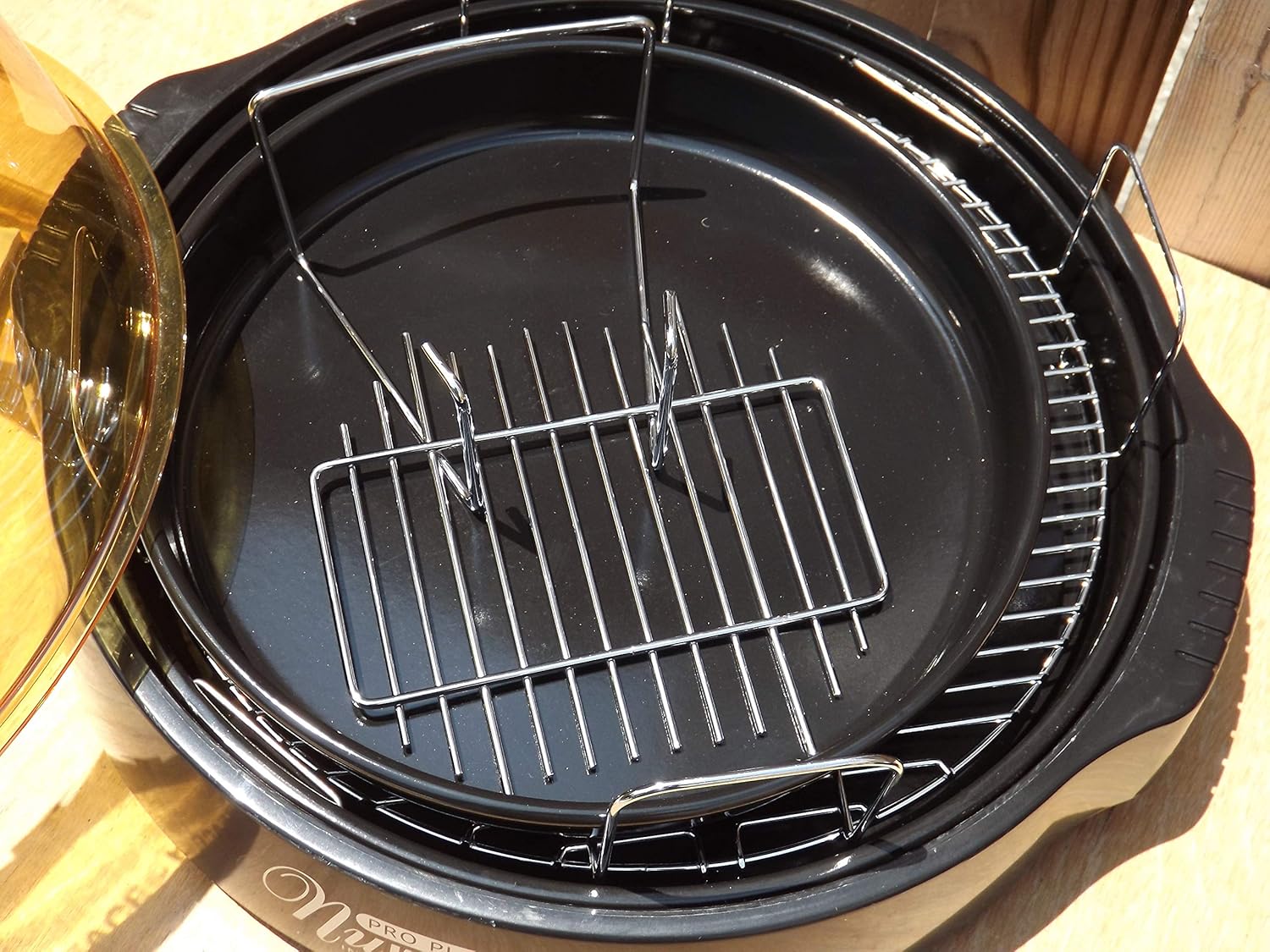
Figure 3.3: The cooking racks positioned within the oven's base pan, ready for food placement.
4. Setup
Before first use, ensure all packaging materials are removed and the appliance is assembled correctly.
- Unpack: Carefully remove all components from the packaging.
- Clean: Wash the dome, cooking rack, and base pan with warm, soapy water. Rinse thoroughly and dry completely. The power head should only be wiped with a damp cloth.
- Assemble: Place the base pan on a stable, heat-resistant surface. Insert the desired cooking rack into the base pan. Place the food on the rack. Carefully position the dome over the base pan. Finally, place the power head securely on top of the dome.
- Power Connection: Plug the power cord into a standard 120V AC electrical outlet.
5. Operating Instructions
The Nuwave Pro Plus Infrared Oven features a digital control panel for precise cooking.

Figure 5.1: The digital control panel with buttons for Cook Time, Cook Temp, Reheat, Warm, Delay, Pause/Clear, Start, and numerical input.
- Power On: Once plugged in, the display will illuminate.
- Set Cooking Time: Press the 'Cook Time' button. Use the numerical keypad to enter the desired cooking duration in minutes. Press 'Start' to confirm.
- Set Cooking Temperature: Press the 'Cook Temp' button. Use the numerical keypad to enter the desired temperature in degrees Fahrenheit. Press 'Start' to confirm.
- Start Cooking: After setting time and temperature, press the 'Start' button to begin the cooking cycle.
- Pause/Clear: To temporarily stop cooking, press 'Pause/Clear'. Press 'Start' to resume. To cancel the current program, press 'Pause/Clear' twice.
- Reheat Function: Press the 'Reheat' button for a preset reheating cycle. Adjust time if necessary using 'Cook Time'.
- Warm Function: Press the 'Warm' button to keep food warm after cooking.
- Delay Function: Press the 'Delay' button to set a delayed start time for cooking. Follow on-screen prompts to set the delay duration.
Always monitor food during cooking. Cooking times may vary based on food type, quantity, and desired doneness.
6. Maintenance and Cleaning
Regular cleaning ensures optimal performance and extends the life of your Nuwave Pro Plus Infrared Oven.
- Unplug and Cool: Always unplug the oven from the power outlet and allow all components to cool completely before cleaning.
- Dome, Rack, and Base Pan: These components are dishwasher safe or can be washed by hand with warm, soapy water. Use a non-abrasive sponge or cloth. Rinse thoroughly and dry completely.
- Power Head: The power head contains electrical components and should NEVER be immersed in water. Wipe the exterior with a damp cloth. For stubborn stains, use a mild detergent on the cloth, then wipe with a clean, damp cloth. Ensure it is completely dry before storage or next use.
- Storage: Store the oven in a clean, dry place when not in use.
7. Troubleshooting
Refer to this section for common issues and their solutions.
| Problem | Possible Cause | Solution |
|---|---|---|
| Oven does not turn on. | Not plugged in; power outage; faulty outlet. | Ensure power cord is securely plugged in. Check circuit breaker. Try a different outlet. |
| Food not cooking evenly. | Improper food placement; too much food; incorrect temperature/time. | Ensure food is placed on the rack and not directly on the base. Do not overcrowd the oven. Adjust cooking time or temperature as needed. |
| Smoke or unusual odor during operation. | Food drippings on heating element; residue from previous cooking. | Unplug immediately. Allow to cool and clean all components thoroughly. Ensure no food particles are on the heating element. |
| Control panel unresponsive. | Temporary electrical glitch; power head not seated correctly. | Unplug the oven for 1 minute, then plug back in. Ensure the power head is securely placed on the dome. |
8. Specifications
Detailed technical specifications for the Nuwave Pro Plus Infrared Oven.
- Brand: Nuwave
- Model Name: Nu-Wave Oven
- Control Type: Knob (Digital Keypad)
- Door Style: Side Swing (Dome Lift)
- Included Components: Crumb Tray (Base Pan), Cooking Rack
- Finish Type: Painted
- Door Material Type: Stainless Steel (referring to internal components/accents)
- Power Source: AC adapter
- Number of Shelves: 1 (Cooking Rack)
- Size: Medium
- Item Weight: 14.26 pounds
- Package Dimensions: 15.8 x 14.9 x 12.1 inches
- ASIN: B00IXC09QC
- UPC: 652185206021
9. Warranty and Support
For warranty information and customer support, please refer to the documentation included with your purchase or visit the official Nuwave website. Keep your purchase receipt as proof of purchase for any warranty claims.
For further assistance, you may contact Nuwave customer service directly. Contact details are typically found on the product packaging or the manufacturer's official website.


