
1. Introduction
This manual provides essential instructions for the safe and efficient use of your TOA Electronics BS-1030W Music/Paging Speaker. Please read this manual thoroughly before installation and operation, and retain it for future reference.
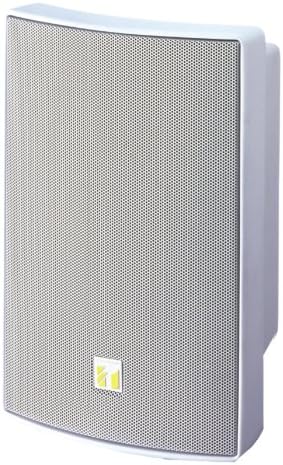
Image 1.1: Front view of the TOA BS-1030W Music/Paging Speaker in white. The speaker features a white ABS resin enclosure and a steel mesh grille, with the TOA logo visible at the bottom center.
2. Safety Precautions
Always observe the following safety precautions to prevent personal injury and property damage.
- Installation: Ensure the speaker is securely mounted to a structure capable of supporting its weight. Incorrect installation may cause the speaker to fall, resulting in injury.
- Power: Connect the speaker to an amplifier with appropriate power output and impedance. Overloading can damage the speaker.
- Environment: While the speaker has splash-proof construction (IPX3), avoid direct exposure to heavy rain or prolonged submersion. Do not install in locations with extreme temperatures or high humidity beyond specified operating conditions.
- Servicing: Do not attempt to open or modify the speaker. Refer all servicing to qualified personnel.
3. Key Features
- 2-Way Bass-Reflex Design: Features a 4.72" (12 cm) cone woofer and a 1" (dome-type) tweeter for a wide frequency response (80 Hz - 20 kHz).
- Versatile Impedance Options: Selectable between low impedance (8 Ohms) and high impedance (100V/70V line) via a rotary switch.
- Splash-Proof Construction: IPX3 compliant, allowing installation under eaves where direct rain exposure is limited.
- Durable Enclosure: Constructed with ABS resin and a steel mesh grille, both in white (RAL9010 PURE WHITE).
- Rated Input: 30 W.
- Sound Pressure Level: 90 dB (1 W, 1 m).
4. Setup and Installation
4.1 Package Contents
Please verify that all components are present before proceeding with installation:
- TOA BS-1030W Speaker Unit
- Mounting Bracket
- Instruction Manual (this document)
- (Additional mounting hardware may be required depending on installation surface, not included)
4.2 Mounting Considerations
The BS-1030W speaker is designed for wall mount or floor standing applications. The included bracket facilitates secure wall mounting.
- Choose a mounting location that can structurally support the speaker's weight (approximately 5.5 pounds).
- For outdoor use, install the speaker under eaves or in a sheltered area to protect it from direct heavy rain, leveraging its IPX3 splash-proof rating.
- Ensure adequate space around the speaker for proper sound dispersion and heat dissipation.
4.3 Impedance Selection and Wiring
The speaker features a rotary switch on the rear for selecting between low impedance (8 Ohms) and various high impedance (100V/70V line) tap settings. Ensure the amplifier is turned OFF before making any impedance selections or wiring connections.
- Select Impedance: Rotate the switch to the desired setting (e.g., 8Ω for low impedance, or a specific wattage tap for 100V/70V line systems). Refer to your amplifier's specifications for compatible impedance and power requirements.
- Connect Speaker Wires: The speaker is equipped with a 2-core cabtyre cord. Connect these wires to the appropriate speaker output terminals on your amplifier. Observe correct polarity (+ to +, - to -).
- Secure Connections: Ensure all wire connections are tight and secure to prevent intermittent sound or short circuits.
5. Operation
Once the speaker is securely installed and wired, you can begin operation.
- Power On: Turn on your amplifier and any connected audio sources.
- Volume Adjustment: Start with the amplifier volume at its lowest setting and gradually increase it to a comfortable listening level. Avoid excessively high volumes that may cause distortion or damage to the speaker.
- Audio Source: Play audio from your connected device (e.g., music player, microphone for paging).
6. Maintenance
Regular maintenance helps ensure the longevity and optimal performance of your speaker.
- Cleaning: Wipe the speaker enclosure and grille with a soft, dry cloth. For stubborn dirt, use a slightly damp cloth and mild detergent, then wipe dry. Do not use abrasive cleaners, solvents, or strong chemicals.
- Inspection: Periodically check mounting hardware for tightness and signs of wear. Inspect speaker wires for any damage.
- Environmental Protection: Ensure the speaker remains protected from direct, heavy weather conditions to maintain its splash-proof integrity.
7. Troubleshooting
If you encounter issues with your speaker, refer to the following common problems and solutions:
| Problem | Possible Cause | Solution |
|---|---|---|
| No Sound |
|
|
| Distorted Sound |
|
|
| Intermittent Sound |
|
|
8. Specifications
| Model | BS-1030W |
| Enclosure Type | 2-way bass-reflex type |
| Rated Input | 30 W |
| Impedance (100V Line) | 330 Ω (30 W), 500 Ω (20 W), 670 Ω (15 W), 1 kΩ (10 W), 2 kΩ (5 W) |
| Impedance (70V Line) | 170 Ω (30 W), 250 Ω (20 W), 330 Ω (15 W), 500 Ω (10 W), 1 kΩ (5 W) |
| Impedance (Low) | 8 Ohms |
| Sound Pressure Level | 90 dB (1 W, 1 m) |
| Frequency Response | 80 Hz - 20 kHz |
| Speaker Components | 12 cm (4.72") cone-type woofer + dome-type tweeter |
| Speaker Cord | 2-core cabtyre cord with diameter of 6 mm |
| Operating Temperature | -10 ℃ to +50 ℃ (14 ℉ to 122 ℉) |
| Finish (Enclosure) | ABS resin, white (RAL9010 PURE WHITE), paint |
| Finish (Net) | Surface treated steel plate, white (RAL9010 PURE WHITE), powder coating |
| Finish (Bracket) | Surface treated steel plate, white equivalent to RAL9010 PURE WHITE, powder coating |
| Dimensions (W x H x D) | 196 × 290 × 150 mm (7.72 × 11.42 × 5.9 inches) (unit only) |
| Weight | 2.5 kg (5.5 pounds) |
| Splash-proof Rating | IPX3 |
9. Warranty and Support
TOA products are manufactured to high quality standards. This product comes with a limited warranty. For specific warranty terms and conditions, please refer to the warranty card included with your product or visit the official TOA website.
For technical support, service, or replacement parts, please contact your authorized TOA dealer or distributor. Do not attempt to repair the unit yourself, as this may void your warranty.


